38 Tools Without Eating the Context Window: How We Designed KwaFlux's MCP Server
How KwaFlux keeps 38 MCP tools inside a measured context budget: generated schemas, tool groups you can switch off, budgets in tests, structured results.
Key takeaways
- Every tool an MCP server offers is described to the model, and that description takes up context the model could use for your request.
- With all 38 tools loaded, KwaFlux's tool list is 51,004 bytes, under a 60,000-byte budget. Loading only the core group drops it to 7,077 bytes.
- Tool groups let you load only what you use: set
KWAFLUX_MCP_TOOLSETS, and unselected groups don't reach the model. - The budgets are checked by tests. If a change pushes the tool list, the core group, or the server instructions over budget, the tests fail.
An MCP server that does a lot has a quiet cost: every tool's name, description, and input schema is sent to the model so it knows the tool exists. With a few tools that doesn't matter. With 38, it can take a noticeable share of the context window before you've typed anything.
We designed KwaFlux's MCP server around that cost. Schemas are generated, not handwritten; tools come in groups you can switch off; results are structured instead of wordy; and the sizes have budgets that tests enforce.
In this guide, you'll learn where an MCP server's context cost comes from, how KwaFlux measures and limits it, how to load fewer tools, and the design choices that keep long video jobs cheap to follow.
Contents
- What does an MCP tool cost in context?
- KwaFlux's numbers
- Budgets that tests enforce
- Load only the groups you use
- Schemas generated from the app's configuration
- Results that don't need to be read twice
- Long jobs: progress and cancel, not polling
- Prompts for multi-step workflows
- FAQ
What does an MCP tool cost in context?
An MCP tool's context cost is the size of its definition, meaning its name, title, description, and JSON Schema for inputs and outputs, which the host passes to the model with every request in a session.
Hosts get the definitions with a tools/list request. Most then include them in the model's context so it can choose a tool. The MCP specification asks servers to return tools in a stable order, partly because that "improves LLM prompt cache hit rates when tools are included in model context," which tells you how routinely they end up there.
KwaFlux's numbers
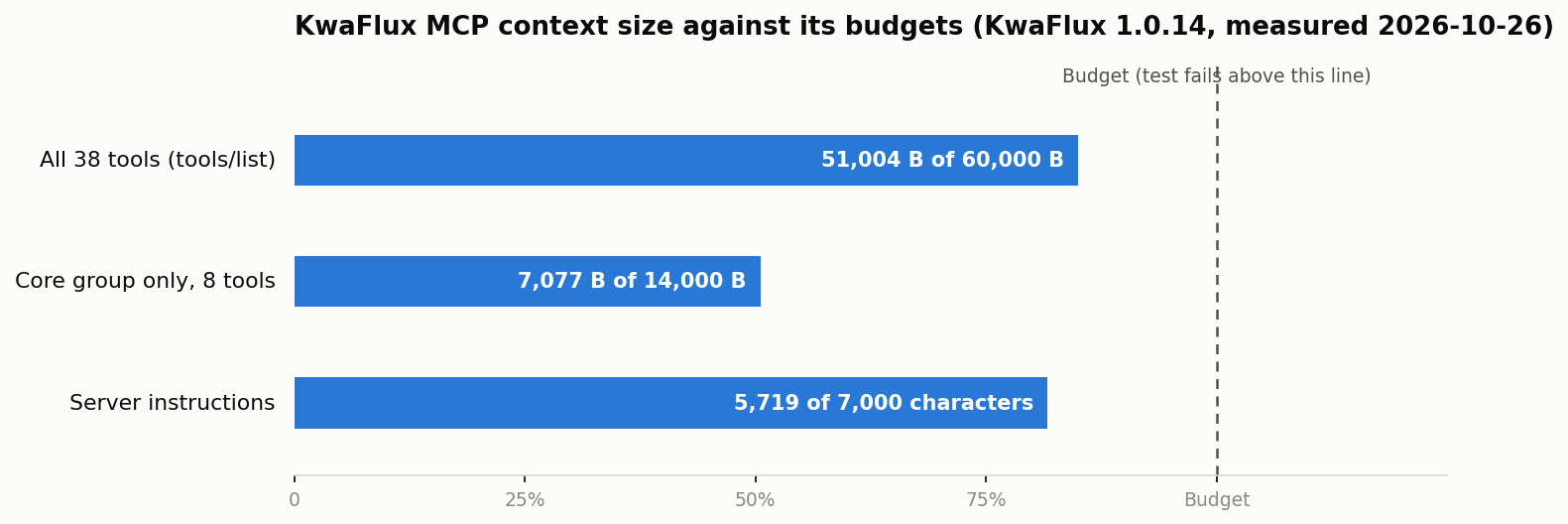
| What's measured | Size | Budget |
|---|---|---|
tools/list with all 38 tools | 51,004 bytes | 60,000 bytes |
tools/list with only the core group (8 tools) | 7,077 bytes | 14,000 bytes |
tools/list with KWAFLUX_MCP_TOOLSETS=convert,repair (14 tools) | 14,753 bytes | — |
| Server instructions | 5,719 characters | 7,000 characters |
| Prompts | 4 | — |
The full list is about 51 KB of JSON. How many tokens that is depends on the model's tokenizer, but it's a fixed cost per session, paid before the first request. The core group alone is about a seventh of that.
Budgets that tests enforce
A size goal in a design document drifts. A size goal in a test doesn't.
KwaFlux's MCP server has a measurement script that runs as part of its tests. It builds the real tools/list response, measures it in bytes, measures the core group on its own and the server instructions in characters, and fails if any of them exceeds its budget.
That changes how tools get written. A new tool has to fit, so a long description gets trimmed, a repeated explanation moves into the shared instructions, and an enum replaces a paragraph explaining valid values. The budget leaves some headroom, about 9 KB on the full list, for features still to come.
Load only the groups you use
KwaFlux's 38 tools are organized in groups; the table lists the main ones. The core group is loaded in every configuration. You choose the rest with the KWAFLUX_MCP_TOOLSETS environment variable, and groups you don't choose aren't registered at all, so they take no context.
| Group | What it covers |
|---|---|
core (on in every setup) | App status, task list and details, wait with progress, cancel, pause, resume, retry |
convert | Converter jobs: quick MP4 conversion, export by format and quality tier, the tier list, GIF |
compress | Compress by ratio, target size, or quality tier |
repair | Diagnose a damaged file, then repair it |
download | Look up a link, then download it |
enhance | The 16 AI enhancement tools |
audio | Noise reduction, voice enhancement, vocal separation, voice change |
image | Image format conversion |
dvd | Scan a disc, then convert a title |
For example, if you only use your assistant to convert and repair files, add the variable to the KwaFlux entry in your host's MCP config:
{
  "mcpServers": {
    "kwaflux": {
      "command": "<path to node>",
      "args": ["<path to kwaflux_mcp.mjs>"],
      "env": { "KWAFLUX_MCP_TOOLSETS": "convert,repair" }
    }
  }
}
Copy the command and args from KwaFlux's Settings › Agent (MCP) page rather than typing them; the quick start shows where. Each host has its own config format, so place env where your host expects it.
Pro tip: Start with everything loaded while you learn what your assistant can do, then trim to the groups you actually use. A smaller tool list also makes it less likely the model picks a tool you didn't mean.
Schemas generated from the app's configuration
Most of the bytes in a tool list are input schemas. Handwritten schemas tend to grow: a field described in prose, valid values listed in the description and again in the schema, notes about exceptions.
KwaFlux's enhancement schemas are generated from the same configuration file as the app's screens. Each setting becomes a typed field with its real range or its real list of options, so the model sees "enum": [...] instead of a sentence about which values are allowed. The photo variants come from the same file. The control plane post explains how a drift test keeps the generated rules in line with the app.
This also keeps tools narrow. Each one takes the few fields a person would choose, and KwaFlux builds the full job itself. A tool that accepted a raw job description would need a schema for everything the engine can do, which would be larger and harder to check.
Results that don't need to be read twice
Every KwaFlux tool declares an outputSchema. Per the MCP specification, if a tool provides one, "Servers MUST provide structured results that conform to this schema," and clients "SHOULD validate structured results against this schema."
For context, that means results are compact JSON with predictable fields: a task ID, a status, an output file name. The model doesn't have to read a paragraph to find out whether something worked, and a host can check the result without asking the model. Results also leave out what the model doesn't need, which is covered in the path and privacy post.
Long jobs: progress and cancel, not polling
Video jobs can take minutes. The obvious way for an assistant to follow one is to ask "is it done?" over and over, and each check adds to the context.
KwaFlux's core group has a wait tool instead:
- Progress. When the host includes a
progressToken, KwaFlux sendsnotifications/progresswhile the task runs. Hosts show these as a progress bar, outside the model's context. - Cancellation. If you stop the request in the host, which sends
notifications/cancelled, KwaFlux stops waiting right away. The assistant can then cancel the task itself if you want.
One wait call replaces a loop of status checks, so a ten-minute export costs about the same context as a ten-second one.
Prompts for multi-step workflows
Some jobs need several tools in order, such as diagnose, then repair, then enhance, then export. Explaining that order in every tool's description would cost bytes on every request. KwaFlux ships it as four MCP prompts instead:
- repair a damaged video
- export for a platform
- download, then convert
- AI quality repair
The MCP specification describes prompts as "user-controlled," usually exposed as slash commands. They cost nothing until you pick one, and then they give the model the steps for that job. The capabilities post shows what each step does.
Final thoughts
Treat the tool list as a budget, not a catalog: measure it, cap it in a test, and let people load only the groups they need. Then keep each call cheap, with typed inputs generated from real configuration, structured results, and progress instead of polling. That's how KwaFlux fits 38 tools into one server without crowding out your request.
Load the tools you need, skip the rest
KwaFlux's local MCP server gives Codex, Claude, Cursor, and other MCP apps up to 38 tools in switchable groups, with the core group on in every setup. AI processing runs locally on your GPU — media files are not uploaded for processing. It runs on Windows 10 (64-bit, version 1809 or later), Windows 11, and macOS 12 or newer on Apple Silicon. Importing files and exploring the app need no account. Signing in with an active paid plan is required only to export, convert, repair a file, or download a file from a link.
Try It on Your Own Footage
Download KwaFlux and preview effects on your own footage for free before you pay — no account needed, and your media is processed on your GPU, not uploaded for processing. Video previews run 1, 3, or 5 seconds; stabilization previews run 5, 15, or 30 seconds.
Frequently asked questions
How many tools should an MCP server have?
There's no single best number. What matters is the total size of the tool list and whether each tool does one clear thing. Measure tools/list in bytes, set a budget, and let users switch off groups they don't need.
Do MCP tool descriptions count against the context window?
Usually yes. Most hosts pass tool definitions to the model so it can choose among them, so every description and schema takes context in each session. Some hosts load tools on demand, which reduces the cost.
Should MCP tools return structured content or text?
Both, ideally. The specification lets a tool declare an output schema and return structuredContent, and recommends including the same JSON as text for older clients. Structured results are easier to validate and shorter to read.
How should an MCP server handle long-running jobs?
Give the job an ID, return quickly, and offer a wait tool that sends progress notifications when the host provides a progress token and stops when the host cancels. That avoids repeated status checks. See a complete agent repair workflow.
What's the difference between MCP tools and MCP prompts?
Tools are called by the model when it decides they're needed. Prompts are picked by the user, often as slash commands, and give the model a ready-made set of instructions for a task.
Sources
- Model Context Protocol, "Tools" (2026-07-28; tools/list ordering and prompt caching; outputSchema; structuredContent) (accessed 2026-10-25)
- Model Context Protocol, "Progress" (2025-11-25; progressToken, notifications/progress) (accessed 2026-10-25)
- Model Context Protocol, "Cancellation" (2025-11-25; notifications/cancelled) (accessed 2026-10-25)
- Model Context Protocol, "Prompts" (2025-11-25; user-controlled prompts) (accessed 2026-10-25)
KwMore in Inside KwaFlux
Keep reading

From 'Won't Open' to Ready to Post: A Complete AI Agent Workflow in KwaFlux
Follow one broken phone clip through diagnosis, repair, Quality Repair, and a platform export, all requested from an AI assistant and run by KwaFlux.

Cursor, Claude, Codex, DeepSeek, Hermes, or OpenClaw: Which AI Assistant Should Drive Your Video App?
Six MCP hosts compared for driving KwaFlux: setup, where config lives, how each asks for approval, timeout quirks, and who each one suits.

How to Use KwaFlux from Claude Code and Claude Desktop (MCP Setup)
Connect KwaFlux to Claude Code with one command or to Claude Desktop with one config entry, check the connection, and let Claude repair and convert videos.