Why AI Agents Shouldn't Click the Screen: Building a Local Control Plane for a Desktop App
Screen automation is fragile and grants too much. How KwaFlux lets AI agents drive a desktop app with typed tools and jobs rebuilt by the app itself.
The short answer
The tempting way to let an AI agent use a desktop app is to let it look at the screen and click, the way a person would. For a video app, that's the wrong design. Clicks are fragile, the agent can reach anything a mouse can, and "it clicked Export" doesn't prove the export is right.
- Letting an AI agent drive a desktop app by looking at screenshots and clicking works in demos but is fragile, slow, and grants the agent everything a mouse can do.
- KwaFlux exposes a structured control plane instead: typed MCP tools, a small set of parameters per call, and checks in the app before anything is queued.
- The agent doesn't write the full job. The KwaFlux worker rebuilds it with the same job builder the app uses when you click Export.
- Rules shared with the app are generated, not copied, and tests fail if the two drift apart.
KwaFlux takes the other route: a local control plane that accepts typed requests, checks them, and builds the real job inside the app.
In this guide, you'll learn why screen automation falls short for this job, how KwaFlux's layers fit together, why the agent only sends small parameters, and what this design deliberately can't do.
Contents
- What is a control plane for AI agents?
- Screen automation vs. a control plane
- The layers, from chat to worker
- Small parameters, rebuilt by the app
- One source of rules for the app and the agent
- What the control plane checks before queueing
- Results the agent can rely on
- What this design gives up
- FAQ
What is a control plane for AI agents?
A control plane for AI agents is a narrow, programmatic interface that lets an agent ask an application to do specific things, while the application keeps the authority to check, refuse, and carry out each request.
In KwaFlux, the interface is a set of MCP tools, and the authority sits in the running desktop app. The agent asks; KwaFlux decides.
Screen automation vs. a control plane
Computer-use agents that work from screenshots are a real advance, and for apps with no API they're the only option. Anthropic's own documentation for its computer use tool is frank about the limits. It notes that the model "sometimes acts as if its actions succeeded without explicitly checking their results," that dropdowns and scrollbars "might be tricky" to operate with the mouse, and that instructions on web pages or in images "might override your instructions." It recommends running computer use in "a dedicated virtual machine or container with minimal privileges."
For a video app on your own computer, such as KwaFlux with its Quality Repair and conversion tools, those limits matter:
| Question | Screen automation | KwaFlux control plane |
|---|---|---|
| How does the agent pick settings? | Reads labels in a screenshot and clicks | Fills typed fields whose allowed values come from the app's own configuration |
| What happens after a UI redesign? | Clicks can land in the wrong place | Tools keep working; the parameters, not the layout, are the contract |
| What can the agent reach? | Anything visible: settings, account pages, other apps | Only the tools offered, each checked by the app |
| How does it know a job succeeded? | It looks at the screen again | It gets a task ID, live progress, and a structured result |
| Can it run unattended for a long export? | It has to keep taking screenshots | It waits on the task with progress updates and can be cancelled |
| Context cost | Each screenshot is roughly 1,000 to 1,800 input tokens, per Anthropic's docs | The whole tool list is about 51 KB of text, loaded once |
The last row isn't a contest of exact numbers. The point is that a structured call costs the same whether the export takes ten seconds or ten minutes, while a screen-watching agent pays for every look.
The layers, from chat to worker
A request passes through six layers. Each layer has one job, and each one can say no.
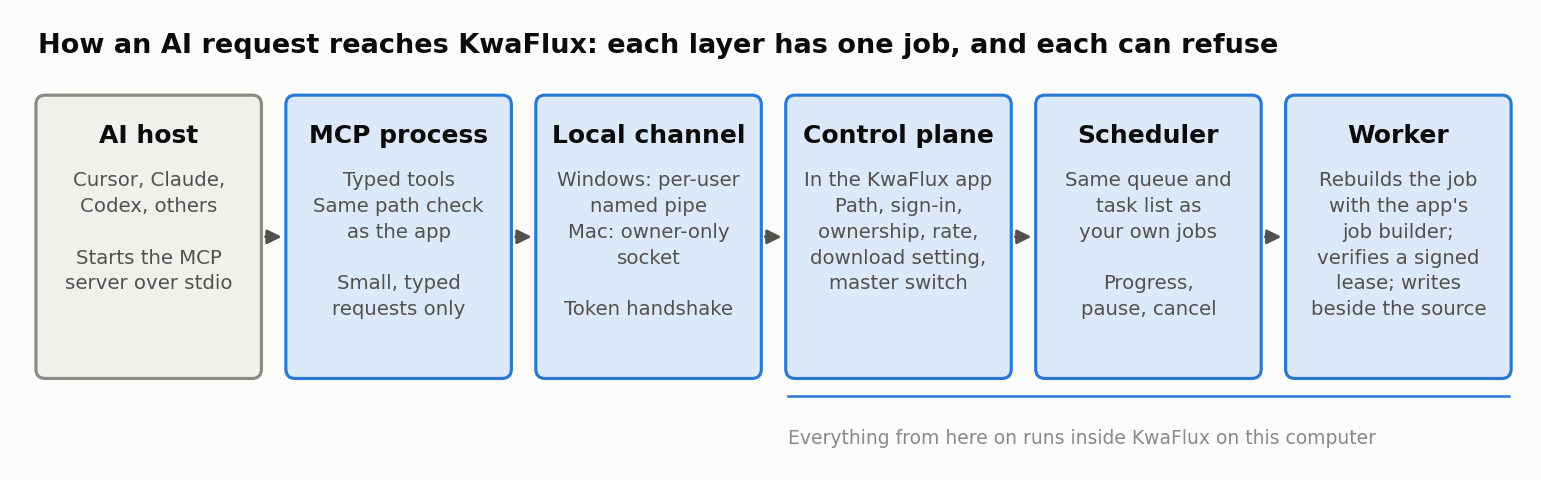
- The AI host (Cursor, Claude, Codex, and others) starts the KwaFlux MCP server as a local process and talks to it over standard input and output.
- The MCP process turns tool calls into small typed requests and checks paths in the same way the app does before touching any file.
- The local channel connects the MCP process to the running app: a named pipe for your user account on Windows, a socket only your account can open on Mac. Every connection starts with a token handshake. The local channel post covers this layer.
- The control plane in the app checks the request: is the path local and absolute, is the user signed in with the right plan, does the task belong to this agent, is the agent within its rate limit, does the download setting allow it?
- The scheduler queues the job next to the ones you started in the window, so they share the same GPU and the same task list.
- The worker builds the full job, verifies a signed lease for paid features, runs the engine, and writes the result next to the source file.
Small parameters, rebuilt by the app
Here's the decision that shapes everything else: the agent doesn't send a full job description.
A KwaFlux export job has many fields: decoder settings, model choices, tile sizes, encoder options, color handling, and more. If the agent could send that whole structure, two things would go wrong. The model would be inventing values it can't check, and anyone who could steer the model, through a poisoned file name or web page, could reach every engine parameter.
So each tool takes only the few fields a person would choose: the input file, the module, an output size from the app's list, a quality tier, a time range for a GIF. The worker then builds the complete job with the same job builder the app uses when you click Export, and trims it to the parameter contract the engine accepts at run time.
The result is that an agent-started job and a clicked job go through the same code from the builder onward. We describe this as "the same parameter rules as the app," not "identical output," because a few tools are narrower over MCP. The capabilities post lists those differences.
One source of rules for the app and the agent
Two copies of the same rules drift apart. KwaFlux avoids keeping two copies:
- The module catalog that MCP offers, including each module's route, settings, and allowed values, is generated from the same configuration file as the app's screens. Photo variants come from the image section of that same file.
- Five rule sets are translated directly from the app's source code for the MCP server: output resolution tiers, the Compressor's container and codec choice, the audio workspace's algorithm parameters, the voice list for AI Voice Change, and one detection rule.
- A drift test fails if the app's version of any of those rules changes and the MCP version wasn't regenerated.
The same idea keeps the tool descriptions small, which the tool design post covers.
What the control plane checks before queueing
The MCP specification says servers "MUST" validate all tool inputs, implement proper access controls, rate limit tool invocations, and sanitize tool outputs. In KwaFlux those checks sit in the app, not in the MCP script, so a different client can't skip them:
| Check | Rule |
|---|---|
| Path | Must be an absolute local path; network paths are refused before any file is opened |
| Output | Written next to the source; a name clash gets name(1).ext instead of overwriting |
| Sign-in and plan | Paid features need sign-in and a plan, and the worker verifies a signed lease. See paid features in AI tool calls |
| Ownership | The agent can pause, resume, cancel, or retry only tasks it submitted |
| Rate | At most 10 new jobs a minute in total and 6 per connection; up to 8 connections |
| Message size | Each message is capped at 64 KiB; idle connections close after 5 minutes |
| Downloads | Off by default; can require a click in a desktop popup |
| Master switch | One setting turns all agent control off |
Results the agent can rely on
Every KwaFlux tool declares an output schema, so the result is structured data the host can validate, not a paragraph the model has to interpret. When the host passes a progress token, KwaFlux sends progress notifications while a task runs. When the user stops the request in the host, KwaFlux stops waiting and the agent can cancel the task.
Task results only say "output ready" when a task has actually succeeded, and they give the output file's name. A queued or failed task doesn't claim to have produced anything.
What this design gives up
A control plane is only as broad as its tools. Nine KwaFlux features need someone to draw on the frame, click a subject, or judge a preview, such as object removal and sky replacement. We could have let the agent guess coordinates, or accepted a raw job description. The first gives results nobody can predict, with a receipt that says it worked. The second removes the boundary that makes the design safe. So those features stay in the app, and the agent is told to send the user there.
That's a product choice, not a gap we plan to close by loosening the rules.
Final thoughts
If an agent has to look at pixels to use your app, you can't check what it's about to do. A control plane flips that: the agent asks in a narrow, typed language, and the app checks, builds, and runs the job with its own code. For KwaFlux, that's how an agent-started export goes through the same job builder as one you click.
KwaFlux's local MCP server lets Codex, Claude, Cursor, and other MCP apps queue real jobs in the desktop app. AI processing runs locally on your GPU — media files are not uploaded for processing. It runs on Windows 10 (64-bit, version 1809 or later), Windows 11, and macOS 12 or newer on Apple Silicon. Importing files and exploring the app need no account. Signing in with an active paid plan is required only to export, convert, repair a file, or download a file from a link.
Try It on Your Own Footage
Download KwaFlux and preview effects on your own footage for free before you pay — no account needed, and your media is processed on your GPU, not uploaded for processing. Video previews run 1, 3, or 5 seconds; stabilization previews run 5, 15, or 30 seconds.
Frequently asked questions
What's the difference between computer use and MCP?
Computer use lets a model see screenshots and send mouse and keyboard input to any app. MCP lets an app offer specific, typed tools that a model can call. Computer use is general but fragile; MCP is narrower but checkable.
Can an AI agent control any desktop application?
Partly. With screen automation it can operate most apps, with the reliability limits that vendors document. Reliable control needs the app to offer an API or MCP tools. See what an AI assistant can do in a video app over MCP for one example.
Why not let the model write ffmpeg commands instead?
Because a generated command is only as good as the model's guess, and the user has to run it. Calling the app's own engine uses settings the app has already tested, and the app can refuse bad input.
Should an MCP server accept raw configuration from the model?
Usually no. Raw configuration hands the model every parameter, including ones that change where files go or what the program does. Small typed inputs that the server expands are easier to validate.
Do MCP tool results need a schema?
No, but it helps. The MCP specification lets a tool declare an output schema, and servers that do must return results that match it, so clients can validate them.
Sources
- Anthropic, "Computer use tool" (security considerations; reliability; screenshot token cost) (accessed 2026-10-25)
- Model Context Protocol, "Tools" (2026-07-28; output schema; Security Considerations) (accessed 2026-07-28)
- Model Context Protocol, "Progress" (2025-11-25; progressToken and progress notifications) (accessed 2025-11-25)
- Model Context Protocol, "Cancellation" (2025-11-25; notifications/cancelled) (accessed 2025-11-25)
KwMore in Inside KwaFlux
Keep reading
Let Your AI Assistant Run Your Video Software: KwaFlux MCP Quick Start
Connect Cursor, Claude, Codex, or another MCP app to KwaFlux in three steps, then ask it to repair, enhance, compress, or convert videos on your PC.
Denoise, Shrink to 50 MB, Fix a Broken File: What an AI Assistant Can Do in KwaFlux
31 KwaFlux features you can start from a chat: audio cleanup, compression to a size, file repair, AI enhancement, and why 9 stay in the app.

KwaFlux: Everything You Need to Know (Features, Platforms, Pricing, Updates)
What KwaFlux is, what it includes, which systems it runs on, what is free and what is paid, how licenses work, and what changed in each version.