
Talking-head background workflow
Replace talking-head backgrounds locally
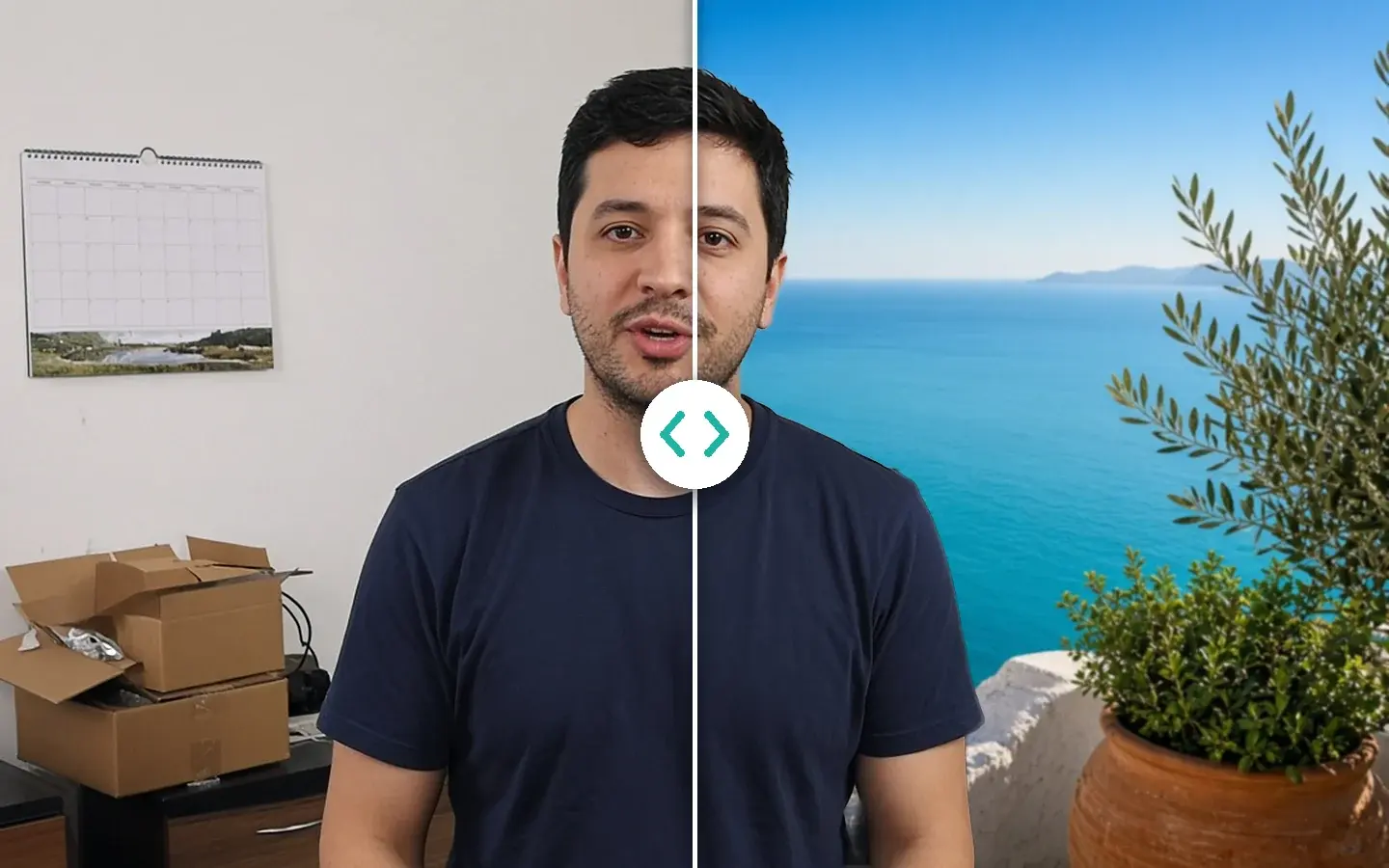
Courses, demos and interviews often need a clean background without a studio. AI Smart Cutout separates the person and replaces the background, AI Beauty handles retouching, and transparent ProRes 4444 or WebM exports go straight into your editor.
Free 1s/3s/5s previews · no account
§01Why
Why replace the background on your own computer
- 01A green-screen setup is a lot to rent or build for one talking-head video.
- 02Cloud cutout services need you to upload footage of faces, which many course and client projects don’t allow.
- 03Hair and fast hand movements are the hardest edges, so check them in the free preview before you export.
- 04If the background goes in later in your editor, export the person on transparency instead of a finished composite.
§02Workflow
One timeline, from source to delivery.
Follow the playhead through each step. Every block is a module you'll find in the app, running on your own computer.
Steps
- Quality Repair before the cutoutAI Video Quality Repair
- AI Smart Cutout to replace the backgroundAI Smart Cutout
- AI Beauty for the faceAI Beauty
- Transparent export: ProRes 4444 MOV or WebMAI Smart Cutout
§03Settings
Recommended KwaFlux settings
- Quality Repair before the cutoutWebcam footage is often blocky. Cleaning it first with Smart Repair gives the cutout cleaner edges; set 1080p or 4K here if you need it.Open feature
- AI Smart Cutout to replace the backgroundIn Portrait Background Removal, swap in an image or video background, or keep the person alone. Preview hair and hands on a 1s/3s/5s clip first.Open feature
- AI Beauty for the facePick an Overall Retouch style, then fine-tune Skin Quality and Makeup. Stop while the person still looks like themselves.Open feature
- Transparent export: ProRes 4444 MOV or WebMProRes 4444 MOV for Premiere Pro, DaVinci Resolve or After Effects; WebM for lighter web use.Open feature
KwaFlux local path
Cutout, retouching and transparent export on your computer, with no upload needed for processing.
Typical cloud path
Upload face footage for the cutout, wait, download, then retouch in another tool.
§04Steps
Three-step workflow
Import the take
A webcam lesson, a product demo or an interview. If it looks blocky, run Quality Repair first.
Cut out and replace the background
Pick an image or video background in AI Smart Cutout, or keep the person on transparency. Preview hair and hands free.
Retouch, then export
Add AI Beauty if the face needs it, then export the composite or a transparent ProRes 4444 or WebM file.
Background without a studio
Cut out locally, retouch if needed
AI Smart Cutout and AI Beauty run in the same app. Preview the hardest frames free before you export.
§05More
More finishing workflows
- Fix old home video
- Repair then upscale
- Social repurpose
- Course & interview finishing
- Short-drama localization
- Clean up video audio
- Stabilize, then slow motion
- Restore old photos
- SDR to HDR video






AI generator upscale pages
§06FAQ
Frequently asked questions
- Will this match a studio green-screen key?
- On the hardest edges and fast motion, a well-lit green screen still does better. For everyday talking-head and demo takes, preview the hardest frames before you export.
- Is my footage uploaded anywhere?
- No. The AI processing runs on your own GPU, and your clips are not uploaded for processing — there are no per-minute cloud fees or upload queues. KwaFlux still goes online for sign-in and license checks, app updates and model downloads (plus the GPU Acceleration Component on Mac), downloading a file from a link, and the crash and diagnostic reports described in our Privacy Policy.
- Should I repair compression before the cutout?
- When blocks are visible, yes. The cutout follows the edges it sees, and blocky edges make it unsteady. Run Smart Repair first, then AI Smart Cutout.
- Can I add captions to the finished video?
- Yes, if you have the subtitle file. Subtitle Edit imports SRT or ASS and burns it in or adds a soft track. It doesn’t transcribe or translate.
Features used here
- AI Smart CutoutReplace the background or export with transparency
- AI BeautyRetouch, skin and makeup
- AI Video Quality RepairClean webcam compression first
- Video ConverterFinal file for each platform
Guides & comparisons
- AI Smart CutoutIsolate subjects without a green screen
- How do I replace a video background without a compositor?AI Smart Cutout lifts the person and puts a new plate behind them in one local step — a solid color, a still, or a blur — when you do not need a full After Effects graph.
- How do I put an AI-generated character into live-action footage?No green screen needed: isolate AI characters frame-by-frame on your GPU and composite them cleanly into live-action NLE timelines.
- Sky ReplaceSwap the sky
These workflows use the same local KwaFlux app as AI Video Quality Repair, Video Converter and AI Video Enhancer. Free previews need no account; sign-in and a paid plan are needed to export, convert, repair a file, or download a file from a link.
KwaFlux is a local media finishing toolkit. Feature availability depends on your license and installed modules.