SDR vs HDR in Depth: PQ, HLG, Tone Mapping, and HDR10 Encoding
How PQ and HLG encode light, why HDR needs 10 bits, what HDR10 metadata says, how tone mapping works, plus tested x265, SVT-AV1, and FFmpeg commands.
Key takeaways
SDR and HDR differ in how a video turns code values into light. SDR uses a gamma curve built around a 100-nit display and BT.709 color; HDR uses the PQ or HLG curve from ITU-R BT.2100, BT.2020 color, at least 10 bits, and often metadata that tells a display how bright the master was.
- SDR and HDR differ in four layers: transfer function, color primaries, bit depth, and metadata.
- PQ ties each code value to a fixed light level up to 10,000 nits. HLG is relative to the display's peak, so it needs no mastering metadata.
- PQ needs at least 10 bits: by our calculation, an 8-bit PQ step near 100 nits is a 4.7% jump in light, a 10-bit step 1.1%.
- Tone mapping fits HDR highlights onto a dimmer display, with one static curve per title or dynamic metadata (HDR10+, Dolby Vision) per scene.
- Tags only label pixels. Changing what the pixels mean takes a real conversion, and ffprobe checks both.
What makes video HDR?
HDR video is video whose code values describe a far wider range of light than SDR, encoded with the PQ or HLG transfer function of ITU-R BT.2100 and carried with BT.2020 primaries at 10 or 12 bits.
| Layer | SDR | HDR |
|---|---|---|
| Transfer function | BT.709 camera curve, BT.1886 display curve (gamma 2.4) | PQ (SMPTE ST 2084) or HLG (ARIB STD-B67), both in BT.2100 |
| Reference peak | 100 nits | PQ up to 10,000 nits; HLG relative, 1,000 nits as reference |
| Reference white | About 90% of the signal in graded SDR | 203 nits: 58% of the PQ signal, 75% of HLG |
| Primaries | BT.709 | BT.2020 |
| Bit depth | 8 bits common for delivery | 10 or 12 bits |
| Metadata | None | Static (HDR10), dynamic (HDR10+, Dolby Vision), or none (HLG) |
The layers are independent: a file can be 10-bit SDR, or PQ without metadata. Each has its own tag, and players read the tags rather than guessing from the pixels.
Transfer functions: BT.1886, PQ, and HLG
A transfer function maps signal values to light. ITU-R BT.1886 defines the SDR display curve as a 2.4 power function with a 100-nit reference white; the BT.709 camera curve is its counterpart, a 0.45 power with a linear segment near black.
PQ (SMPTE ST 2084) is display-referred: every code value means a specific luminance, up to 10,000 nits. BT.2100 says PQ reaches a very wide brightness range for a given bit depth with a curve tuned to human vision. Working through its formula, 100 nits sits at 51% of the signal, 203 nits at 58%, and 1,000 nits at 75%; the bottom half of the range covers 0 to about 92 nits.
HLG (ARIB STD-B67) is scene-referred: the signal describes relative scene light, and the display decides how bright to show it. Report ITU-R BT.2390 describes a square-root curve in the lower half of the signal, close to SDR, and a logarithmic curve above it. BT.2100 sets the display's system gamma to 1.2 at 1,000 nits and adjusts it for other peaks (γ = 1.2 + 0.42 log10(Lw / 1000)), so one HLG signal adapts to a 600-nit TV or a 1,500-nit monitor without metadata.
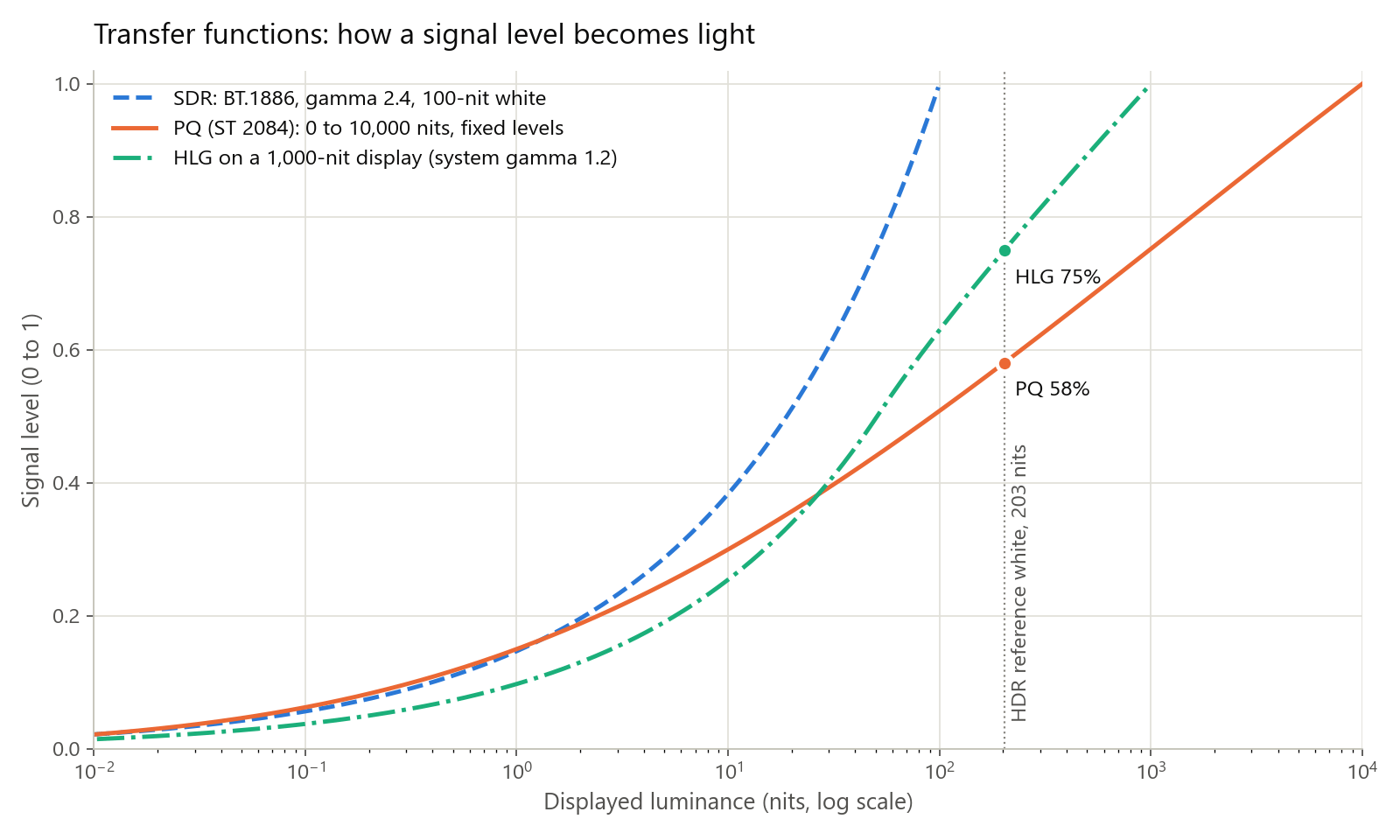
Sidenote: BT.2100 asks productions to use one system consistently and not intermix PQ and HLG. Moving between them is a conversion, not a relabel.
Color primaries: BT.709 vs BT.2020
Primaries set the reddest red, greenest green, and bluest blue a signal can describe. BT.709 puts them at (0.640, 0.330), (0.300, 0.600), and (0.150, 0.060) on the CIE 1931 xy diagram; BT.2100 uses the BT.2020 primaries at (0.708, 0.292), (0.170, 0.797), and (0.131, 0.046). Both use the D65 white point. By our arithmetic, the BT.2020 triangle has about 1.9 times the area of BT.709's, and few masters fill it: grading monitors are often P3-D65, which is why x265's own example mastering string describes one.
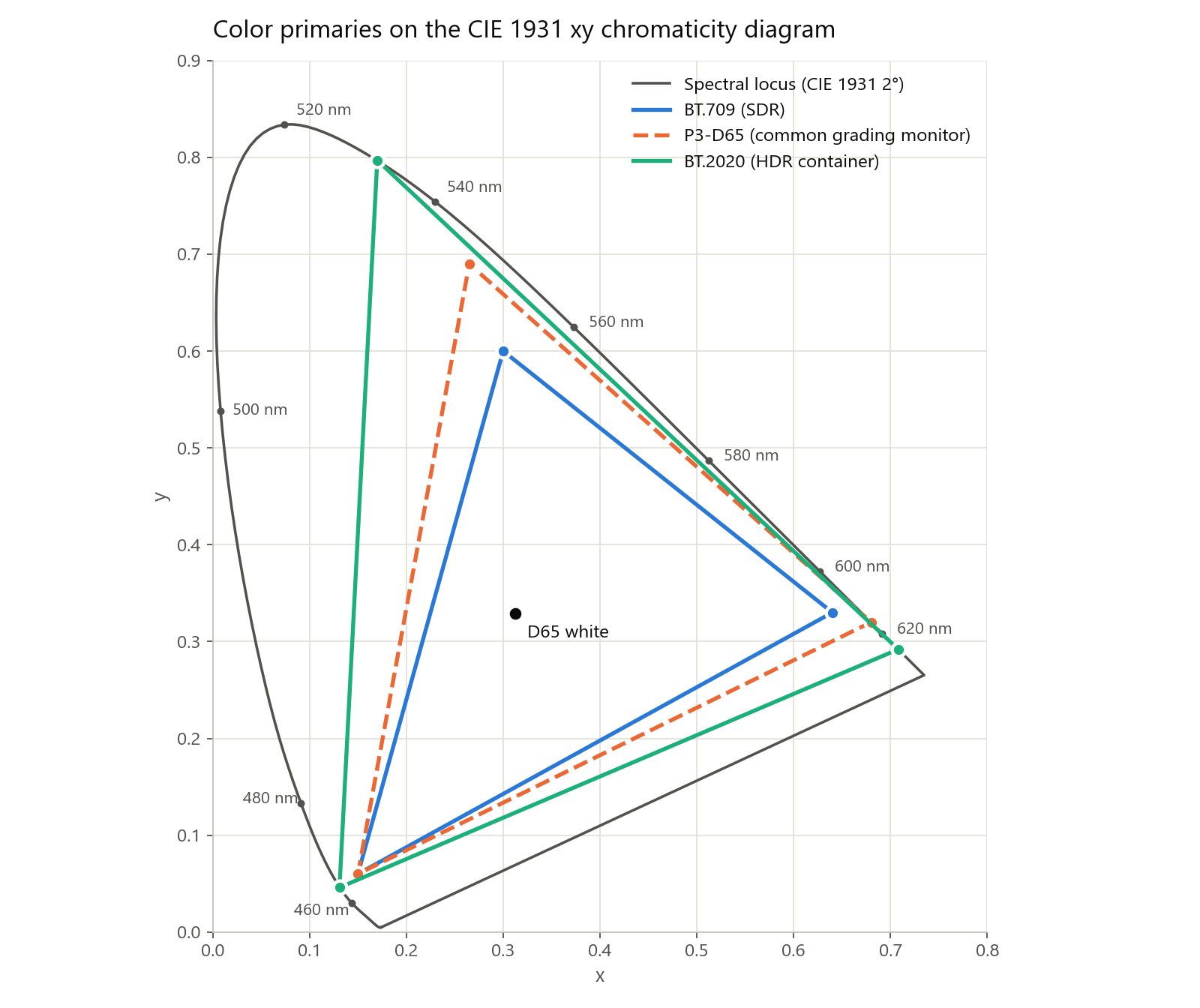
The same color has different code values in each container: pure BT.709 red becomes linear RGB of about (0.627, 0.069, 0.016) in BT.2020. Relabeling BT.709 pixels as BT.2020 without converting makes every color more saturated; YouTube warns that P3 masters tagged with Rec. 2020 primaries look oversaturated with shifted hues.
Bit depth: why PQ needs 10 bits or more
Banding appears when the jump in light between neighboring code values is big enough to see, and PQ spreads 0 to 10,000 nits over the code range SDR spends on 0 to 100 nits. Our calculation from the BT.2100 and BT.1886 formulas, for narrow-range codes:
| Light level | 8-bit PQ | 10-bit PQ | 12-bit PQ | 8-bit SDR, gamma 2.4 |
|---|---|---|---|---|
| 1 nit | 9.4% per step | 2.3% per step | 0.56% per step | 7.7% per step |
| 100 nits | 4.7% per step | 1.1% per step | 0.28% per step | 1.1% per step |
| 1,000 nits | 4.3% per step | 1.1% per step | 0.26% per step | Beyond the SDR range |
Near 100 nits, 10-bit PQ is about as fine as 8-bit SDR at its white, while also covering 10,000 nits. BT.2390 compares these steps with a Barten-model visibility threshold: 12-bit PQ stays below it from 10,000 nits down to under 0.001 nits, and 10-bit PQ comes slightly above it, which realistic camera noise masks in practice.
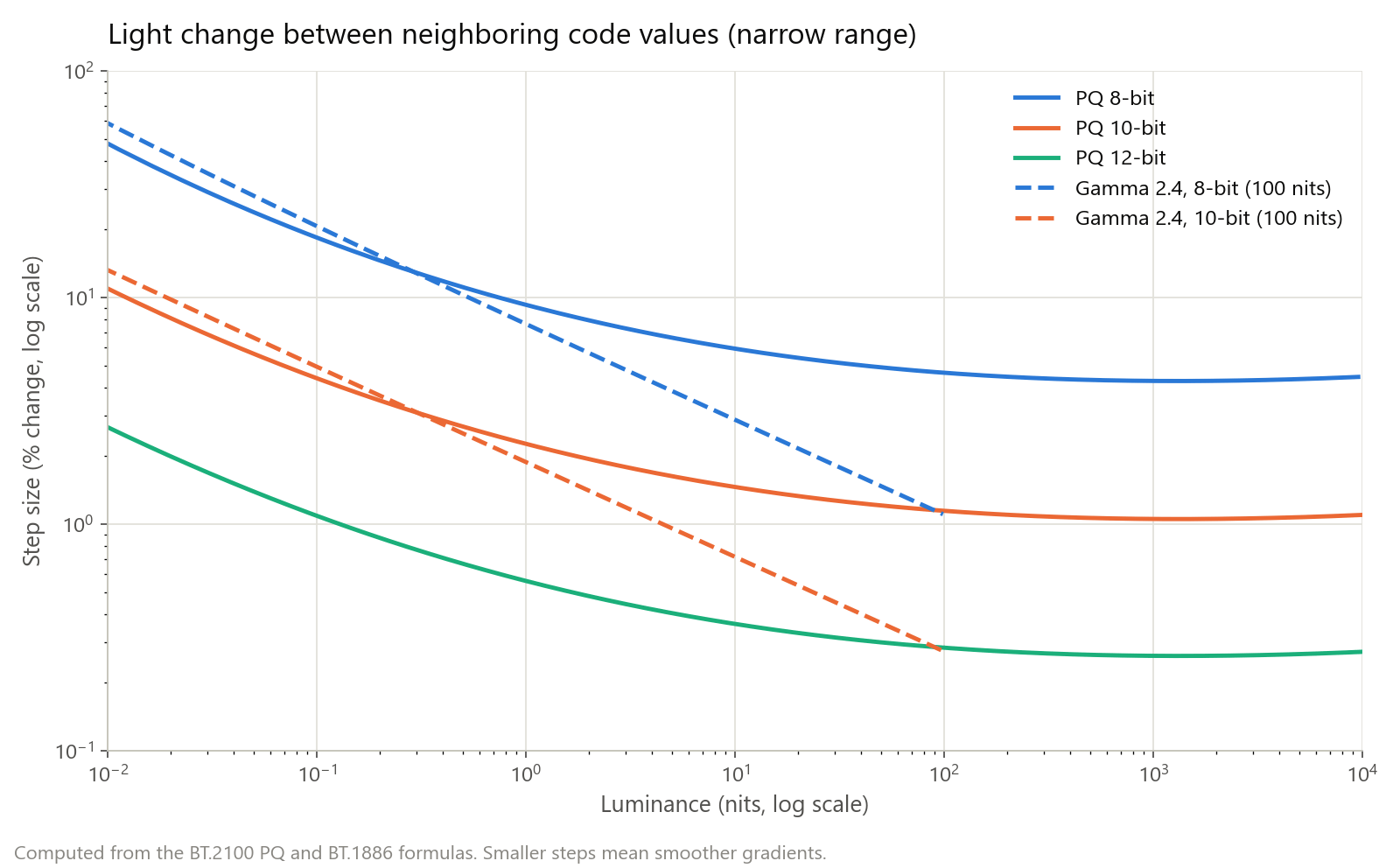
So keep intermediate steps at 10 bits or more, and dither when you drop to 8 bits. In our test, zscale's d=error_diffusion kept the same levels in a tone-mapped dark ramp but broke the straight band edges into fine noise. For debanding, see 8-bit vs 10-bit video.
HDR metadata: static and dynamic
HDR10 is PQ with BT.2020 primaries at 10 bits, plus static metadata: one description for the whole title.
| Metadata | What it describes | Defined in |
|---|---|---|
| Mastering display | Primaries, white point, peak and black of the grading monitor | SMPTE ST 2086 (x265 master-display) |
| MaxCLL | Brightest pixel in the title, in nits | CTA-861.3 (first max-cll value) |
| MaxFALL | Highest frame-average light level, in nits | CTA-861.3 (second max-cll value) |
| HDR10+ | Scene-by-scene or frame-by-frame brightness, contrast, and color | SMPTE ST 2094-40 (x265 dhdr10-info) |
| Dolby Vision | Dynamic metadata for every image, up to 12-bit color | Dolby |
With static metadata, a mostly dim film with one bright explosion gets one curve chosen with the explosion in mind. HDR10+ describes its dynamic metadata as instructions that let the display optimize tone mapping in real time, and Dolby says Dolby Vision maps every image to the TV's capabilities. HLG carries no mastering metadata; the display's system gamma does the adapting.
Pro tip: Describe your real grading monitor and measured levels. If you can't measure MaxCLL, x265 lets you signal 0 for "no maximum indicated", which beats a guess.
Tone mapping: fitting HDR onto a dimmer display
Tone mapping reduces a picture's dynamic range to fit a display; Report ITU-R BT.2446 calls the reverse inverse tone mapping. A static mapping uses one curve for the whole title, usually picked from the mastering peak or MaxCLL. A dynamic mapping changes over time, from metadata or by measuring frames; BT.2390 notes that it can adapt to statistics such as the scene maximum.
| Curve | What it does | Trade-off |
|---|---|---|
| Clip | Keeps in-range values, cuts the rest | Highlights become flat patches |
| Reinhard | Simple roll-off, L / (L + c) | Even brightness, flatter detail and color |
| Hable (filmic) | S-curve with toe and shoulder | Detail at both ends, slightly darker picture |
| Möbius | Untouched below a knee, rolls off above | Keeps in-range contrast and color |
| BT.2390 EETF | 1:1 below a knee, Hermite spline above, on the PQ signal | Built for PQ displays dimmer than the master |
The EETF normalizes the PQ signal to the mastering range, starts the knee at KS = 1.5 × maxLum − 0.5 (maxLum being the target peak on that scale), and bends the top so the source peak lands on the display peak. For a 1,000-nit master, that puts the knee at about 28 nits on a 100-nit display and about 161 nits on a 300-nit one.
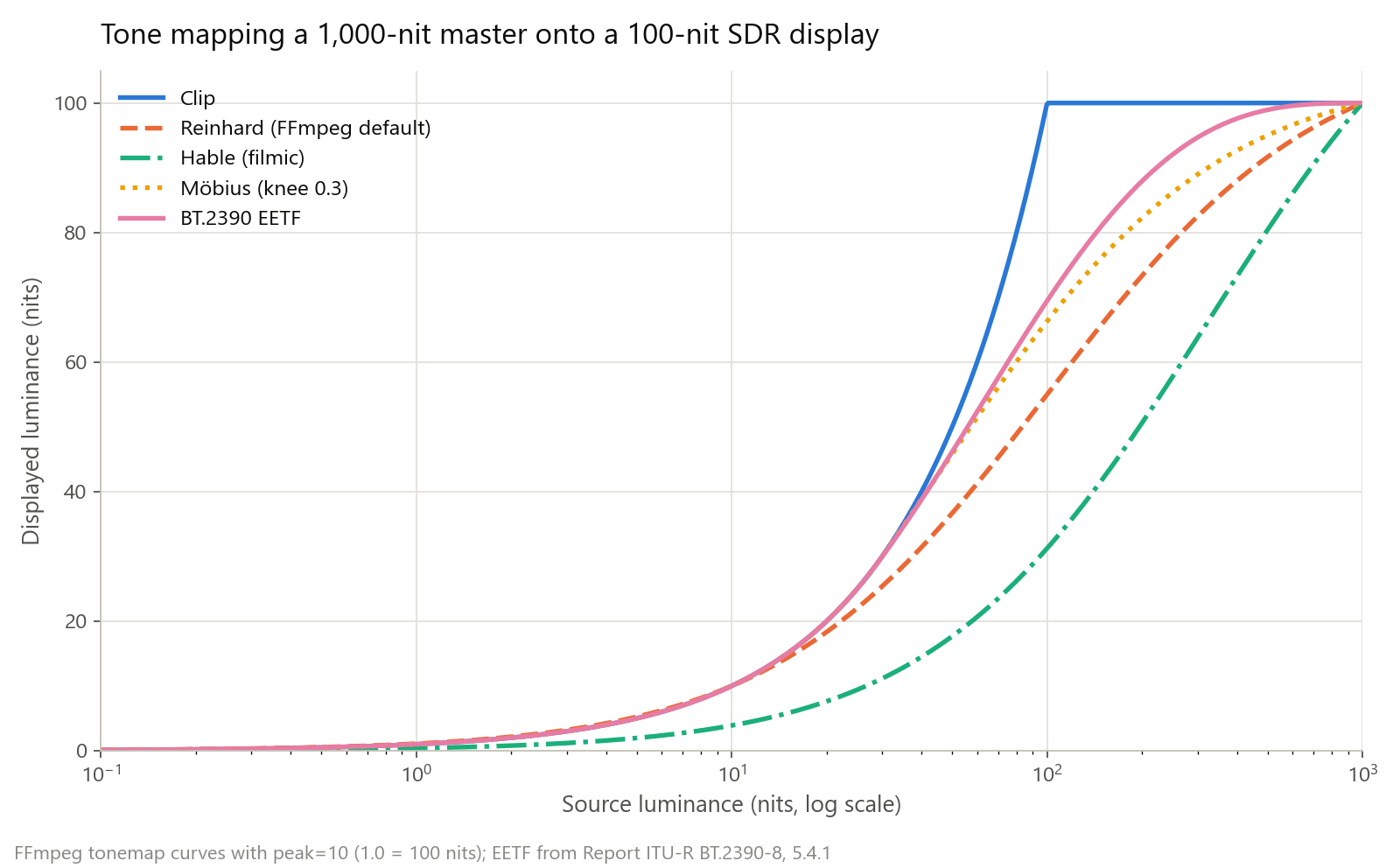
FFmpeg's tonemap filter implements clip, linear, gamma, Reinhard, Hable, and Möbius. Its documentation says the curves only work on linear light in float, so the chain linearizes with zscale, tone maps, and converts back:
ffmpeg -i hdr10.mp4 -vf "zscale=t=linear:npl=100,format=gbrpf32le,zscale=p=bt709,tonemap=tonemap=mobius:peak=10:desat=0,zscale=t=bt709:m=bt709:r=tv:d=error_diffusion,format=yuv420p" -c:v libx264 -crf 18 -color_primaries bt709 -color_trc bt709 -colorspace bt709 -color_range tv -c:a copy sdr.mp4npl=100 makes linear 1.0 equal 100 nits, so peak=10 means 1,000 nits; left at 0, the peak comes from the file's metadata. desat=0 turns off the default fade of very bright pixels toward white. On a synthetic PQ ramp from 0 to 1,000 nits, the 8-bit output codes were (averaged, limited range, so 235 is white):
| Source level | clip | reinhard | hable | mobius |
|---|---|---|---|---|
| 25 nits | Code 139 | Code 133 | Code 98 | Code 139 |
| 100 nits | Code 235 | Code 187 | Code 151 | Code 201 |
| 204 nits | Code 235 | Code 209 | Code 182 | Code 218 |
| 1,000 nits | Code 235 | Code 235 | Code 235 | Code 235 |
Clip turned everything above 100 nits into one white; Hable kept the most highlight separation and darkened midtones the most; Möbius left values below its knee alone. Judge them on your own footage. For SDR-side symptoms, see why video looks washed out after export.
Sidenote: tonemap has no BT.2390 mode, and the FFmpeg 8.1 build we tested has no libplacebo, tonemap_opencl, or tonemap_vaapi filter, so we didn't test those.
SDR to HDR: placing vs expanding
Placing keeps the picture's dynamic range and re-encodes it as PQ or HLG, so SDR material can sit in an HDR program. BT.2446 points to Report ITU-R BT.2408 for this, and the anchor is HDR reference white, which BT.2100 defines as 203 nits:
ffmpeg -i input_sdr.mp4 -vf "zscale=t=linear:npl=203,format=gbrpf32le,zscale=p=bt2020:t=smpte2084:m=bt2020nc:r=tv:npl=203,format=yuv420p10le" -c:v libx265 -preset slow -crf 18 -profile:v main10 -color_primaries bt2020 -color_trc smpte2084 -colorspace bt2020nc -color_range tv -tag:v hvc1 -c:a copy sdr_in_pq.mp4In our test, full SDR white came out at 10-bit code 573, which is 203 nits in PQ; npl=100 gave code 509 (100 nits) and npl=1000 gave 723 (1,000 nits). The file is valid PQ, but nothing in it is brighter than reference white.
Expanding is inverse tone mapping: lifting highlights above reference white and widening color. BT.2446 asks for shadows and midtones to stay close, without raising average brightness so far that viewing gets uncomfortable, and warns that expansion can amplify artifacts already in the source. Its methods are static curves; it notes that adaptive, spatially varying methods also exist, which is where AI-based SDR to HDR sits. For how that combines with other passes, see SDR to HDR and smooth motion.
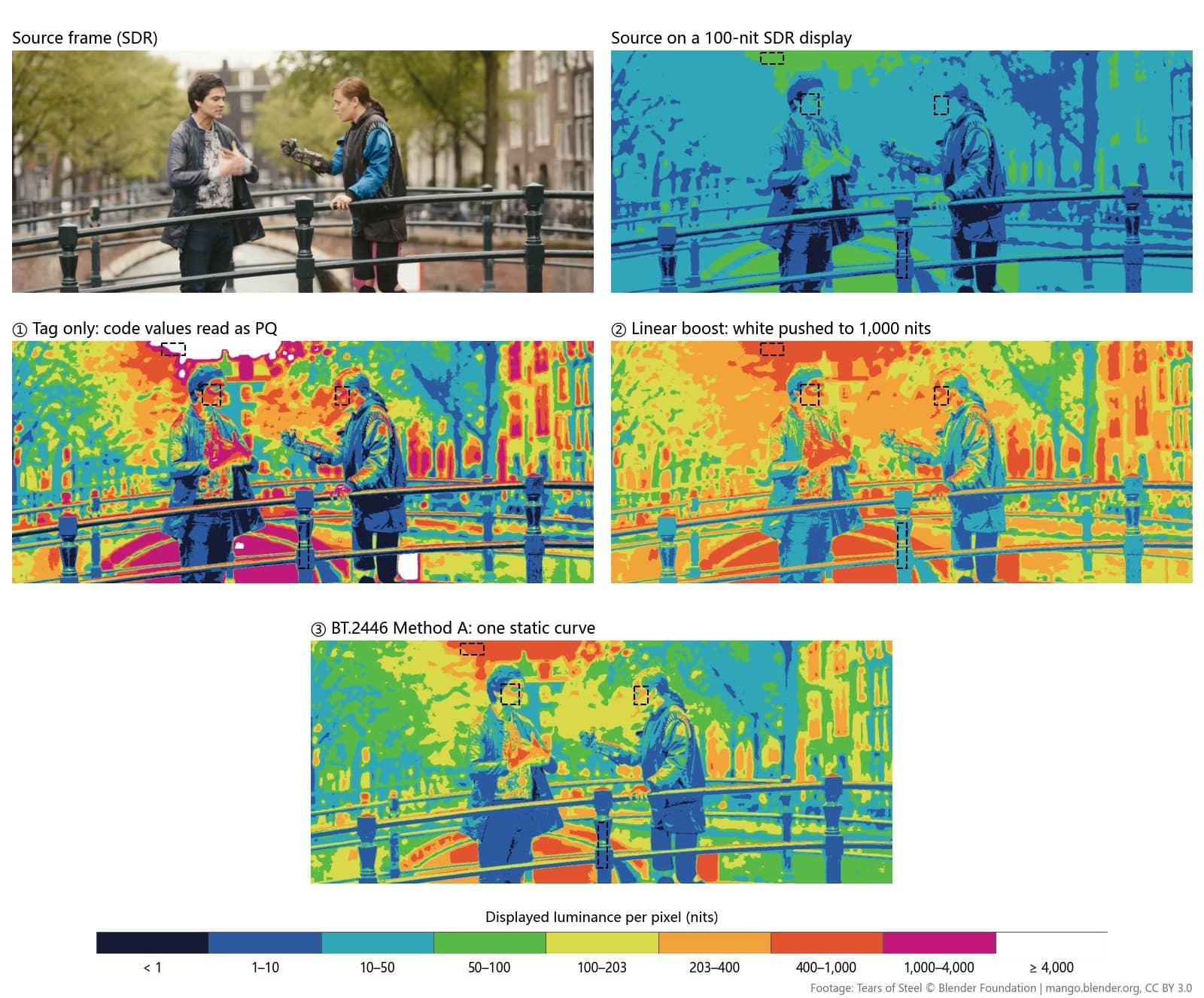
Sidenote: Changing tags alone does neither. Full 10-bit SDR white (code 940) read as PQ asks the display for 10,000 nits.
Encode HDR10 with x265 and SVT-AV1
The encoder has to write a 10-bit profile, the color description, and the static metadata.
x265 (HEVC Main 10)
ffmpeg -i master_pq.mov -c:v libx265 -preset slow -crf 18 -pix_fmt yuv420p10le -x265-params "profile=main10:colorprim=bt2020:transfer=smpte2084:colormatrix=bt2020nc:range=limited:hdr10=1:repeat-headers=1:master-display=G(13250,34500)B(7500,3000)R(34000,16000)WP(15635,16450)L(10000000,50):max-cll=1000,400" -tag:v hvc1 -c:a copy hdr10.mp4Each -x265-params key matches an x265 option (--colorprim, --hdr10, --master-display, and so on):
| Setting | What it does |
|---|---|
colorprim, transfer, colormatrix | Write BT.2020, PQ, and the non-constant-luminance matrix as stream tags |
master-display | ST 2086 values: x,y in units of 0.00002, luminance in 0.0001 nits, so L(10000000,50) is a 1,000-nit peak with 0.005-nit black |
max-cll=1000,400 | MaxCLL and MaxFALL in nits |
hdr10=1 | Forces the HDR10 messages, which x265 also enables when master-display or max-cll is set |
repeat-headers=1 | Repeats stream headers at every keyframe |
The primaries are x265's documented example for a P3-D65 1,000-nit monitor; use your own. For HLG, set transfer=arib-std-b67, drop the mastering values, and add atc-sei=18, which x265 lists as needed for HLG; the YouTube HDR guide has the full command. hdr10-opt=1 adds x265's block-level QP tuning for 10-bit 4:2:0 BT.2020 PQ input.
SVT-AV1 (AV1, 10-bit)
ffmpeg -i master_pq.mov -c:v libsvtav1 -preset 6 -crf 30 -pix_fmt yuv420p10le -color_primaries bt2020 -color_trc smpte2084 -colorspace bt2020nc -color_range tv -svtav1-params "mastering-display=G(0.265,0.690)B(0.150,0.060)R(0.680,0.320)WP(0.3127,0.3290)L(1000,0.005):content-light=1000,400" -c:a copy hdr10_av1.mkvSVT-AV1 takes CIE x,y as decimals and luminance in nits; FFmpeg passed its -color_* flags through to the encoder's color options. With FFmpeg 8.1 and SVT-AV1 4.0.1, both commands produced 10-bit files tagged BT.2020, PQ, and BT.2020 NCL, with mastering and light-level metadata on the first frame.
Fix missing tags without re-encoding. If the pixels are already PQ, the hevc_metadata bitstream filter rewrites the color description and leaves the picture alone:
ffmpeg -i untagged.mp4 -c copy -bsf:v "hevc_metadata=colour_primaries=9:transfer_characteristics=16:matrix_coefficients=9" retagged.mp4On our HEVC test file in MP4, decoded frames had identical checksums before and after, and the tags went from unknown to BT.2020, PQ, and BT.2020 NCL (codes 9, 16, and 9; HLG is 18). It doesn't add ST 2086 or MaxCLL; those need a re-encode.
Verify the file with ffprobe
ffprobe -v error -select_streams v:0 -show_entries stream=profile,pix_fmt,color_range,color_space,color_transfer,color_primaries:frame=side_data_list -read_intervals "%+#1" -show_frames -of json hdr10.mp4One call returns the color tags and the first frame's side data. For the x265 file above:
| Field | Value | Meaning |
|---|---|---|
profile, pix_fmt | Main 10, yuv420p10le | 10-bit HEVC, 4:2:0 |
color_primaries, color_transfer, color_space | bt2020, smpte2084, bt2020nc | BT.2020, PQ, non-constant luminance |
color_range | tv | Limited (narrow) range |
| Mastering display metadata | max_luminance=10000000/10000, min_luminance=50/10000 | 1,000-nit peak, 0.005-nit black |
| Content light level metadata | max_content=1000, max_average=400 | MaxCLL and MaxFALL |
Values print as fractions in each codec's units: our AV1 file showed max_luminance=256000/256, also 1,000 nits. HLG files show arib-std-b67 and usually no mastering data. A file graded in HDR that reads bt709 or unknown will play as SDR.
How KwaFlux handles HDR
- SDR to HDR is inverse tone mapping. In AI Color Grading, SDR to HDR expands an SDR clip with an AI model toward a wider dynamic range, brighter highlights, and clearer shadows. Scene sets the look: Landscape (the default), Nightscape, or Custom with a Brightness slider from 2.0 to 5.0 (default 3.8).
- Export choices. Color Space offers HDR PQ (Rec.2020) (the default), HDR HLG (Rec.2020), and SDR (BT.709), with H.265 (recommended) or AV1 and MKV recommended. HDR exports are 10-bit, SDR 8-bit, and the export settings pair each choice with matching transfer, BT.2020 primaries and matrix, and limited-range tags.
- Check before you deliver. Run the ffprobe command above on the export; if a platform needs ST 2086 and MaxCLL values that aren't there, re-encode with the x265 settings.
- HDR previews on SDR screens. The preview renderer decodes PQ and HLG, converts BT.2020 color to BT.709, and compresses highlights with a Reinhard-style curve, and it has an HDR pass-through mode for HDR output.
- Repair and multi-step jobs. Quality Repair exports have no color-space option, so check a repaired HDR file's tags. Between the steps of a multi-step job, KwaFlux passes 10-bit intermediate files, so 8-bit rounding doesn't build up into banding.
Common problems
| Problem | Likely cause | Fix |
|---|---|---|
| HDR file looks gray and flat | Tags missing, or a player without HDR | Check tags; retag only if the pixels are PQ; make a tone-mapped SDR copy |
| SDR clip tagged as PQ looks harsh | Tags changed without a conversion | Re-encode with zscale placement or inverse tone mapping |
| Colors oversaturated | BT.709 or P3 pixels tagged as BT.2020 | Convert primaries with zscale p=bt2020 first |
| Bands in skies in the SDR copy | 8-bit output without dither | Add d=error_diffusion; keep intermediates at 10 bits |
| Flat white patches in highlights | Clip curve, or peak too low | Use Möbius, Reinhard, or Hable with the real peak |
| No mastering metadata | master-display and max-cll not set | Add them in x265 or SVT-AV1 and check the first frame |
What this can't do
- Tone mapping can't show 1,000 nits on a 100-nit screen. It chooses what to keep: highlight detail, midtone contrast, or color.
- Inverse tone mapping can't recover clipped detail, and BT.2446 warns it can make compression artifacts visible.
- Metadata can't fix a grade. It describes the master so a display can adapt it.
- Tags can't convert pixels. Changing them without a conversion changes the picture.
Final thoughts
SDR versus HDR is four decisions, not one: curve, primaries, bit depth, and metadata. Set each on purpose, check them with ffprobe, and when a picture crosses between SDR and HDR, convert it rather than relabel it.
KwaFlux runs AI Color Grading on your own GPU, including SDR to HDR exports in PQ or HLG. AI processing runs locally on your GPU — media files are not uploaded for processing. It runs on Windows 10 (64-bit, version 1809 or later), Windows 11, and macOS 12 or newer on Apple Silicon. Previews need no account: render a 1-, 3-, or 5-second preview on any clip. Signing in with an active paid plan is required only to export, convert, repair a file, or download a file from a link.
Experience on Your Own Footage
Download KwaFlux and preview effects on your own footage for free before you pay — no account needed, and your media is processed on your GPU, not uploaded. Video previews run 1, 3, or 5 seconds; stabilization previews run 5, 15, or 30 seconds.
Frequently asked questions
Why does PQ need more bits than SDR gamma?
Because PQ spreads 0 to 10,000 nits over the code range SDR uses for 0 to 100 nits. By our calculation, an 8-bit PQ step near 100 nits changes light by about 4.7%, which bands visibly; 10-bit brings it to about 1.1%. 8-bit vs 10-bit video covers banding fixes.
Is HLG backward compatible with SDR TVs?
Partly. Report ITU-R BT.2390 says HLG was designed for a significant degree of compatibility on SDR displays, but only those that accept the BT.2020 color container. A screen that handles only BT.709 still needs a converted SDR version.
What are MaxCLL and MaxFALL?
MaxCLL is the light level of the brightest pixel in a title, and MaxFALL is the highest average light level of any single frame, both in nits. They come from CTA-861.3 and travel with HDR10 as static metadata that players can use to choose a tone-mapping curve.
Can you tone map HDR to SDR without losing highlight detail?
Partly. A roll-off curve such as Hable, Möbius, or the BT.2390 EETF keeps gradation in highlights instead of clipping it. The extra brightness can't survive on a 100-nit display, and each curve gives up some midtone contrast or color to keep that detail.
Is changing the color tags enough to turn SDR into HDR?
No. Tags only tell players how to read the numbers, and full 10-bit SDR white read as PQ asks for 10,000 nits. Place SDR in a PQ container with a real conversion, or expand it with inverse tone mapping; see SDR to HDR and smooth motion.
Sources
- ITU-R, Recommendation BT.2100-3 (PQ constants, HLG system gamma, BT.2020 primaries, 203-nit reference white) (accessed 2026-10-21)
- ITU-R, Recommendation BT.1886 (gamma 2.4 display curve, 100 cd/m² white, BT.709 camera curve and primaries) (accessed 2026-10-21)
- ITU-R, Report BT.2390-12 (PQ bit depth against the Barten threshold, HLG curve and compatibility) (accessed 2026-10-21)
- ITU-R, Report BT.2390-8, sections 5.4.1 and 7.4 (EETF; clip, static, and dynamic mapping) (accessed 2026-10-21)
- ITU-R, Report BT.2446-1 (tone mapping and inverse tone mapping, reference white levels, artifact amplification) (accessed 2026-10-21)
- x265 Documentation, "Command Line Options" (color, HDR10, and HLG options) (accessed 2026-10-21)
- SVT-AV1, "Parameters" (color description, mastering-display, content-light) (accessed 2026-10-21)
- FFmpeg Filters Documentation (`tonemap`, `zscale`) (accessed 2026-10-21)
- FFmpeg source, vf_tonemap.c (curve formulas for our chart) (accessed 2026-10-21)
- FFmpeg Bitstream Filters Documentation (`hevc_metadata`) (accessed 2026-10-21)
- YouTube Help, "Upload High Dynamic Range (HDR) videos" (P3 masters tagged as Rec. 2020) (accessed 2026-10-21)
- Dolby Professional, "Dolby Vision HDR at Home" (dynamic metadata, 12-bit color) (accessed 2026-10-21)
- HDR10+, "How does dynamic metadata in HDR10+ improve upon this?" (accessed 2026-10-21)
- CVRL, CIE 1931 2-degree colour matching functions (spectral locus for our chart) (accessed 2026-10-21)
CoMore in Color & HDR
Keep reading
SDR to HDR, Measured: Relabeling, Brightness Boosts, and a Static Curve
One SDR frame converted three computed ways, every pixel measured in nits: a relabel sends the sky to 6,207 nits, a linear boost puts faces at 350.

SDR to HDR and AI frame interpolation — enhance without another upscale
Already 1080p but still washed out or choppy? SDR-to-HDR, AI Color Grading, and Frame Interpolation run locally. Free 1s/3s/5s preview, no account needed.