Hardware Video Decoding and Encoding on Windows and Mac: D3D11, CUDA, Vulkan, OpenGL, and Metal Explained
How NVDEC, NVENC, Quick Sync, AMF, D3D11VA, Vulkan Video, and VideoToolbox work, what a zero-copy GPU pipeline is, and when hardware encoding pays off.
Key takeaways
Hardware video decoding and encoding hand the heavy codec work to fixed-function engines on the GPU instead of the CPU. On Windows, apps reach those engines through D3D11VA, D3D12, NVIDIA's CUDA-based SDK, AMD AMF, Intel oneVPL, or Vulkan Video; on a Mac, through VideoToolbox. The result is lower CPU load, faster exports, and frames that can stay in GPU memory.
- GPUs carry dedicated video engines (NVIDIA NVDEC and NVENC, Intel Quick Sync, AMD VCN, Apple's media engine) that decode and encode separately from the graphics cores.
- Windows reaches them through several APIs: D3D11VA and D3D12 video, NVIDIA's CUDA-based SDK, AMD AMF, Intel oneVPL and Media SDK, and Vulkan Video. Macs use VideoToolbox.
- The real gain is often lower CPU load: in our test, hardware decoding of 4K H.264 used about 95% less CPU time than software decoding.
- Hardware encoding is fast but spends more bits for the same quality. Our GPU HEVC encode matched x265's VMAF score 3.3 times faster, using 15% more bits.
- A zero-copy pipeline keeps frames in GPU memory between decoding, processing, display, and encoding, with bridges between D3D11, CUDA, OpenGL, Vulkan, and Metal.
What happens to a frame
Every video app runs the same four stages: decode the compressed file into frames, process them (scaling, color, AI models), then display them on screen or encode them into a new file. Each stage can run on the CPU or the GPU, and each hand-off between the two costs time.
The frames are bigger than most people expect. A 4K frame in 10-bit 4:2:0 (the P010 format GPUs use) takes 3,840 × 2,160 × 1.5 samples × 2 bytes, about 24.9 MB. At 60 frames per second, that's 1.5 GB every second, in each direction, if frames bounce between system memory and GPU memory. A pipeline that decodes, processes, and encodes on the GPU without that round trip is called zero-copy, and it's where most of the speed in modern video software comes from.
The video engines inside your GPU
Video decoding and encoding don't run on the same cores that draw games or run AI models. GPUs carry separate fixed-function blocks for them:
| Vendor | Decode engine | Encode engine | Accessed through |
|---|---|---|---|
| NVIDIA | NVDEC | NVENC | NVIDIA Video Codec SDK (with CUDA), D3D11VA, D3D12, Vulkan Video |
| Intel | Quick Sync Video | Quick Sync Video | Intel oneVPL (Iris Xe and newer), Media SDK (older GPUs), D3D11VA, D3D12, Vulkan Video |
| AMD | VCN | VCN | AMD AMF, D3D11VA, D3D12, Vulkan Video |
| Apple | Media engine | Media engine | VideoToolbox |
NVIDIA states it plainly: its GPUs contain hardware decoders and encoders separate from the CUDA cores. Two consequences follow. First, hardware decoding and encoding barely slow down other GPU work, so an AI model can run while the video engine decodes the next frames. Second, what an engine can do is fixed in silicon: codec, bit depth, and chroma format support depend on the GPU generation. NVIDIA's support matrix, for example, lists 4:2:2 encoding as new with its Blackwell generation. Check your vendor's matrix before you assume a codec is accelerated.
The decode and encode APIs on Windows and Mac
One video engine can usually be reached through several APIs. Each has its own strengths:
| API | Platform | What stands out |
|---|---|---|
| D3D11VA | Windows | Vendor-neutral, built into Windows, the most widely supported way to decode on any GPU; frames land in D3D11 textures ready to display |
| D3D12 video | Windows | The same vendor-neutral idea on Direct3D 12, with explicit control over memory and queues; also encodes |
| NVDEC and NVENC (Video Codec SDK) | Windows, Linux | Direct access to NVIDIA's engines, the full set of encoder controls, and frames in CUDA memory for CUDA processing |
| AMD AMF | Windows, Linux | Access to AMD's video engines plus GPU compute for conversion and scaling |
| Intel oneVPL and Media SDK | Windows, Linux | Access to Quick Sync: oneVPL for Iris Xe and newer, Media SDK for older Intel graphics |
| Vulkan Video | Windows, Linux, others | A cross-vendor standard: decoding, encoding, compute, and graphics in one explicit API |
| VideoToolbox | macOS | Apple's framework for hardware-accelerated encoding and decoding on the Mac's media engine |
Software decoding and encoding (libavcodec, x264, x265, SVT-AV1) remain the fallback for everything the hardware can't handle, and the reference for quality.
The five pipelines: D3D11, CUDA, OpenGL, Vulkan, and Metal
Decoding produces frames; a pipeline decides where they live and who works on them next. Each graphics or compute API is a different kind of pipeline:
- D3D11 is the Windows workhorse for video. Decoders write straight into D3D11 textures, the video processor converts and scales them, and the swap chain shows them. It's mature, works on every Windows GPU, and is the natural home for hardware-decoded frames.
- CUDA is NVIDIA's compute platform. Frames decoded by NVDEC can stay in CUDA memory for processing and go straight to NVENC. NVIDIA documents a CUDA–Direct3D 11 interoperability API, so CUDA results can become D3D11 textures without a copy through system memory.
- OpenGL is the most portable graphics API and still common in players and editors. On Windows it shares textures with D3D11 through interop extensions, NVIDIA's
WGL_NV_DX_interop2or the vendor-neutralGL_EXT_memory_object_win32, which imports D3D11 memory into OpenGL. - Vulkan is the modern explicit API: graphics, compute, and, with Vulkan Video, decoding and encoding in one place, on any vendor. The
VK_KHR_external_memory_win32extension lets Vulkan share memory with D3D11 on Windows. - Metal is Apple's GPU API for graphics and compute on Apple silicon. Apple describes the chip's unified memory as letting all of its parts access the same data without copying it between memory pools, so a frame decoded through VideoToolbox can be processed and shown without crossing a bus.
The hard part isn't any single API; it's the borders between them. A frame decoded with CUDA but displayed with OpenGL needs a bridge, and a bridge that falls back to system memory gives away the advantage of decoding on the GPU.
What our tests showed
We tested an ordinary laptop: an Intel Core i7-1360P with Intel Iris Xe integrated graphics, using FFmpeg 8.1. FFmpeg listed three hardware paths on it: D3D11VA, D3D12VA, and Vulkan.
Decoding 5 seconds of 4K H.264 (121 frames at 25 Mbps):
| Path | CPU time (user and system) | Wall-clock time |
|---|---|---|
| Software (libavcodec) | 4.45 s | 0.55 s |
| D3D11VA | 0.22 s | 0.40 s |
| D3D12VA | 0.30 s | 0.48 s |
| Vulkan | 0.25 s | 0.52 s |
The CPU decoded H.264 quickly by spreading the work over many threads, but it used about 4.5 seconds of CPU time to do it. All three hardware paths finished about as fast while using roughly 95% less CPU time, which leaves the processor free for everything else in the pipeline.
Encoding 5 seconds of detailed 1080p footage at a 4 Mbps target:
| Encoder | Time | Actual bitrate | VMAF |
|---|---|---|---|
| x264, preset medium (software) | 3.7 s | 3.4 Mbps | 71.6 |
| x265, preset medium (software) | 7.0 s | 3.5 Mbps | 72.5 |
| H.264 on the GPU (D3D12) | 2.1 s | 4.3 Mbps | 67.2 |
| HEVC on the GPU (D3D12) | 2.1 s | 4.1 Mbps | 72.8 |
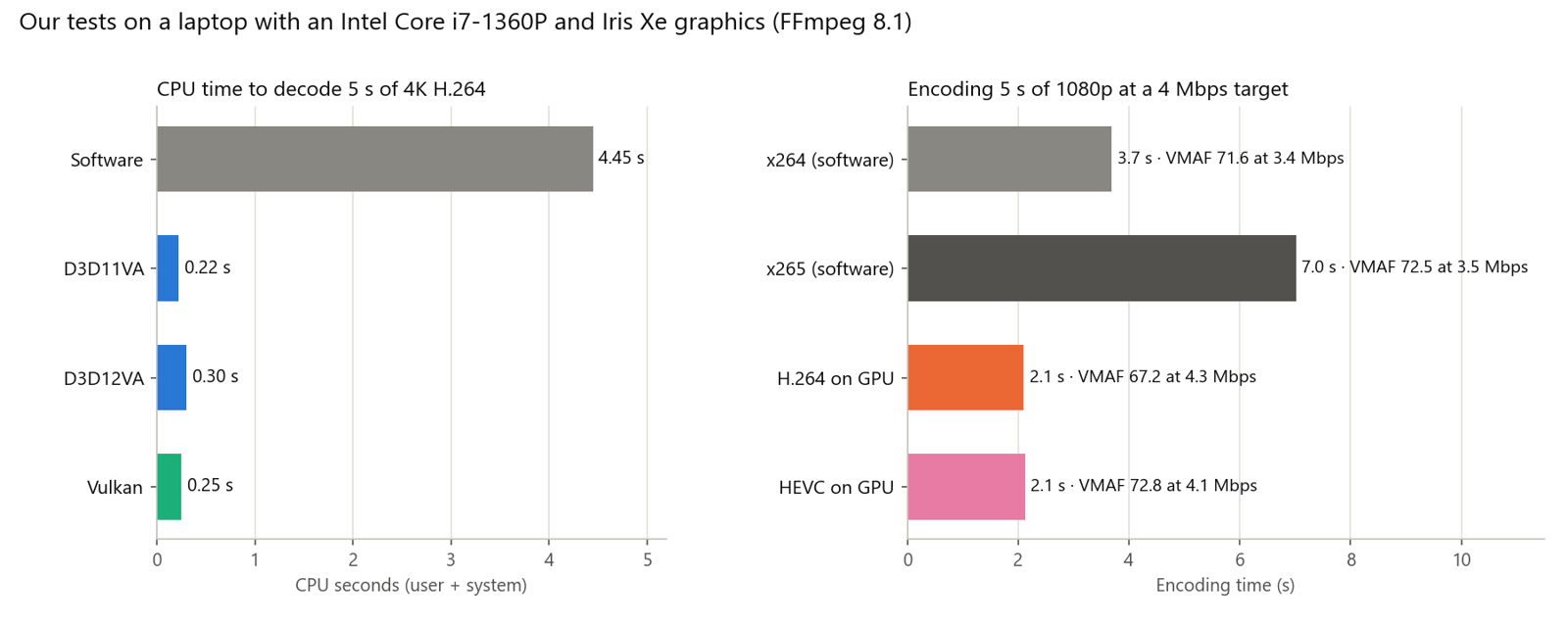
The GPU's HEVC encoder matched x265's VMAF score 3.3 times faster, but needed about 15% more bits to do it; its H.264 encoder used 26% more bits than x264 and still scored lower. That's the usual trade: hardware encoders are tuned for speed and power, software encoders for quality per bit. On this driver, FFmpeg's Vulkan Video encoders didn't start, a reminder that support differs by GPU and driver. How we score video quality explains what VMAF measures.
How KwaFlux uses every path
KwaFlux doesn't bet on one API. Its media engine carries a plugin for each decode and encode path and bridges between the pipelines, so it can pick a working hardware route on each machine and keep frames on the GPU.
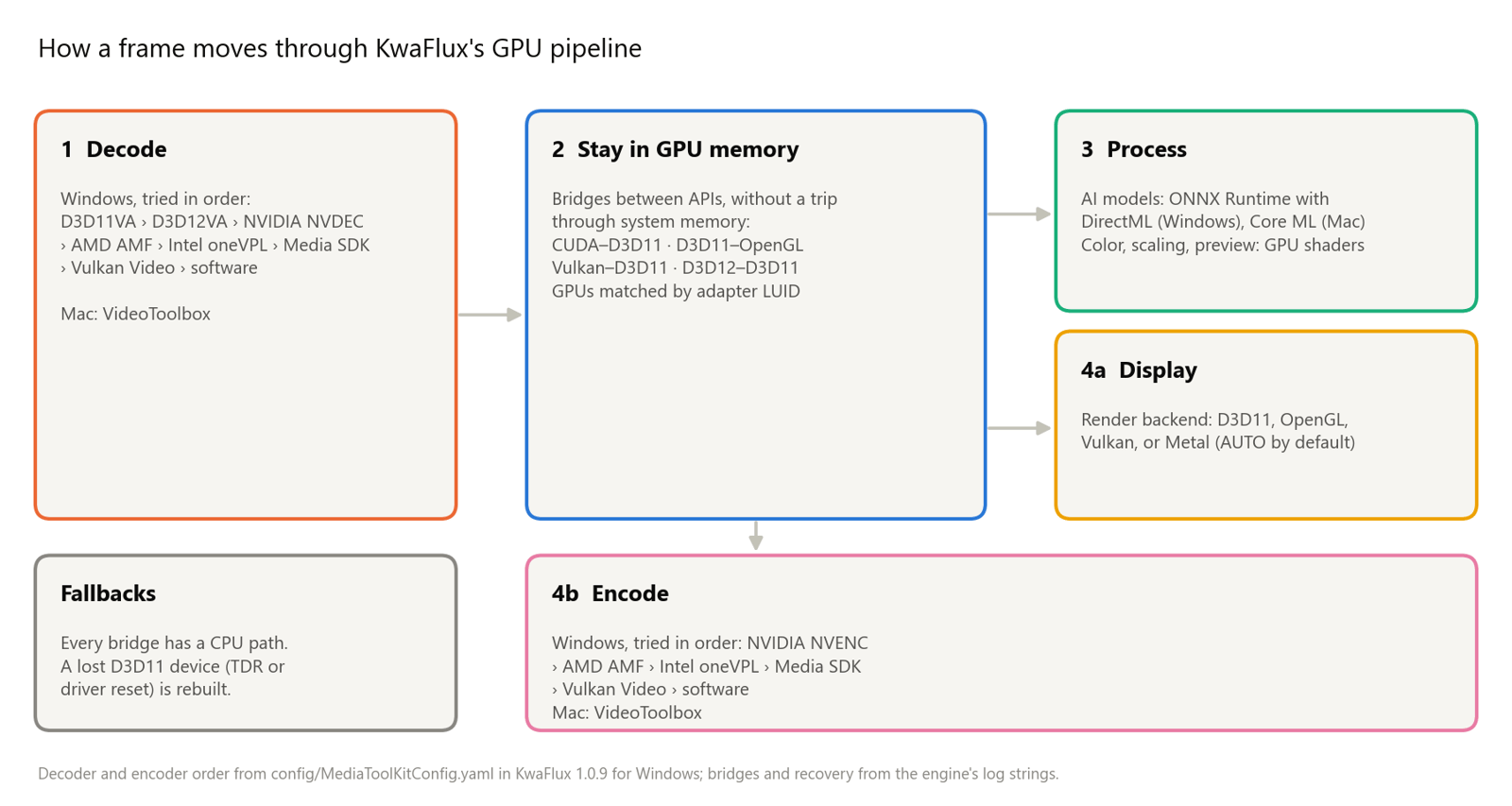
- Eight decode paths, tried in order. On Windows, the engine's configuration tries D3D11VA, then D3D12VA, NVIDIA NVDEC, AMD AMF, Intel oneVPL, Intel Media SDK, and Vulkan Video, and decodes in software only when none of them can take the file.
- Six encode paths. For encoding, it tries NVIDIA NVENC, AMD AMF, Intel oneVPL, Media SDK, and Vulkan Video before software. Its encoder table also includes Apple's VideoToolbox encoders.
- Four render backends. The picture is drawn with D3D11, OpenGL, Vulkan, or Metal. The default, AUTO, lets the engine choose, and a backend the platform doesn't support falls back to AUTO.
- Bridges that avoid system memory. NVDEC frames reach D3D11 through CUDA's D3D11 interop; D3D11 and OpenGL share textures through
WGL_NV_DX_interop2orGL_EXT_memory_object_win32; Vulkan shares memory with D3D11 throughVK_KHR_external_memory_win32; D3D12 and D3D11 exchange frames through shared DXGI handles. When OpenGL has no efficient bridge on a machine, the player switches to D3D11 instead of copying every frame. - One GPU per job. On laptops with two GPUs, the engine matches adapters by their LUID, so decoding, processing, and display don't bounce frames between the integrated and the discrete GPU.
- Recovery, not crashes. If Windows resets the graphics driver (TDR), the player rebuilds its D3D11 device. Every bridge has a CPU path, and an export whose GPU encoder can't start is encoded in software.
- AI on any recent GPU. On Windows, AI processing runs through ONNX Runtime with DirectML, which works on DirectX 12 GPUs from Intel, AMD, and NVIDIA. On macOS 13 or later, the GPU Acceleration Component runs supported features through Apple's Core ML. Which GPU you need and KwaFlux on Mac cover the hardware side.
Two settings let you steer it. Settings › Performance › Hardware Accelerated Decoding turns hardware decoding on or off (it applies after a restart), and AI Processor chooses Auto, GPU, or CPU for AI work. In the Converter, High-speed conversion › GPU acceleration encodes H.264 and HEVC on the graphics card. It's off by default: KwaFlux notes that it's faster but slightly lower in quality than software encoding at the same bitrate, which matches our test. Each file shows a GPU encoded badge, or Software encoded if the GPU encoder couldn't start.
How to check your own machine
List the hardware paths FFmpeg can use:
ffmpeg -hide_banner -hwaccelsCompare CPU time for software and hardware decoding. The -benchmark line reports user (utime), system (stime), and wall-clock (rtime) time:
ffmpeg -hide_banner -benchmark -i input.mp4 -an -f null -ffmpeg -hide_banner -benchmark -hwaccel d3d11va -hwaccel_output_format d3d11 -i input.mp4 -an -f null -Encode HEVC on the GPU through D3D12 and compare it with x265 at the same target:
ffmpeg -hide_banner -loglevel error -y -init_hw_device d3d12va=gpu -filter_hw_device gpu -i input.mp4 -vf "format=nv12,hwupload" -c:v hevc_d3d12va -rc_mode VBR -b:v 4M -maxrate 6M -c:a copy gpu_hevc.mp4ffmpeg -hide_banner -loglevel error -y -i input.mp4 -c:v libx265 -preset medium -b:v 4M -c:a copy cpu_hevc.mp4Then score each against the source. Download vmaf_v0.6.1.json from the Netflix VMAF repository into the same folder first, because some FFmpeg builds don't include a built-in model:
ffmpeg -hide_banner -i gpu_hevc.mp4 -i input.mp4 -lavfi "[0:v][1:v]libvmaf=model=path=vmaf_v0.6.1.json" -f null -If the hardware encode scores close to the software one at a similar bitrate, use it for drafts and quick shares; keep software encoding for archives. For codec choices themselves, see H.264 vs H.265 vs AV1.
Common problems
| Problem | Likely cause | Fix |
|---|---|---|
| A file decodes in software even with hardware decoding on | Codec, bit depth, or chroma format the engine doesn't support (often 4:2:2 or 4:4:4) | Check the vendor's support matrix; software decoding still works |
| GPU-encoded files look softer | Hardware encoders spend bits less efficiently | Raise the bitrate, or switch GPU acceleration off for final copies |
| GPU encoding falls back to software | Unsupported format, busy encoder, or driver problem | Update the graphics driver; only H.264 and HEVC are GPU-encoded in the Converter |
| Stutter on a laptop with two GPUs | Frames crossing between the integrated and discrete GPU | Run the app on the GPU the display is connected to, or update drivers |
| The screen flashes and the picture recovers | Windows reset the graphics driver (TDR) | Update the driver; reduce other GPU load during long exports |
| Hardware decoding seems no faster | The CPU decodes this codec quickly | Look at CPU load instead: the gain is the CPU time saved |
What this can't do
- Hardware decoding doesn't improve the picture. Decoders produce the same frames as software; only the work moves.
- Hardware encoding doesn't beat a slow software preset on quality per bit. It wins on speed and power.
- No GPU accelerates every codec. Support is fixed by the chip generation and the driver.
- Zero-copy needs matching hardware. When two APIs or two GPUs can't share memory, frames take the slower CPU route.
Final thoughts
Hardware decoding and encoding are about where the work happens: on fixed-function engines instead of the CPU, and ideally without frames leaving GPU memory. Turn on hardware decoding for smoother work, use GPU encoding when speed matters more than the last bit of efficiency, and measure both on your own machine.
KwaFlux decodes, processes, and encodes video on your own GPU, in the Converter and in every AI module. Media files are not uploaded for processing. It runs on Windows 10 (64-bit, version 1809 or later), Windows 11, and macOS 12 or newer on Apple Silicon. Importing files and exploring the app need no account. Signing in with an active paid plan is required only to export, convert, repair a file, or download a file from a link.
Experience on Your Own Footage
Download KwaFlux and preview effects on your own footage for free before you pay — no account needed, and your media is processed on your GPU, not uploaded. Video previews run 1, 3, or 5 seconds; stabilization previews run 5, 15, or 30 seconds.
Frequently asked questions
Is hardware encoding worse than software encoding?
Usually, at the same bitrate. Hardware encoders favor speed and power over efficiency, so they need more bits for the same quality. In our test, the GPU's HEVC encoder matched x265's VMAF score 3.3 times faster but used about 15% more bits.
Does hardware decoding make playback faster?
Sometimes. Its main gain is lower CPU load: in our 4K H.264 test, hardware decoding used about 95% less CPU time at a similar speed. It matters most for demanding codecs, high resolutions, and when the CPU is busy with other work.
What is the difference between D3D11VA and NVDEC?
Both use the same decoding hardware on an NVIDIA GPU. D3D11VA is Microsoft's vendor-neutral interface and delivers frames as D3D11 textures; NVDEC is NVIDIA's own interface and delivers frames to CUDA for processing. Apps choose by where the frames go next.
Can integrated graphics decode and encode video?
Yes. Intel's integrated GPUs include Quick Sync Video, and recent AMD and Apple chips include their own video engines. Our test laptop decoded 4K H.264 and encoded HEVC on its Iris Xe graphics. Codec support depends on the generation.
Why does my 4:2:2 file decode in software?
Because many consumer video engines only decode 4:2:0, the format of most delivery video, and support for 4:2:2 arrived only in some newer generations. Software decoding still works, at a higher CPU cost. Chroma subsampling explained covers the formats.
Sources
- NVIDIA, "NVIDIA Video Codec SDK" (hardware decoders and encoders separate from the CUDA cores; NVENC codecs; 4:2:2 encoding on Blackwell) (accessed 2026-10-22)
- NVIDIA, "Video Encode and Decode GPU Support Matrix" (accessed 2026-10-22)
- NVIDIA, CUDA Runtime API, "Direct3D 11 Interoperability" (accessed 2026-10-22)
- Intel, "Intel Video Processing Library (Intel VPL)" (hardware decode, encode, and processing; VPL runtime for Iris Xe and newer, Media SDK for older graphics) (accessed 2026-10-22)
- AMD GPUOpen, "Advanced Media Framework (AMF) SDK" (access to AMD video engines, compute shaders, and hardware accelerators) (accessed 2026-10-22)
- Microsoft Learn, "Direct3D 11 Video APIs" (accessed 2026-10-22)
- Microsoft Learn, "WDDM support for timeout detection and recovery" (TDR resets an unresponsive graphics card) (accessed 2026-10-22)
- ONNX Runtime, "DirectML Execution Provider" (DirectML is a DirectX 12 library for machine learning across a broad range of hardware) (accessed 2026-10-22)
- Khronos, "VK_KHR_external_memory_win32" reference page (accessed 2026-10-22)
- Khronos OpenGL Registry, "WGL_NV_DX_interop2" (sharing Direct3D 10 and 11 resources with OpenGL) (accessed 2026-10-22)
- Apple Developer, "Video Toolbox" (hardware-accelerated video encoding and decoding) (accessed 2026-10-22)
- Apple Developer, "Metal" (graphics and compute on Apple GPUs) (accessed 2026-10-22)
- Apple Newsroom, "Apple unleashes M1" (unified memory lets the chip's components access the same data without copying it between pools of memory) (accessed 2026-10-22)
- Netflix, "VMAF" repository (vmaf_v0.6.1.json model) (accessed 2026-10-22)
- FFmpeg documentation (`-hwaccel`, `-hwaccel_output_format`, `-init_hw_device`, `-benchmark`) (accessed 2026-10-22)
KwMore in Inside KwaFlux
Keep reading

KwaFlux: Everything You Need to Know (Features, Platforms, Pricing, Updates)
What KwaFlux is, what it includes, which systems it runs on, what is free and what is paid, how licenses work, and what changed in each version.
KwaFlux on Mac: Supported Macs, Setup, and Performance Tips
Which Macs run KwaFlux, how to install it, what the GPU Acceleration Component and Standard Mode mean, and how to keep AI video fast on Apple Silicon.
How to Make AI Video Enhancement Faster: Workflow, Settings, and Hardware
Why AI video enhancement is slow and how to speed it up: process less, pick the output size, order the steps, and use the GPU and app settings well.