SDR to HDR, Measured: Relabeling, Brightness Boosts, and a Static Curve
One SDR frame converted three computed ways, every pixel measured in nits: a relabel sends the sky to 6,207 nits, a linear boost puts faces at 350.
Key takeaways
SDR to HDR conversion turns standard-dynamic-range video, made for a 100-nit display, into HDR video encoded to ITU-R BT.2100: the transfer function becomes PQ or HLG, the primaries become BT.2020, and the bit depth rises to at least 10 bits per channel.
Done properly, the highlights also rise above HDR reference white while shadows and skin tones barely move. In this guide, we measure three computed methods on the same frame of an open movie, show where fake HDR goes wrong, explain step by step how KwaFlux's AI model computes PQ and HLG, and finish with how to do it and check it yourself. How to choose PQ or HLG is covered below.
- A real SDR-to-HDR conversion passes two tests: the signal is right (PQ or HLG, BT.2020, 10-bit, correct tags) and the content is expanded (highlights open up while shadows and skin stay put). Pass only one and you have fake HDR.
- We converted one SDR frame three ways and computed the displayed luminance of every pixel. A relabel turned the sky into 6,207 nits. A linear boost put faces at 346 to 373 nits, more than three times the top of the BT.2408 range for light skin (65 to 110 nits).
- The ITU's own BT.2446 report says linear scaling is inappropriate for expanding luminance, and that all three of its methods are static, independent of the content.
- KwaFlux's SDR to HDR is an in-house AI model: linearisation, the move to BT.2020, and PQ or HLG encoding all happen inside the model, luminance and colour run in separate branches, Brightness is an input every layer sees, and it works at 16 bits internally before a 10-bit export.
- You don't have to judge an HDR file by eye: ffprobe reads the tags, and signalstats measures the peak and the brightness of a face. Commands and conversion tables are below.
What counts as a real HDR conversion?
A real SDR-to-HDR conversion gets both the signal and the content right. The signal is a format question: the file is PQ or HLG with BT.2020 primaries at 10 bits or more, and the tags match the pixels. The content is a picture question, and ITU-R Report BT.2446 lists what a conversion should do. In short:
- Keep shadows and midtones close to the original, so shadow detail doesn't vanish next to bright highlights.
- Don't lift the midtones too far, or the average picture level climbs and the image becomes uncomfortable to watch.
- Expand the highlights above reference white; that's where HDR's extra range is meant to go.
- Adjust colour as luminance changes, so hues don't shift.
- Expect existing compression artefacts to get amplified, and don't push heavily compressed material too bright.
A file that passes only the signal test makes the player switch to HDR, but the picture may glare, look washed out, or look the same as before. A picture that is just made brighter and more saturated without HDR encoding is still SDR. Both are fake HDR.
Four methods at a glance
| Method | What it does | Highlights | Faces | Main problem |
|---|---|---|---|---|
| ① Relabel only | Pixels unchanged; tags changed to BT.2020 and PQ | Full white read as 10,000 nits | Pushed to several hundred nits | Brightness and colour both misread; glaring and oversaturated |
| ② Linear boost | Linearise, multiply everything by a constant, encode as PQ | White at 1,000 nits | Also multiplied by 10 | Average level rises with it; skin goes pale; banding is magnified |
| ③ Static curve (BT.2446) | One non-linear curve expands every frame of the title | White at 1,000 nits | Lifted less than linear | One curve for all content; it follows luminance only |
| ④ AI inverse tone mapping | A model learns the mapping from paired data and takes a brightness input | Decided by the model | Decided by the model | Needs a GPU; detail clipped in the source still can't come back |
① and ② take the least work to build. If a tool's HDR export simply looks brighter overall, the checks in section 8 will tell you quickly whether it's method ②.
One frame, measured pixel by pixel
You can't see HDR on an SDR web page; however bright a screenshot is, it tops out around 100 nits. So we look at it another way: convert every pixel each method produces into displayed luminance in nits, and colour it by range. Blues and greens are what an SDR display can show, yellow runs up to the 203-nit HDR reference white, orange and red are 203 to 1,000-nit highlights, and magenta and white are above 1,000 nits.
How we measured. The footage is the Blender Foundation's open movie Tears of Steel (CC BY 3.0), the 1280 × 534 H.264 release, decoded as BT.709. The source is shown as BT.1886 (gamma 2.4, 100-nit white). Method ① reads the code values as PQ and the primaries as BT.2020. Method ② linearises and multiplies by 10, so white lands at 1,000 nits. Method ③ follows the Method A formulas in section 4.2 of BT.2446-1, pixel by pixel, with a 1,000-nit peak. All luminance uses the BT.2020 luma coefficients. The maps and the tables below cover those three methods.
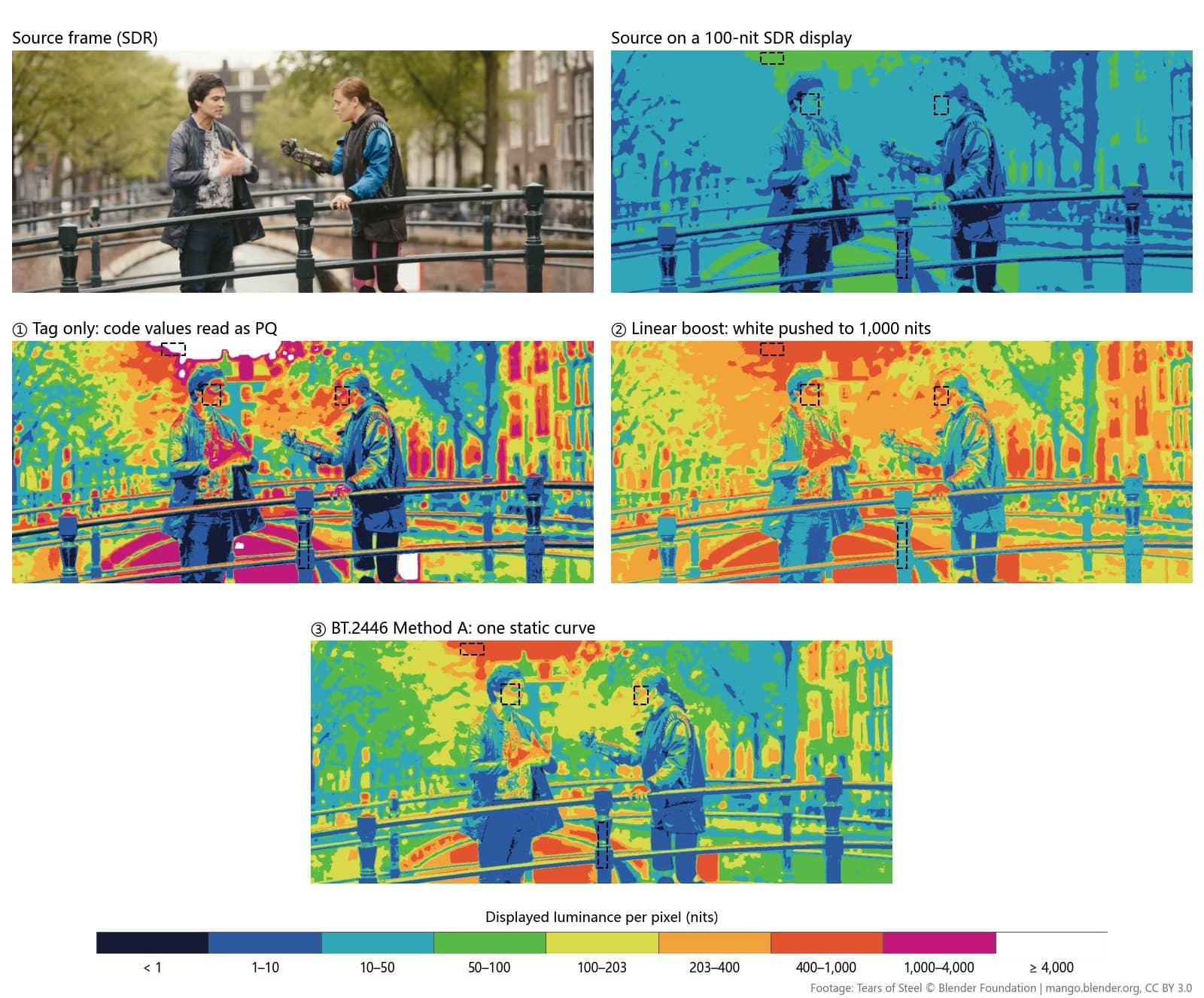
Medians of the boxed regions:
| Region | Source on an SDR display | ① Relabel only | ② Linear boost | ③ BT.2446 Method A |
|---|---|---|---|---|
| Man's face (left) | 35 nits | 513 nits | 346 nits | 163 nits |
| Woman's face (right) | 37 nits | 636 nits | 373 nits | 180 nits |
| Sky between the trees | 88 nits | 6,207 nits | 882 nits | 762 nits |
| Black railing | 2.0 nits | 2.2 nits | 19.8 nits | 6.1 nits |
Report BT.2408 gives reference levels for HDR production: 65 to 110 nits for light skin, 40 to 85 for medium skin, and 203 nits for HDR reference white. Measured against that:
- Relabel only reads the sky as 6,207 nits, far more than most HDR TVs can produce, and puts faces at 513 to 636 nits, two to three times reference white (think of a sheet of white paper). The black railing barely changes. Dark stays dark, bright goes through the roof, and BT.709 colours read as BT.2020 make it all oversaturated.
- Linear boost multiplies everything by 10. Faces land at 346 to 373 nits, over three times the top of the light-skin range, and the black railing goes from 2 to 20 nits, so blacks turn grey. That's where "HDR made it look like a white haze and plastic skin" comes from. BT.2446 is blunt about it: linear scaling raises the mean luminance too much, the midtones become too bright for comfortable viewing, and it is inappropriate for luminance expansion.
- BT.2446 Method A is far more restrained: faces at 163 to 180 nits, sky at 762, shadows lifted only to 6. This film is graded dark (faces sit at 35 nits in the source), so faces still end up above the reference range, but at half the level of the linear boost.
Next, a frame with a large overcast sky:
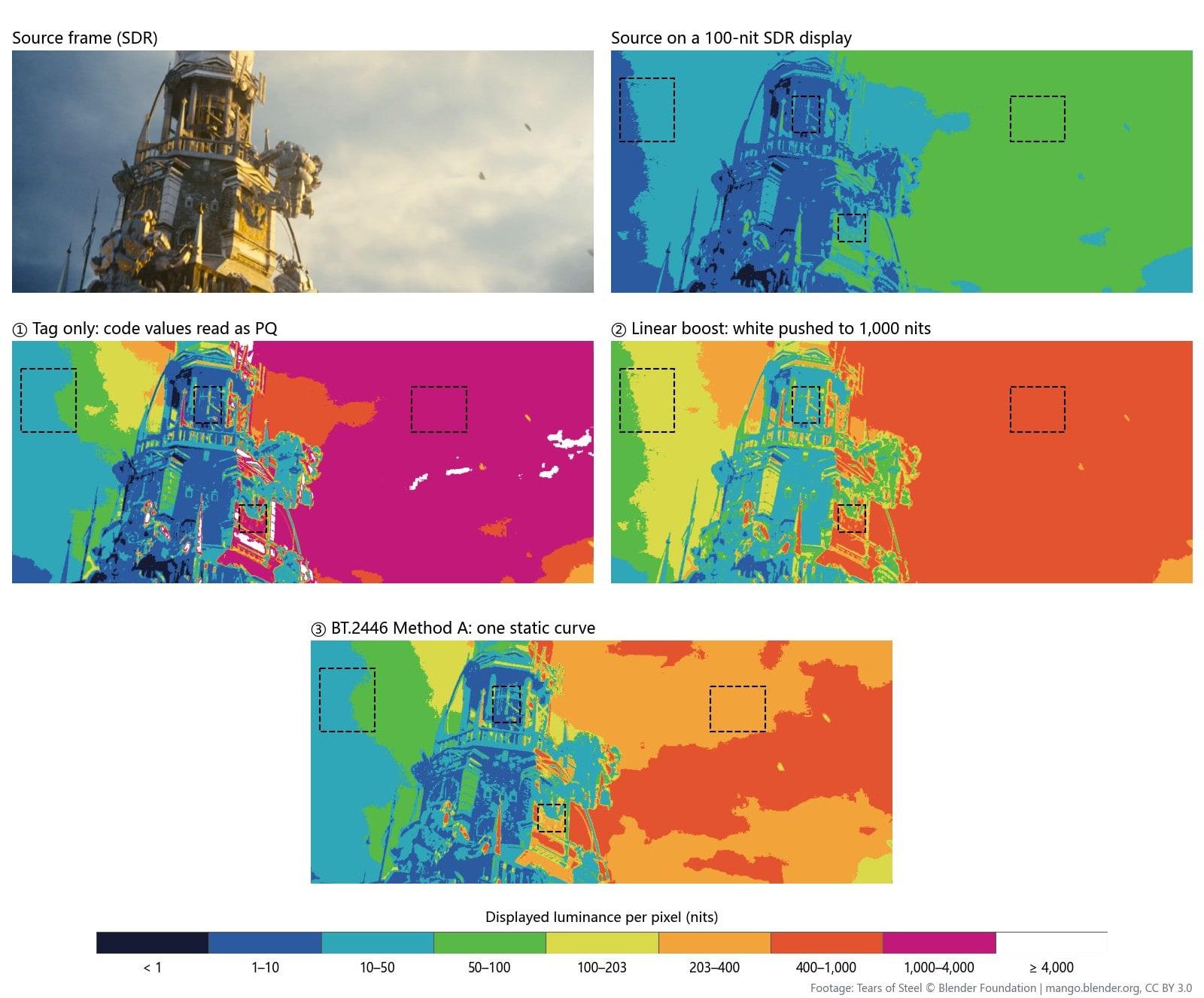
| Region | Source on an SDR display | ① Relabel only | ② Linear boost | ③ BT.2446 Method A |
|---|---|---|---|---|
| Bright cloud (right) | 56 nits | 1,330 nits | 555 nits | 328 nits |
| Blue sky (left) | 12 nits | 37 nits | 117 nits | 44 nits |
| Gold clock face | 37 nits | 795 nits | 371 nits | 177 nits |
| Shadow inside the tower | 3.0 nits | 4.3 nits | 30 nits | 9.5 nits |
| Whole-frame average | 39 nits | 1,141 nits | 391 nits | 238 nits |
With a relabel, 50% of the pixels are above 1,000 nits and the frame averages 1,141 nits, 29 times the source. The linear boost turns the overcast sky into a glowing wall between 400 and 1,000 nits. BT.2446 warns about exactly this: large areas near full signal become uncomfortably bright under strong expansion, which is why its Method B caps the peak lower.
Sidenote: these maps answer one question, how many nits each pixel is sent to. They don't say whether the result looks good; that still takes an HDR display.
The methods as curves
Sweep the SDR signal from black to full white and plot the nits each method returns:
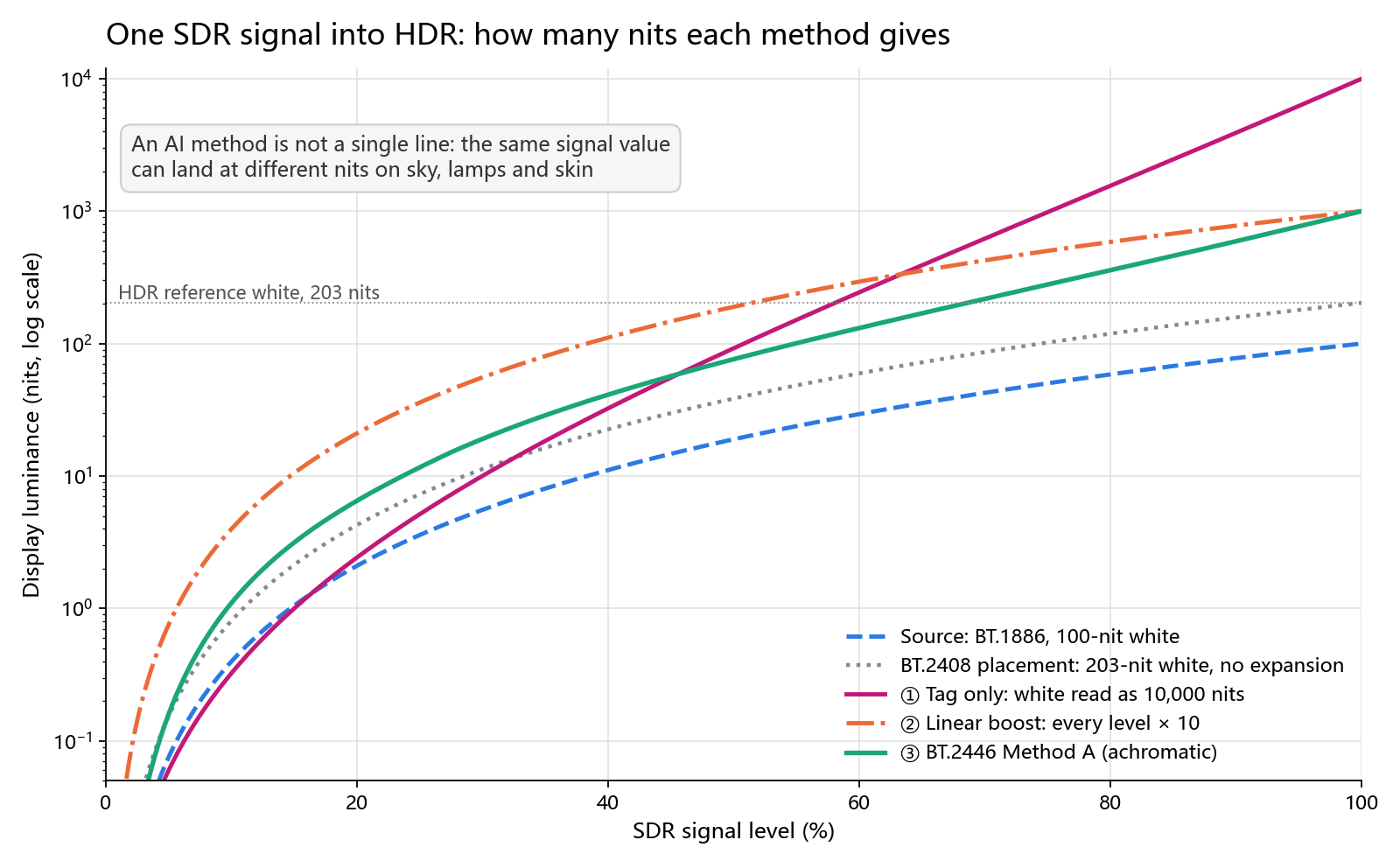
- The relabel line overtakes the linear boost at about 63% signal and reaches 10,000 nits at full white. PQ code values stand for absolute luminance, so SDR code values read as PQ mean something else altogether.
- The linear boost is the source curve shifted up on a log scale: shadows rise tenfold too, which is why blacks turn grey.
- BT.2446 Method A stays only a little above BT.2408's no-expansion placement in the shadows and steepens toward the highlights. It's a carefully designed curve, but it's still one curve: a given luminance value gets the same result whether it falls on a face, a white wall, or a cloud.
The report says so up front: its three methods are static, offering fixed processing independent of content or viewing environment; adaptive, dynamic, and spatially varying methods exist, and a suitable dynamic method could perform better across more content. AI inverse tone mapping heads in that direction: the mapping is no longer a curve written in advance but something a model learns from a large set of paired SDR and HDR pictures.
How KwaFlux's AI model makes HDR
KwaFlux's SDR to HDR runs on an in-house model. It doesn't guess an HDR picture with a curve and then have a network touch it up. The colour science is built into the model's compute graph, and what comes out of the last layer is an HDR signal ready to encode.
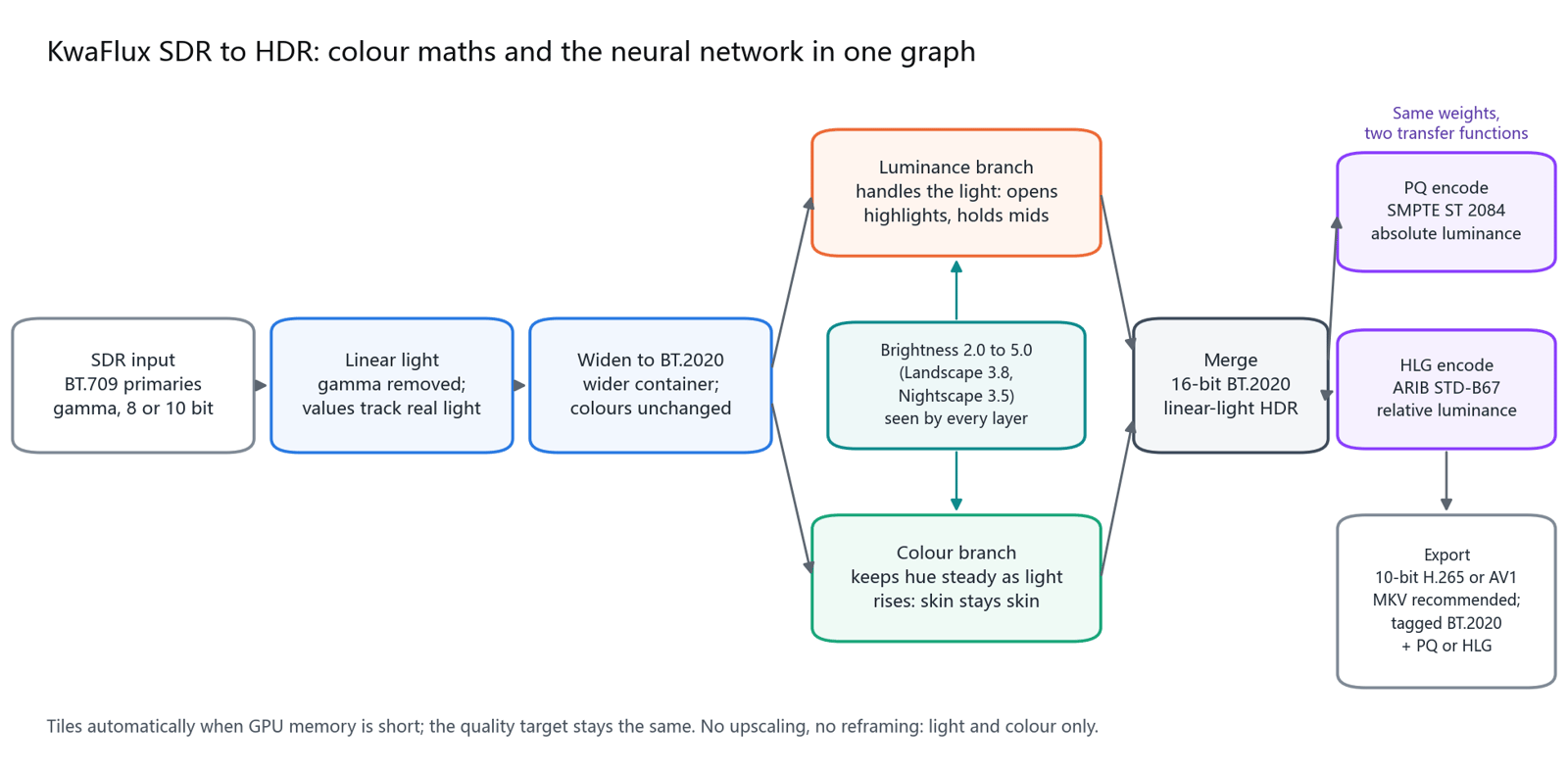
The colour maths lives inside the model. The first step inside the network decodes the SDR gamma to linear light, so every later operation works on real light quantities. The picture then moves from BT.709 into the wider BT.2020 container, and the last stage encodes it as PQ or HLG. There's no LUT bolted on and no curve added at export, so BT.2020 primaries, PQ's absolute luminance, and HLG's relative luminance are constraints the model is trained against.
Luminance and colour run in separate branches. The classic HDR failure is lifting everything until faces turn plastic and neon signs grow white halos. KwaFlux splits the job. The luminance branch handles the light, letting highlights leave SDR's 100-nit ceiling while shadows and midtones stay where they were. The colour branch holds the hue as the light gets stronger, so the sky stays the same blue and the lipstick the same red. The measurements above show why the split matters: a curve that follows luminance alone can't look after a face and a cloud at the same time.
Brightness is a model input, not a multiplier applied afterwards. Footage wants different HDR: portraits suffer when pushed too bright, landscapes can open up, and night scenes need lamps that glow without turning signs into white blocks. KwaFlux's Brightness is a continuous value from 2.0 to 5.0, and every layer of the model sees it. Drag it and the light and the vividness change together, smoothly, without the jump of swapping LUTs and without the flat look of multiplying everything by one number.
One set of weights, PQ or HLG. PQ and HLG differ only in the transfer function used at the end, so KwaFlux delivers both from the same weights. There's no separate model per format, and the two exports match each other.
16 bits inside, 10 bits out. The model computes in 16-bit BT.2020 linear light, then encodes to 10-bit H.265 or AV1 in the colour space you pick. Once highlights are stretched, gradients need more steps; keeping intermediate results off 8 bits is what keeps skies and walls from banding.
Light enough to run a whole film. The model does light and colour only: no upscaling, no reframing, no invented texture. The network itself is small. On machines short of GPU memory it tiles the frame automatically, keeping the same quality target and running more reliably.
PQ or HLG?
| What you're making | Pick | Why |
|---|---|---|
| Uploads to YouTube and similar platforms, or HDR10 delivery | PQ | Display-referred; each code value means a fixed luminance, and the HDR10 ecosystem is built on it |
| Broadcast, or one file that must also play on SDR TVs | HLG | Scene-referred, needs no mastering metadata, and displays reasonably on SDR TVs that accept BT.2020 |
| Going back into an editor for grading | Whatever the timeline uses | Deliver PQ to a PQ timeline and HLG to an HLG one; don't bounce between the two systems |
| Not sure | PQ | It's KwaFlux's default export, and HDR10 TVs, monitors, and platforms all read it |
How the two curves differ, and how HLG system gamma works, is why the table above picks PQ or HLG by job. For YouTube and HDR10, export PQ.
How to convert SDR to HDR in KwaFlux
Step 1. Open AI Color Grading and pick SDR to HDR. Import a clip into AI Color Grading and choose the SDR to HDR mode. It works on video only; for photos, use Smart Color or Filter Grading.
Step 2. Pick a scene. Scene offers Landscape (default), Nightscape, and Custom. Landscape and Nightscape use preset brightness (3.8 and 3.5); only Custom shows the Brightness slider, from 2.0 to 5.0. The starting points below are our suggestions; adjust for your footage:
| Footage | Start with | Check |
|---|---|---|
| Landscape, travel, aerial | Landscape preset | Whether the clouds separate and the darker ground keeps its detail |
| Night, street, light shows | Nightscape preset | Whether signs and street lamps turn into white blocks, and whether noise rises in the shadows |
| Portraits, talking heads, interviews | Custom, around 3.0 | Whether foreheads and cheeks start to shine and skin goes pale |
| Not sure | Landscape preset | Watch a 3-second preview, then move half a step up or down |
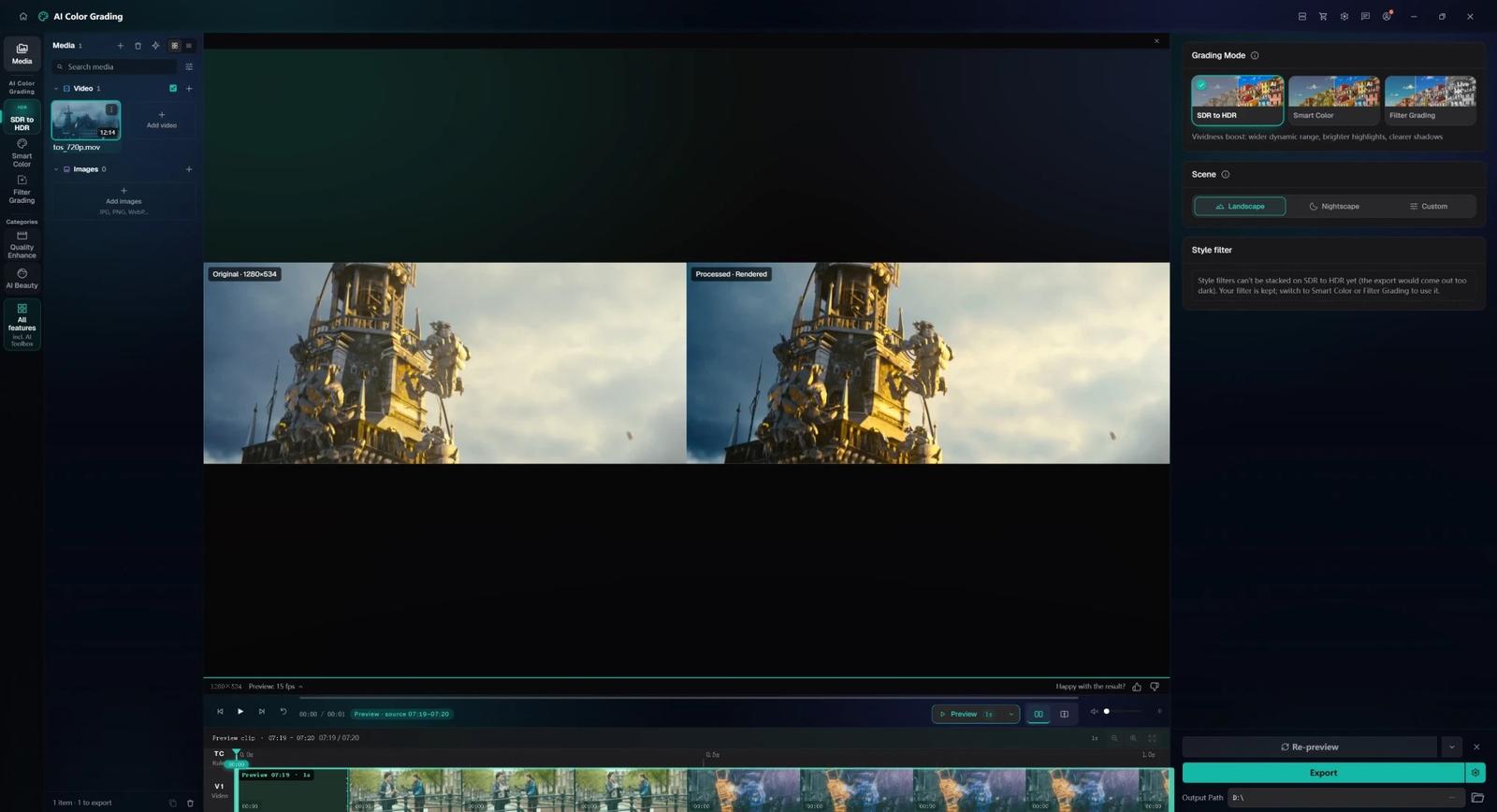
Step 3. Preview first. Render a 1-, 3-, or 5-second preview of the brightest part of the clip and the part with the most faces. On an SDR monitor you see a version mapped back to SDR, where the separation of tones and skin is still visible; on an HDR monitor, turn on HDR in the system first.
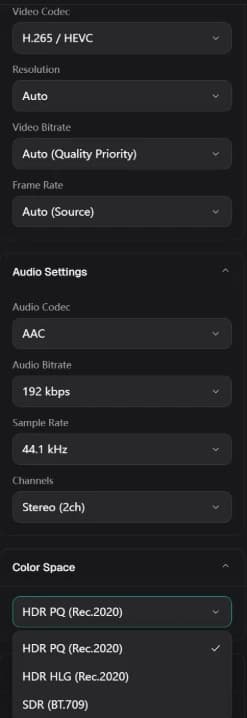
Step 4. Export. In the export settings, Color Space offers HDR PQ (Rec.2020) (default), HDR HLG (Rec.2020), and SDR (BT.709). Pick H.265 (recommended) or AV1; MKV is the recommended container. HDR exports are 10-bit, and KwaFlux writes the matching transfer function, BT.2020 primaries and matrix, and limited-range tags.
Pro tip: if the footage is soft, noisy, or blocky, clean it up with Quality Repair before SDR to HDR. HDR magnifies the source's flaws along with everything else; repairing first and expanding second gives a much cleaner result than the other way round.
Sidenote: SDR to HDR can't currently stack style filters; stacking one makes the export come out darker. Filters you've set are kept and apply again when you switch to Smart Color or Filter Grading.
How to check an HDR file without trusting your eyes
Check the tags first. This command lists the colour tags:
ffprobe -v error -select_streams v:0 -show_entries stream=pix_fmt,color_range,color_space,color_transfer,color_primaries -of default=nw=1 output.mkvA PQ file shows smpte2084, an HLG file arib-std-b67, primaries and matrix bt2020 and bt2020nc, and a 10-bit pixel format such as yuv420p10le.
Then measure the peak. signalstats reports the highest luma code value in each frame:
ffmpeg -i output.mkv -vf "signalstats,metadata=print:key=lavfi.signalstats.YMAX:file=ymax.txt" -f null -For a 10-bit, limited-range PQ file, convert the code value back to nits with this table (computed from the SMPTE ST 2084 formula):
| YMAX code value | About |
|---|---|
| 509 | 100 nits |
| 573 | 203 nits (HDR reference white) |
| 636 | 400 nits |
| 674 | 600 nits |
| 723 | 1,000 nits |
| 855 | 4,000 nits |
| 940 | 10,000 nits |
On a PQ test file, the command reported YMAX 715, about 920 nits, matching the 910-nit peak our script computed pixel by pixel. YMAX measures luma (Y′), so coloured highlights differ somewhat from true luminance, but it's good enough for the order of magnitude. If most frames sit at 940, full white is being read as 10,000 nits, and the file was most likely relabeled.
Finally, measure a face. A face tells you more than the peak about whether the whole picture was pushed up. Pick a frame with a face toward the camera and measure the average code value inside a box around it (the four crop numbers are width, height, and the x and y of the top-left corner; change them for your frame):
ffmpeg -ss 10 -i output.mkv -frames:v 1 -vf "crop=30:40:712:100,signalstats,metadata=print:key=lavfi.signalstats.YAVG:file=-" -f null -| YAVG code value | About | Against BT.2408 |
|---|---|---|
| 431 | 40 nits | Low end of the medium-skin range |
| 472 | 65 nits | Low end of the light-skin range |
| 517 | 110 nits | Top of the light-skin range |
| 573 | 203 nits | HDR reference white, a sheet of white paper |
| 609 | 300 nits | A face here is much brighter than paper |
On our portrait frame, the linear-boost version measured 618, about 330 nits; the BT.2446 Method A version measured 549, about 155 nits. A darker or brighter source grade moves faces up or down, but when a face is clearly brighter than reference white, the whole picture has almost certainly been lifted.
Troubleshooting
| Problem | Likely cause | Fix |
|---|---|---|
| The HDR export looks washed out on a computer | The player or OS isn't in HDR and is mapping PQ back to SDR | Turn on HDR in the OS or use an HDR-capable player; confirm the tags with ffprobe first |
| Faces look pale or shiny | Brightness is too high | Choose Custom and lower Brightness by half a step to a full step, then preview the part with the most faces |
| Night signs turn into white blocks | The signs were already clipped in the source, or Brightness is too high | Use the Nightscape preset; detail clipped in the source can't be restored, only kept from getting brighter |
| Banding in the sky | The source is heavily compressed 8-bit | Remove blocking with Quality Repair first; keep the 10-bit export and don't convert to 8-bit afterwards |
| The export comes out darker overall | A style filter is stacked | Don't stack filters with SDR to HDR; grade in a separate pass |
| A platform doesn't show HDR after upload | The platform has codec or container requirements | Re-wrap or re-encode as the platform requires. For YouTube and HDR10, export PQ |
What AI can't do
- Recover detail the source clipped. Where an SDR sky or lamp is already a flat 255, any method can only infer what was there, not restore it.
- Fix source compression on its own. Inverse tone mapping magnifies existing blocking and noise; repair heavily compressed footage first.
- Replace an HDR display. On a 100-nit screen, HDR can only be mapped back to SDR; the extra brightness shows up only on an HDR screen.
- Generate Dolby Vision dynamic metadata. KwaFlux exports PQ (the HDR10 family) or HLG.
Final thoughts
Fake HDR is easy: change a tag or lift everything and the player lights up its HDR badge. Real HDR has to get both the signal and the content right. Next time you're handed an "HDR" video, run the commands above: where the peak sits and how bright the faces are will tell you which kind it is.
Try it on your own footage
KwaFlux runs AI Color Grading on your own GPU, including SDR to HDR exports in PQ or HLG. AI processing runs locally on your GPU — media files are not uploaded for processing. It runs on Windows 10 (64-bit, version 1809 or later), Windows 11, and macOS 12 or newer on Apple Silicon. Previews need no account: render a 1-, 3-, or 5-second preview on any clip. Signing in with an active paid plan is required only to export, convert, repair a file, or download a file from a link.
Experience on Your Own Footage
Download KwaFlux and preview effects on your own footage for free before you pay — no account needed, and your media is processed on your GPU, not uploaded. Video previews run 1, 3, or 5 seconds; stabilization previews run 5, 15, or 30 seconds.
Frequently asked questions
Is converting SDR to HDR just raising the brightness?
No. Raising everything lifts shadows, midtones, and faces too, so the average level gets too high and skin goes pale; BT.2446 states that linear scaling is inappropriate for luminance expansion. A proper conversion leaves shadows and midtones largely alone, expands the highlights, and encodes the result as PQ or HLG.
Will SDR converted to HDR look better on a regular monitor?
Sometimes, but you won't see the HDR itself. A regular monitor maps HDR back to SDR, so you see the mapped tones and colours. The extra highlight brightness only shows on a display or TV with HDR turned on.
What is BT.2446?
It's an ITU-R report on converting between HDR and SDR. It describes three static methods: Method A expands SDR to 1,000 nits, Method B expands more conservatively to avoid large overly bright areas, and Method C focuses on preserving skin tones. All three apply one curve to the whole title, whatever the content.
Is AI-converted HDR real HDR?
It depends on two things: whether the file is encoded to BT.2100 (PQ or HLG, BT.2020, 10-bit, correct tags), and whether the highlights were expanded rather than the whole picture lifted. If both hold, it's a proper HDR signal. It still isn't native HDR from an HDR camera; clipped detail doesn't come back.
Does SDR to HDR amplify noise and compression artefacts?
Yes. Once the range is stretched, quantisation steps and compression artefacts that were invisible in SDR can become visible, as BT.2446 warns. Denoise and deblock heavily compressed footage before converting, and keep the 10-bit export so the steps are not rounded back to 8-bit.
Sources
- ITU-R, Report BT.2446-1 (requirements for SDR/HDR conversion, Method A inverse tone mapping formulas, the problem with linear scaling, all three methods static) (accessed 2026-10-22)
- ITU-R, Report BT.2408-8 (HDR reference white at 203 nits, reference levels for skin tones and grey cards) (accessed 2026-10-22)
- ITU-R, Recommendation BT.2100-3 (PQ and HLG, BT.2020 primaries, HDR bit depth) (accessed 2026-10-22)
- ITU-R, Recommendation BT.1886 (SDR display curve, gamma 2.4, 100-nit white) (accessed 2026-10-22)
- FFmpeg Filters Documentation (`signalstats`, `metadata`) (accessed 2026-10-22)
- Blender Foundation, Tears of Steel (open movie, CC BY 3.0; the test footage in this article) (accessed 2026-10-22)
CoMore in Color & HDR
Keep reading
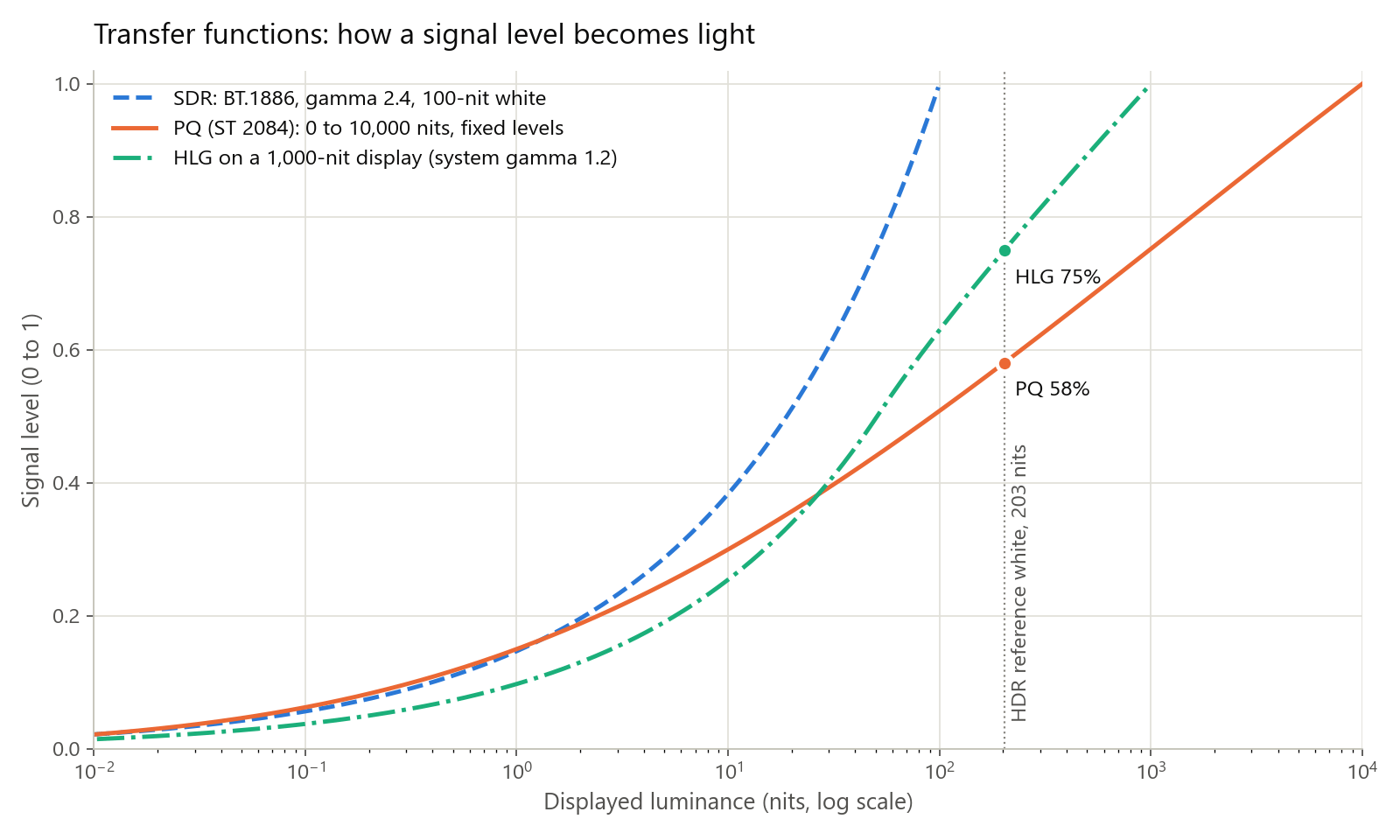
SDR vs HDR in Depth: PQ, HLG, Tone Mapping, and HDR10 Encoding
How PQ and HLG encode light, why HDR needs 10 bits, what HDR10 metadata says, how tone mapping works, plus tested x265, SVT-AV1, and FFmpeg commands.

SDR to HDR and AI frame interpolation — enhance without another upscale
Already 1080p but still washed out or choppy? SDR-to-HDR, AI Color Grading, and Frame Interpolation run locally. Free 1s/3s/5s preview, no account needed.