Denoise, Deblock, Sharpen, Correct Color: Video Restoration Filters in Depth
How denoising, deblocking, debanding, sharpening, white balance, and chromatic aberration fixes work, which order to run them in, with FFmpeg tests.
Key takeaways
Video restoration filters each fix one kind of damage, and the order you run them in decides whether they help or fight. Deinterlace first, deblock and denoise at the source size, correct color, then scale, sharpen lightly, and add dither or grain last. Sharpening noise, or denoising grain you just added, undoes the work.
- Each restoration filter targets one kind of damage: noise, compression blocks, banding, softness, a color cast, or color fringing. Name the damage before you pick the filter.
- Order matters: deinterlace, deblock, and denoise at the source size, fix color, then scale, sharpen lightly, and add dither or grain last.
- Denoisers trade noise for texture in different ways. In our tests, non-local means cleaned a flat sky almost to nothing but left the noise in foliage; pushed harder, it erased 17% of the leaf detail.
- Sharpening steepens edges that are already there and draws halos when pushed. It can't add detail.
- Two different problems get called "color errors": a color cast, fixed by white balance, and chromatic aberration, fixed by realigning the red and blue channels.
What each repair fixes
Restoration starts with a diagnosis. The table lists the common kinds of damage, how to recognize them, and the filters we tested for each. If you can't tell grain from noise or compression, see grain vs noise vs compression artifacts first.
| Damage | What you see | Repair | FFmpeg filters we tested |
|---|---|---|---|
| Sensor noise | Speckle that changes every frame, worst in shadows | Denoise | hqdn3d, atadenoise, nlmeans, fftdnoiz, bm3d |
| Compression blocks | A grid of squares in gradients and moving areas | Deblock | deblock, spp, pp7, fspp, uspp |
| Ringing and mosquito noise | Dots and ripples that crawl around edges and text | Deringing (soft thresholding) or denoise | spp with mode=soft, nlmeans |
| Banding | Visible steps in skies, walls, and fades | Deband, then a 10-bit encode | deband, gradfun |
| Softness | Edges without snap | Sharpen, or upscale with a model | unsharp, cas |
| Color cast | Whites look orange, blue, or green | White balance | colorchannelmixer, grayworld, greyedge |
| Lateral chromatic aberration | Red–cyan or blue–yellow fringes that grow toward the frame edges | Scale the red and blue channels | perspective on extracted planes |
| Combing | Comb-like lines on moving edges | Deinterlace | bwdif |
Why the order matters
Each step changes what the next one sees, so a filter in the wrong place can undo the one before it or amplify the damage it should remove.
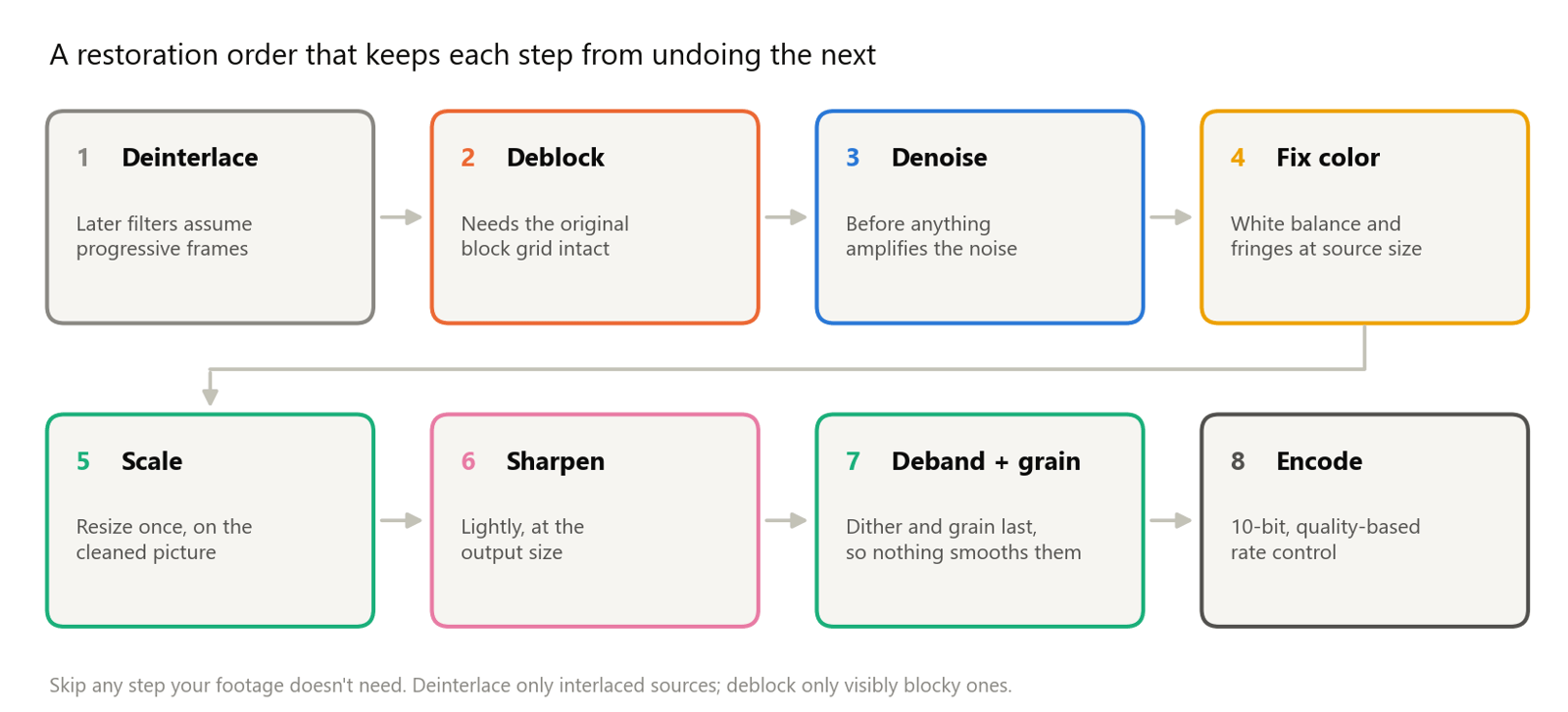
- Deinterlace first. Every other filter assumes whole frames. On interlaced fields, a denoiser treats the combing as texture and a scaler smears it into ghosting. See how to deinterlace video.
- Deblock before anything moves pixels. Deblockers work on the encoder's block grid, which denoising and scaling blur and shift.
- Denoise before you sharpen or grade. Sharpening and contrast increases amplify noise along with detail.
- Fix color before sharpening. Correct the cast and realign the color channels while edges are still soft; sharpening would crisp up the fringes.
- Scale once, on the cleaned frame, so leftover damage isn't enlarged.
- Sharpen at the output size, and lightly.
- Add dither and grain last. Any smoothing step after them would remove the fine noise that hides banding or a waxy look.
- Encode with enough bits. A 10-bit encode keeps smooth gradients from banding again.
We checked the denoise–sharpen order on a synthetic clip with fine texture and added noise. Sharpening first, then denoising, left more noise in a flat patch (14.5 by our measure, against 12.2 the other way round) and scored 26.6 dB PSNR against the clean clip, against 27.7 dB. Denoising alone scored 30.3 dB with 8.0 left: any sharpening costs some cleanliness, so use as little as the footage needs.
Denoising: five families of filters
Noise is random variation that changes from frame to frame; detail is structure that stays put or moves with the scene. Every denoiser exploits that difference in its own way.
- Spatial filters average each pixel with its neighbors in the same frame. They're fast, but they can't tell fine texture from noise of the same size, so they soften both.
- Temporal filters average the same pixel across neighboring frames. Static detail survives because it repeats, while noise averages out. Anything that moves smears into trails unless the filter detects motion or aligns the frames first; temporal consistency, flicker, and ghosting covers that problem. FFmpeg's
atadenoiseis an adaptive temporal average, andhqdn3dcombines a light spatial pass with a temporal one. - Non-local means replaces each pixel with an average of pixels whose surrounding patches look alike, wherever they sit in a search window. As its authors put it, the most similar pixels need not be close. Repetitive areas such as sky or walls provide many matches; unique texture provides few.
- Transform-domain filters move blocks of the picture into a frequency representation, where real structure concentrates in a few strong coefficients and noise spreads thinly across all of them, then shrink the weak ones.
fftdnoizdoes this with a 3D FFT that can include neighboring frames. BM3D first groups similar 2D patches into 3D stacks, which makes the representation sparser still. - Learned denoisers train a network on pairs of clean and noisy images. DnCNN learns to predict the noise itself (residual learning); FFDNet takes a noise-level map as an extra input, so one model handles different and uneven noise levels; FastDVDnet uses several frames at once and avoids a costly motion-compensation stage.
What our tests showed
We added Gaussian noise that changes every frame, about 8 levels out of 255 on luma, to 30 frames of a 1080p sample clip of sunlit leaves against blue sky. Then we ran FFmpeg's denoisers on a laptop CPU (Intel Core i7-1360P) and compared each result with the clean clip:
| Filter and setting | Family | Time for 30 frames | PSNR (luma) | Error left in flat sky | Error in leaves | Leaf detail kept |
|---|---|---|---|---|---|---|
| None (noisy input) | Reference | Not applicable | 30.3 dB | 8.8 | 8.9 | 99% |
hqdn3d (defaults) | Spatial and temporal | 1.0 s | 30.7 dB | 8.1 | 8.7 | 99% |
hqdn3d=8:6:12:9 | Spatial and temporal | 0.8 s | 31.5 dB | 6.1 | 8.0 | 97% |
atadenoise (thresholds 0.1 and 0.2) | Temporal | 0.9 s | 31.1 dB | 4.9 | 8.5 | 94% |
nlmeans=s=6 | Non-local means | 31.7 s | 32.2 dB | 1.1 | 8.1 | 98% |
nlmeans=s=10 | Non-local means | 31.8 s | 31.0 dB | 1.0 | 8.9 | 83% |
fftdnoiz=sigma=8:prev=1:next=1 | Transform domain, 3 frames | 3.8 s | 33.7 dB | 4.3 | 6.4 | 98% |
bm3d=sigma=30 | Transform domain | 8.1 s | 34.0 dB | 1.3 | 6.2 | 91% |
"Error" is the standard deviation of the difference from the clean clip, so in the leaves it counts leftover noise and lost texture alike. "Leaf detail kept" is the share of the clean clip's fine leaf texture still present in the result.
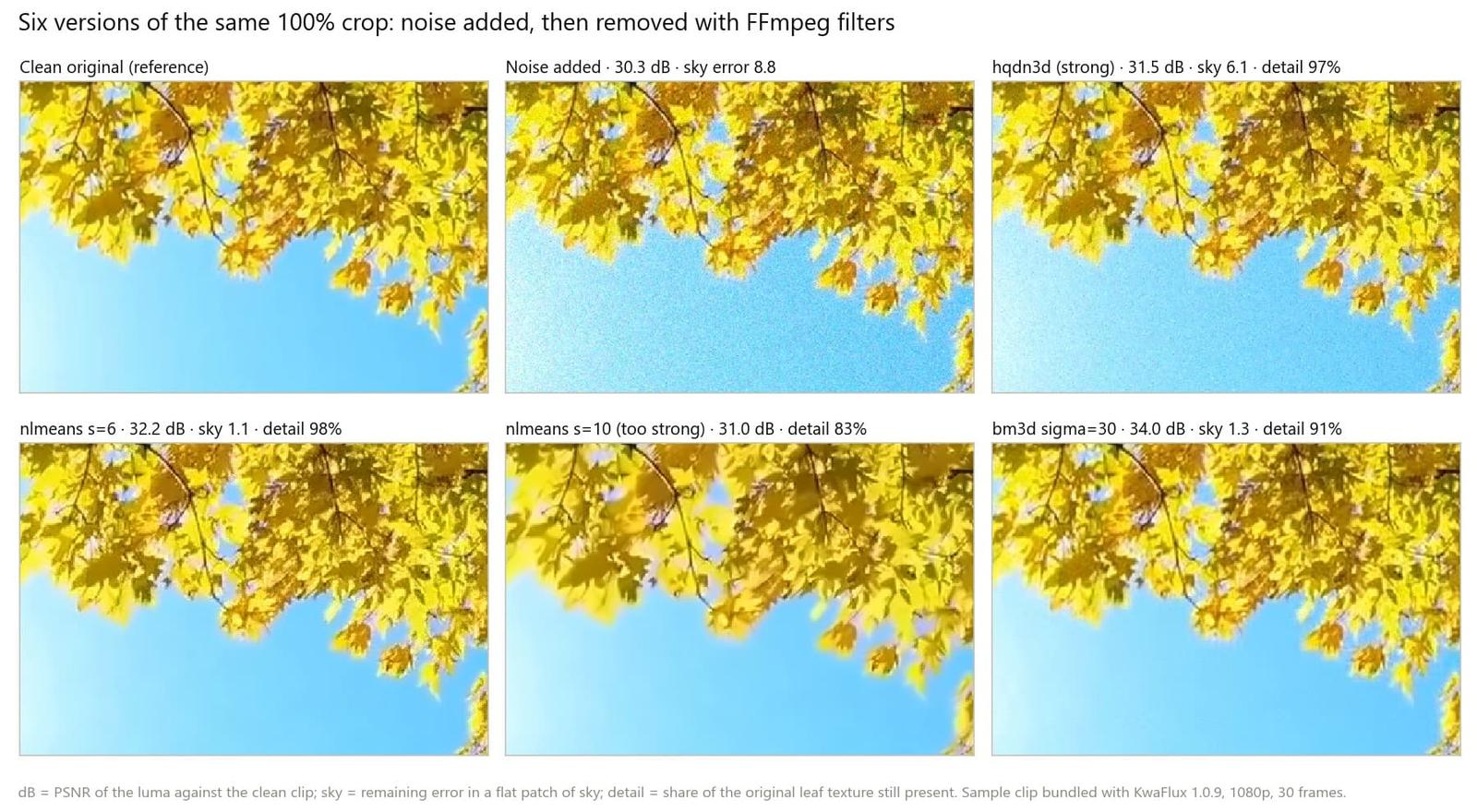
What the numbers say:
- Fast filters barely dent strong noise.
hqdn3dat its defaults moved the sky error from 8.8 to 8.1. It suits light noise, or a first pass before a stronger filter. - Non-local means is uneven by design. At
s=6it cleaned the sky to 1.1 but left the leaves almost as noisy as before (8.1), because unique texture has few similar patches to average. Ats=10the leaves lost 17% of their real detail and PSNR fell: that's the waxy look described in why AI restoration looks plastic. - Transform-domain filters balanced both.
fftdnoizwith one frame on each side kept 98% of the leaf detail at 33.7 dB.bm3dscored the highest PSNR, 34.0 dB, but removed 9% of the leaf detail on the way. - Speed varies by a factor of 40.
nlmeansran at about one frame per second at 1080p on our CPU; on 121 frames of another 1080p clip it took 192 seconds.
One caveat on bm3d: FFmpeg's docs say it does no block matching unless group is above 1, its default. In our build, raising it made the filter more than 15 times slower without lowering the noise, so the table uses the default, which acts as a transform-domain filter rather than full BM3D.
Two commands from the table, ready to adapt:
ffmpeg -i input.mp4 -vf "nlmeans=s=6" -c:v libx264 -crf 16 -c:a copy denoised.mp4ffmpeg -i input.mp4 -vf "fftdnoiz=sigma=8:prev=1:next=1" -c:v libx264 -crf 16 -c:a copy denoised.mp4Start low and raise the strength until the noise in flat areas stops bothering you, then check faces, fabric, and foliage at 100% zoom. For a short, practical walkthrough, see how to denoise video with AI.
Compression damage: blocks, ringing, and banding
Most codecs cut each frame into blocks, transform them, and round off the detail they can least afford to keep. Three kinds of damage come out of that rounding:
- Blocking. When the rounding is coarse, neighboring blocks stop matching at their borders and a grid appears. MPEG-2, MPEG-4 Part 2 (DivX and Xvid era files), and Motion JPEG show it as 8×8 squares. H.264 and HEVC filter block edges inside the codec, so their damage tends to look smeared and blotchy rather than gridded; how to fix pixelated video shows both kinds.
- Ringing and mosquito noise. Rounding off high frequencies leaves ripples next to sharp edges and text, which crawl from frame to frame.
- Banding. A smooth gradient stored with too few levels, by an 8-bit pipeline or by a codec that flattened a sky, turns into visible steps.
Deblocking
We encoded the leaves clip as MPEG-2 at a low bitrate, then scored how much stronger the brightness steps are across the 8-pixel block borders than elsewhere (1.0 means no visible grid; the clean clip scored 0.99, the MPEG-2 file 2.08).
| Filter | What it does | Blockiness score | PSNR (luma) |
|---|---|---|---|
| MPEG-2 file | Reference | 2.08 | 27.7 dB |
deblock=filter=strong | Smooths across block borders that look like steps | 1.78 | 27.7 dB |
pp7=qp=12 | Thresholds DCT coefficients at shifted positions | 1.43 | 27.4 dB |
spp=quality=4:qp=12 | Re-compresses at several shifts and averages them | 1.24 | 27.6 dB |
spp=quality=4:qp=24 | Same, stronger | 1.04 | 26.4 dB |
uspp=quality=3:qp=12 | Like spp, but encodes each shift with a real codec | 1.03 | 27.5 dB |
Two lessons. First, deblocking hides the grid but doesn't bring back what the encoder discarded: PSNR barely moved at moderate settings, and the strongest spp setting cost 1.3 dB as it blurred. Second, spp, pp7, fspp, and uspp need a quantizer value. They read it from the stream when the decoder supplies one; in our tests they changed nothing until we set qp ourselves. Start near 12 and raise it only while blocks remain:
ffmpeg -i old.mpg -vf "spp=quality=4:qp=12" -c:v libx264 -crf 16 -c:a aac deblocked.mp4For ringing around text and edges, spp also has mode=soft, which FFmpeg's docs describe as a better deringing effect, but likely blurrier.
Debanding
Banding needs the opposite of sharpening: the steps have to be blended and then kept from coming back. On a sky from one of KwaFlux's bundled sample clips, which shows real compression banding, we measured how long the flat runs along each row were before and after:
- Source: flat runs averaged 10.4 pixels, and 20% of them were 24 pixels or longer, which reads as bands.
- **
deband:** 2.8 pixels on average, with 0.8% of runs that long. - **
gradfun:** 1.3 pixels, with none that long. FFmpeg's docs describe it as designed for playback only, because compression tends to lose its dither and bring the bands back.
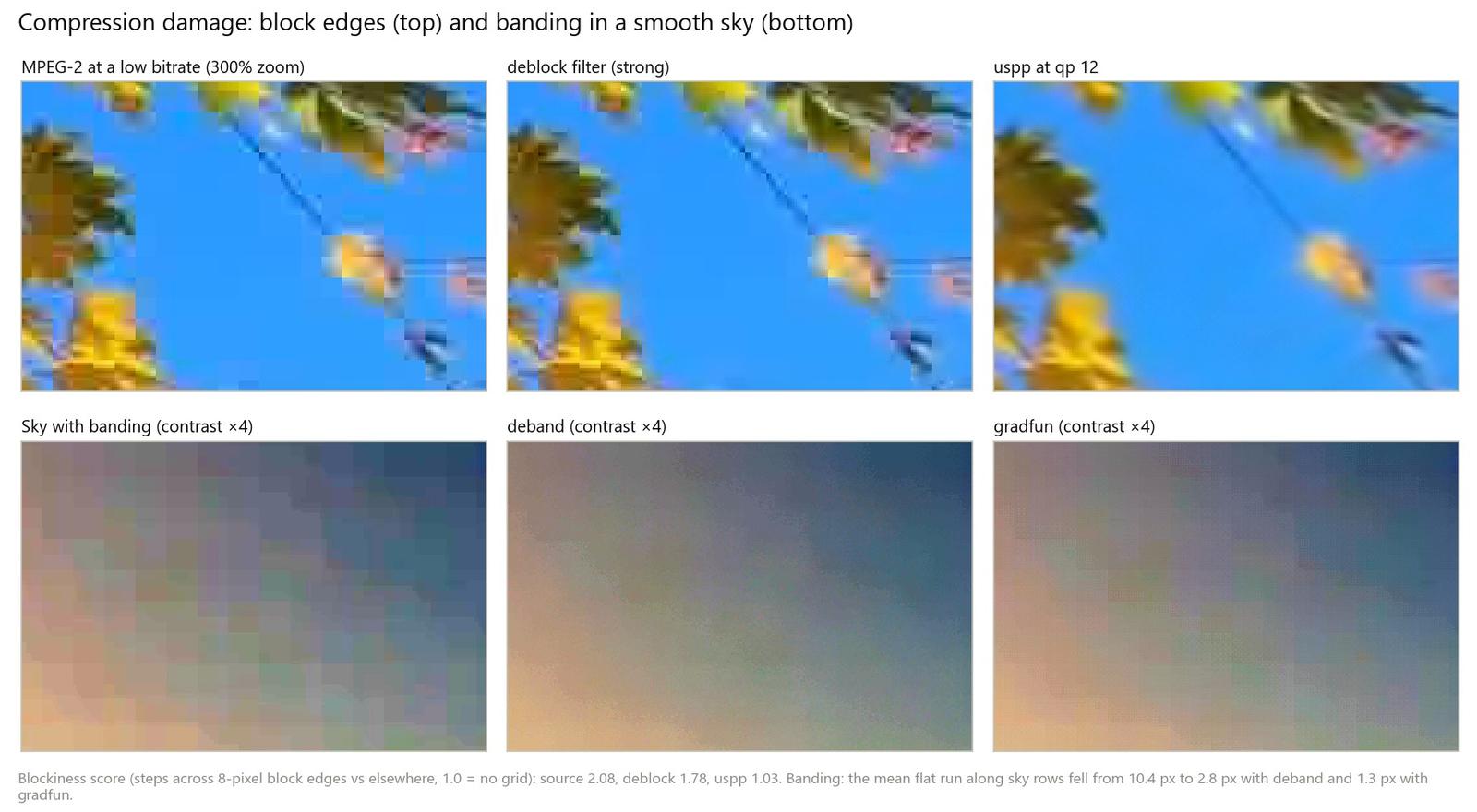
So for files you'll keep, deband and then encode at 10 bits, where the extra levels hold the smoothed gradient. 8-bit vs 10-bit video explains why:
ffmpeg -i input.mp4 -vf "deband" -c:v libx264 -crf 16 -pix_fmt yuv420p10le -c:a copy debanded.mp4Sharpening without halos
Sharpening raises the contrast of edges. The classic method, the unsharp mask, subtracts a blurred copy of the picture to find the edges and adds that difference back, multiplied by an amount. The side effect is overshoot: a bright line on the light side of an edge and a dark line on the dark side. Those are the halos.
Contrast-adaptive sharpening (CAS), from AMD's FidelityFX, adjusts the amount per pixel: areas that are already sharp get less, areas that lack detail get more.
We sharpened a soft edge that steps from level 60 to 180 and measured the overshoot:
| Filter | Dark halo (levels below 60) | Bright halo (levels above 180) |
|---|---|---|
unsharp, 5×5, amount 1.5 | 4 | 2 |
unsharp, 7×7, amount 2.5 | 20 | 16 |
cas=strength=0.5 | About 2 | None |
cas=strength=1.0 | 35 | 2 |
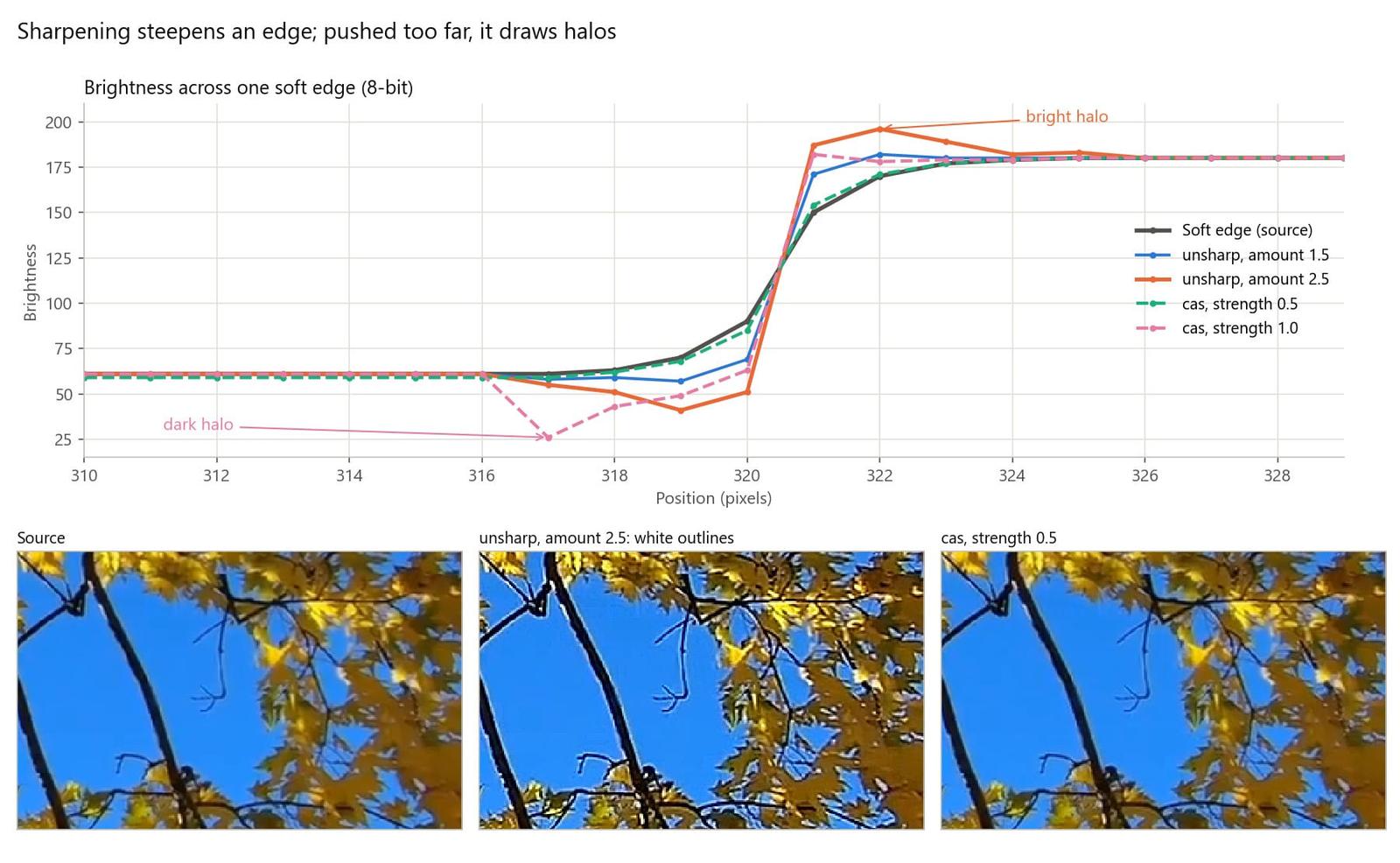
FFmpeg's docs call unsharp amounts between −1.5 and 1.5 reasonable, and our 2.5 run shows why. CAS stayed clean at moderate strength but drew the deepest dark halo of the four at full strength, so adaptive isn't the same as safe at any setting. Two habits keep sharpening honest:
- Sharpen after scaling, at the size people will watch, and judge at 100% zoom on that size.
- Remember what sharpening can't do. It steepens edges that survived; it can't recover detail lost to focus or motion blur. For those, see how to fix blurry video.
ffmpeg -i input.mp4 -vf "cas=strength=0.4" -c:v libx264 -crf 16 -c:a copy sharpened.mp4Color casts and chromatic aberration
Color casts: white balance
A color cast happens when the camera misjudges the light, so every color shifts the same way: tungsten light turns whites orange, shade turns them blue. Correcting it means scaling the red, green, and blue channels until something neutral looks neutral again. The methods differ in how they find "neutral":
- Gray world assumes the average reflectance of the scene is achromatic. It works when the scene has varied colors and fails when one color dominates.
- Gray edge, proposed by van de Weijer, Gevers, and Gijsenij, assumes the average *edge difference* in a scene is achromatic, which large single-colored areas influence less.
- A known neutral reference measures something you know is white or gray, such as a gray card, a white wall, or a white boat hull, and computes the gains that make it neutral.
We added a warm cast to a frame from a bundled sample clip of a boat at sea, then corrected it three ways and measured the average color difference from the original frame (ΔE, lower is closer):
| Method | Average ΔE vs original | White hull, red minus blue |
|---|---|---|
| Original frame | Reference | −6 |
| Warm cast added | 19.9 | 39 |
grayworld | 15.4 | 36 |
greyedge | 8.9 | 9 |
Gains from the hull (colorchannelmixer) | 5.9 | 0 |
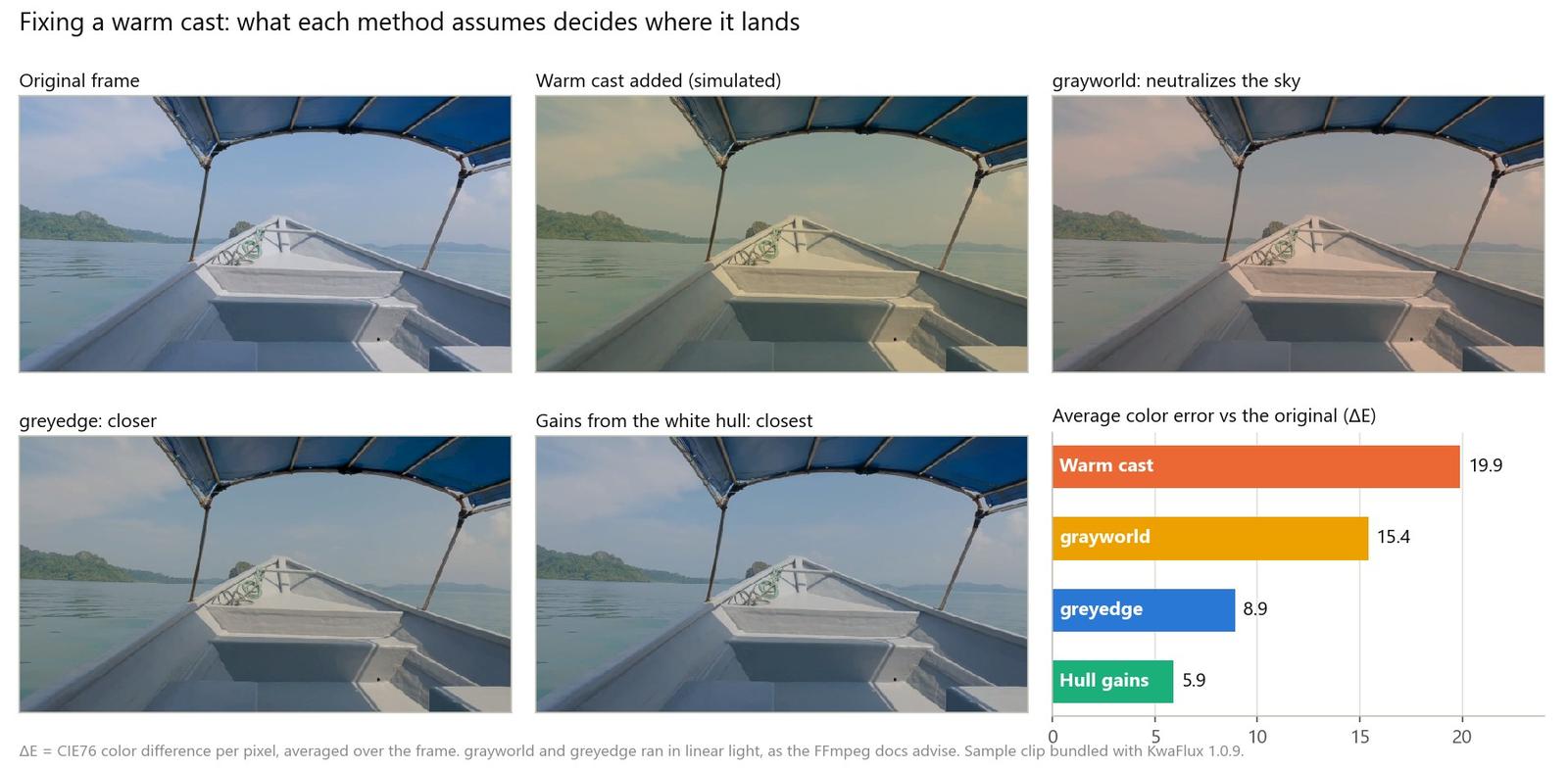
Gray world failed in the textbook way: the frame is mostly blue sky and sea, so it neutralized the sky and left the hull orange. Gray edge got most of the way. Gains from the hull got closest. To compute them, sample the RGB values of the neutral patch, then divide the green value by red and by blue. Our hull read 156, 144, 117, so red gets 144 ÷ 156 = 0.923 and blue 144 ÷ 117 = 1.232:
ffmpeg -i input.mp4 -vf "colorchannelmixer=rr=0.923:bb=1.232" -c:v libx264 -crf 16 -c:a copy balanced.mp4Without a neutral reference, gray edge is the safer automatic choice. Run it in linear light, as FFmpeg's docs advise for these filters:
ffmpeg -i input.mp4 -vf "zscale=transfer=linear,format=gbrpf32le,greyedge=difford=1:minknorm=5:sigma=2,zscale=transfer=bt709,format=yuv420p" -c:v libx264 -crf 16 -c:a copy balanced.mp4For a cast plus flat, dull color, a grade is often the faster fix; AI Color Grading covers that side.
Chromatic aberration: realigning the channels
Chromatic aberration is a lens problem: glass bends wavelengths by different amounts, so the colors don't land in the same place. It comes in two types:
- Lateral (transverse) aberration gives each color a slightly different magnification. Fringes, typically red–cyan or blue–yellow, are absent at the center and grow toward the edges of the frame. Stopping the lens down doesn't help, but post-processing can: scale the red and blue channels so they line up with green again.
- Axial (longitudinal) aberration focuses each color at a different distance, so purple or green fringes appear around high-contrast edges anywhere in the frame, mostly with the aperture wide open. Scaling can't fix it; masking or desaturating the fringes can only hide it.
To test the fix, we magnified the red channel of a checkerboard chart by 0.5% and shrank blue by 0.5% about the center, then measured the mean red–blue difference near the edges:
| Version | Left edge | Center | Right edge |
|---|---|---|---|
| Clean chart | 0 | 0 | 0 |
| Simulated lateral aberration | 37.5 | 2.3 | 37.5 |
Uniform channel shift (rgbashift) | 77.3 | 43.3 | 6.9 |
| Radial fix (inverse scaling) | 0.5 | 0.5 | 0.5 |
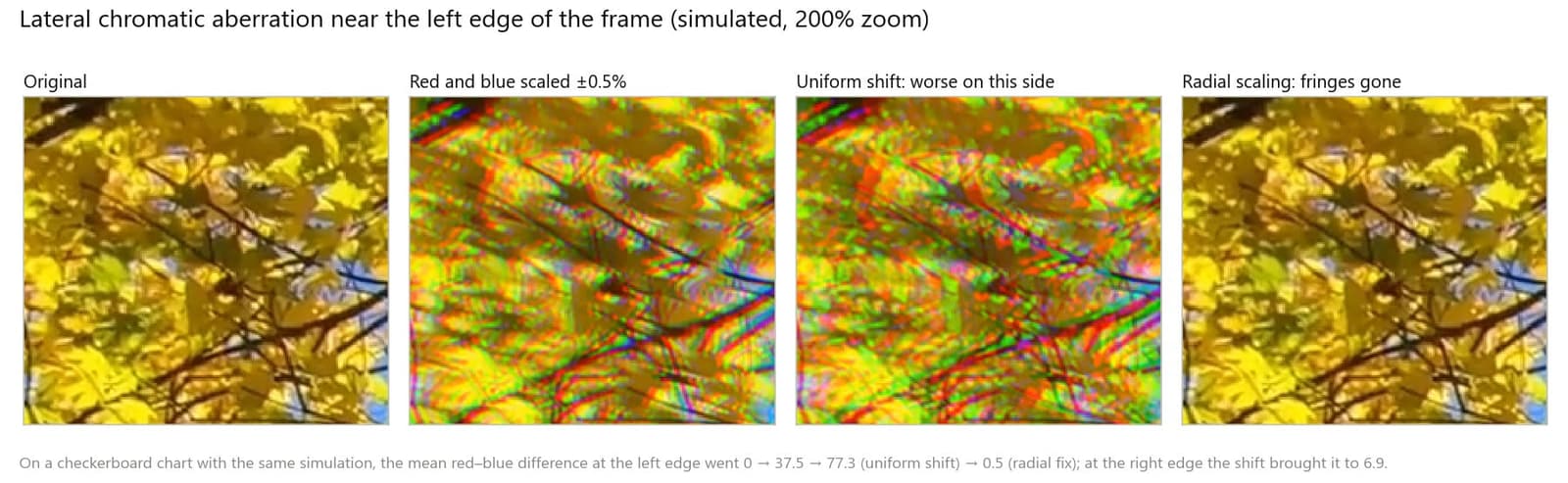
The uniform shift is the common mistake: it lines up one side and doubles the error on the other, because lateral aberration grows with the distance from the center. The radial fix scales red down and blue up about the center. With FFmpeg's perspective filter that works at sub-pixel precision; the numbers below match a 1920 × 1080 frame and 0.5%, so measure your own footage and recompute them (the margins are half of width × (1 − 1/1.005) and of height × (1 − 1/1.005)):
ffmpeg -i input.mp4 -filter_complex "[0:v]format=gbrp,extractplanes=r+g+b[r][g][b];[r]perspective=x0=4.776:y0=2.687:x1=1915.224:y1=2.687:x2=4.776:y2=1077.313:x3=1915.224:y3=1077.313:interpolation=cubic:sense=destination[r2];[b]perspective=x0=4.776:y0=2.687:x1=1915.224:y1=2.687:x2=4.776:y2=1077.313:x3=1915.224:y3=1077.313:interpolation=cubic:sense=source[b2];[g][b2][r2]mergeplanes=0x001020:gbrp,format=yuv420p" -c:v libx264 -crf 16 -c:a copy fixed.mp4Pro tip: In our tests, extractplanes returned the planes in R, G, B order no matter how we typed them, so extractplanes=g+b+r still gives red first. Label the outputs in R, G, B order, or the channels end up swapped. Raw converters and editors with lens profiles do this correction automatically, and they're the easier route when your lens is in their database.
A complete FFmpeg chain
Here is the whole order in one command, for an old, blocky, noisy 720p clip with a warm cast, upscaled to 1080p:
ffmpeg -i input.mp4 -vf "bwdif=mode=send_frame:deint=interlaced,spp=quality=4:qp=12,hqdn3d=4:3:6:4.5,colorchannelmixer=rr=0.92:bb=1.23,scale=1920:-2:flags=lanczos,cas=strength=0.4,deband,noise=c0s=4:c0f=t" -c:v libx264 -crf 16 -preset slow -tune grain -pix_fmt yuv420p10le -c:a copy restored.mp4| Filter | Step | Notes |
|---|---|---|
bwdif=mode=send_frame:deint=interlaced | Deinterlace | Only touches frames flagged as interlaced; drop it for progressive sources |
spp=quality=4:qp=12 | Deblock | Only for visibly blocky sources |
hqdn3d=4:3:6:4.5 | Denoise | The defaults written out; swap in fftdnoiz or nlmeans for heavier noise |
colorchannelmixer=rr=0.92:bb=1.23 | White balance | Replace with gains from your own neutral patch |
scale=1920:-2:flags=lanczos | Scale | A conventional upscale; an AI upscaler would go here instead |
cas=strength=0.4 | Sharpen | Light, at the output size |
deband | Deband | Blends steps in gradients |
noise=c0s=4:c0f=t | Grain | Fine luma grain that changes every frame |
-tune grain -pix_fmt yuv420p10le | Encode | Keeps grain and gradients; 10-bit H.264 plays on fewer devices, so use it as a master |
On our laptop, the chain processed 150 frames of a 720p sample clip into 1080p H.264 High 10 in 32.8 seconds. For delivery, encode the master to HEVC Main 10 or to 8-bit H.264 with grain.
Where AI models fit, and where it's heading
Classic filters have a few parameters and a fixed idea of what noise looks like. Learned models replace that fixed idea with one learned from examples:
- Single-image models (DnCNN, FFDNet, and the restoration networks that followed) learn the difference between clean and degraded pictures and can remove noise, blocks, and blur in one pass.
- Multi-frame models combine several aligned frames, so detail that appears in more than one frame is recovered rather than guessed. FastDVDnet showed that this can work without a costly motion-compensation step. When alignment fails, they leave trails, the subject of temporal consistency, flicker, and ghosting.
- Generative models (GANs and diffusion) add texture the input doesn't contain. That's the source of both their detail and their risk; why AI restoration looks plastic covers the trade-off and the 2026 trend toward one-step diffusion restoration.
The classic lessons carry over: repair before you enlarge, keep some texture, and judge at 100% zoom and in motion.
How KwaFlux handles this
- Smart Repair combines the steps. In Quality Repair, Smart Repair checks the clip and combines denoising, sharpening, color and brightness correction, upscaling, and face and fine-detail restoration, working from neighboring frames.
- Scene Repair targets one kind of damage. Night Scene handles low-light noise and Film Grain Removal handles grain, alongside Dehaze, Remove Rain, Anime, and Colorize.
- Deinterlacing comes first. The Quality Repair workbench runs Deinterlacing, then Quality Repair, then Frame Interpolation, the same order this guide recommends.
- Casts belong to color grading. Smart Color in AI Color Grading "automatically fixes color casts and dull tones."
- Multi-step jobs keep 10 bits. When an export runs in several steps, the files passed between them are 10-bit H.264, so repeated 8-bit rounding doesn't add banding.
- Preview, then compare. Render a 1-, 3-, or 5-second preview, choose Match source before you judge motion, and turn on Compare quality after preview to see the scores. Fix lateral chromatic aberration before you import, with the command above or your editor's lens correction.
Common problems
| Problem | Likely cause | Fix |
|---|---|---|
| Waxy faces after denoising | Strength too high, or a non-local filter erasing texture | Lower the strength; compare skin at 100% zoom; add fine grain last |
| Noise looks worse after sharpening | Sharpened before denoising, or too much | Denoise first; sharpen last and lightly |
| White or dark outlines on edges | Sharpening amount too high | Lower the amount; try cas at 0.3 to 0.5 |
| Bands come back after export | 8-bit encode, or dither lost in compression | Deband before the final encode and encode at 10 bits |
| Trails behind moving objects | Temporal denoiser averaging motion | Lower the temporal strength or use a motion-aware filter |
| Deblocking changes nothing | No quantizer value from the stream | Set qp yourself, starting near 12 |
| Auto white balance turns the sky gray | Gray world on a scene dominated by one color | Use gray edge or gains from a known neutral |
| Fringes fixed on one side only | A uniform channel shift | Scale red and blue about the center instead |
What this can't do
- No denoiser separates noise from detail of the same size and contrast. Something gives, and you choose what.
- Deblocking hides edges; it doesn't restore what the encoder discarded.
- Sharpening raises edge contrast; it doesn't add resolution.
- Channel scaling can't fix axial chromatic aberration or purple fringing around clipped highlights.
- Automatic white balance is an estimate. Without a neutral reference, it's a guess about the light.
Final thoughts
Good restoration is a sequence of small, targeted repairs: diagnose the damage, run each filter where it can't undo the others, and stop as soon as the problem stops showing. Measure when you can, compare at 100% zoom and in motion, and keep a little texture rather than chasing a spotless frame.
KwaFlux runs Quality Repair on your own GPU. AI processing runs locally on your GPU — media files are not uploaded for processing. It runs on Windows 10 (64-bit, version 1809 or later), Windows 11, and macOS 12 or newer on Apple Silicon. Previews need no account: render a 1-, 3-, or 5-second preview on any clip. Signing in with an active paid plan is required only to export, convert, repair a file, or download a file from a link.
Experience on Your Own Footage
Download KwaFlux and preview effects on your own footage for free before you pay — no account needed, and your media is processed on your GPU, not uploaded. Video previews run 1, 3, or 5 seconds; stabilization previews run 5, 15, or 30 seconds.
Frequently asked questions
Should I denoise before or after sharpening?
Before. Sharpening raises the contrast of everything at edge scale, noise included, so a denoiser that runs afterwards has more to remove. In our test, denoising first left less noise in a flat patch (12.2 against 14.5) and scored higher against the clean clip.
Which video denoise filter keeps the most detail?
There's no single best filter; it depends on the footage and the noise. In our tests, a frequency-domain filter using neighboring frames kept 98% of the leaf texture with the second-highest score. Compare crops at 100% zoom, as in how to denoise video with AI.
Can sharpening fix a blurry video?
Partly. Sharpening steepens edges that are still there, so slightly soft footage looks crisper, but it can't recover detail lost to focus or motion blur, and pushing it draws halos. For real blur, see how to fix blurry video.
Why does banding come back after export?
Because an 8-bit encode rounds the smoothed gradient again, and compression tends to drop the fine dither that hid the steps. Deband just before the final encode, encode at 10 bits where your delivery allows, and add a little grain so flat areas keep some texture.
Is automatic white balance reliable?
Sometimes. Automatic methods estimate the light from assumptions: gray world expects the scene to average to gray and fails when one color dominates, while gray edge holds up better. Gains measured from something you know is white or gray are the more reliable fix.
Can chromatic aberration be removed in post?
Partly. Lateral chromatic aberration, where fringes grow toward the frame edges, can be corrected by scaling the red and blue channels about the center. Axial aberration, the purple or green fringing around bright edges anywhere in the frame, can only be masked or desaturated.
Sources
- Buades, Coll, and Morel, "Non-Local Means Denoising," Image Processing On Line, 2011 (averaging similar pixels, which need not be close) (accessed 2026-10-22)
- Lebrun, "An Analysis and Implementation of the BM3D Image Denoising Method," Image Processing On Line, 2012 (grouping similar 2D patches into 3D groups) (accessed 2026-10-22)
- Zhang et al., "Beyond a Gaussian Denoiser: Residual Learning of Deep CNN for Image Denoising" (DnCNN, residual learning) (accessed 2026-10-22)
- Zhang, Zuo, and Zhang, "FFDNet: Toward a Fast and Flexible Solution for CNN-Based Image Denoising" (noise-level map input) (accessed 2026-10-22)
- Tassano, Delon, and Veit, "FastDVDnet: Towards Real-Time Deep Video Denoising Without Flow Estimation" (multi-frame denoising without motion compensation) (accessed 2026-10-22)
- AMD GPUOpen, "AMD FidelityFX Contrast Adaptive Sharpening (CAS)" (per-pixel sharpening amount) (accessed 2026-10-22)
- van de Weijer, Gevers, and Gijsenij, "Edge-Based Color Constancy," IEEE Transactions on Image Processing, 2007, author's copy (gray-world and gray-edge assumptions) (accessed 2026-10-22)
- Wikipedia, "Chromatic aberration" (axial and transverse types; transverse corrected by radial scaling, axial hard to remedy in post) (accessed 2026-10-22)
- FFmpeg Filters Documentation (`hqdn3d`, `atadenoise`, `nlmeans`, `bm3d`, `fftdnoiz`, `deblock`, `spp`, `uspp`, `deband`, `gradfun`, `unsharp`, `cas`, `grayworld`, `greyedge`, `perspective`, `extractplanes`, `bwdif`) (accessed 2026-10-22)
- x264 source, x264.c help text (`--tune grain` settings) (accessed 2026-10-22)
UpMore in Upscale & Repair
Keep reading
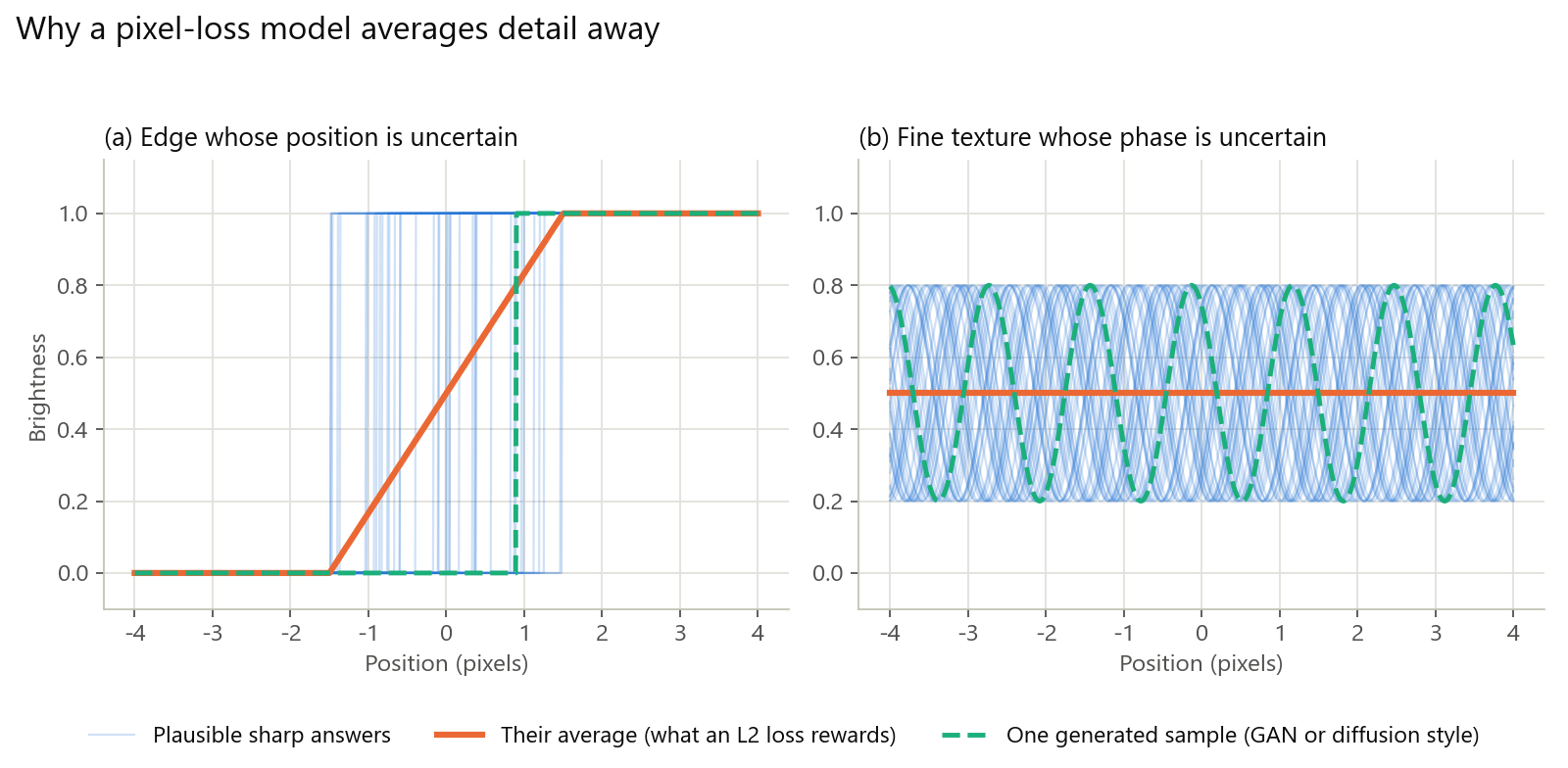
Why AI Restoration Looks Plastic: Losses, GANs, Diffusion, and How to Avoid It
Why AI-restored video looks waxy: averaged detail, invented GAN texture, diffusion drift, and mismatched training data, plus how to spot and avoid it.
4K vs 8K: What Actually Changes on Screen, and When Upscaling to 8K Pays Off
4K vs 8K explained with pixel math, bitrates, and file sizes. See when 8K pays off, when 4K is enough, and how to export an 8K upscale.
How to Upscale 720p Video to 1080p (and When to Stop There)
Upscale 720p video to 1080p with KwaFlux, HandBrake, or FFmpeg. Exact settings, the bitrate to export at, and when going further to 4K isn't worth it.