Local Doesn't Mean Safe: Securing the Channel Between an AI Assistant and a Desktop App
Why a local MCP link still needs defenses: per-user named pipes, first-instance ownership, a 128-bit token, constant-time checks, and fail-closed setup.
Key takeaways
- A local connection between an AI assistant and a desktop app can still be reached by other users on the same PC, by remote clients, and by a program that grabs the channel name first.
- On Windows, KwaFlux's channel is a named pipe that only your account can open, that KwaFlux claims first, and that refuses remote clients. On Mac it's a socket with permissions for your account only.
- Every connection starts with a 128-bit random token, checked in constant time and kept out of logs. You can reset it in Settings.
- The file that hands the token to the MCP server is written atomically with owner-only permissions. If those permissions can't be set, KwaFlux doesn't publish it.
An AI assistant talks to KwaFlux over a channel on your own computer. That makes it easy to assume no one else can reach the channel. It isn't automatically true. On Windows, a named pipe with default settings can be read by any user, can be reached from the network, and can be claimed by whichever process creates it first.
KwaFlux closes each of those doors, and this post walks through how.
In this guide, you'll learn the three ways a local channel gets reached, the defenses KwaFlux uses for each, how the token gets to the MCP server safely, and what a local channel can't protect against.
Contents
- What is a local IPC channel?
- Three ways "local" goes wrong
- Layer 1: who can open the pipe
- Layer 2: a token on every connection
- Layer 3: publishing the token without leaking it
- Layer 4: limits that keep a client in check
- What the channel doesn't protect against
- How we test it
- FAQ
What is a local IPC channel?
A local IPC (inter-process communication) channel is a connection that lets two programs on the same computer exchange messages without going through the network stack. Named pipes on Windows and Unix domain sockets on macOS are common examples.
In KwaFlux's MCP setup, your AI assistant starts the KwaFlux MCP server, for jobs such as file repair or conversion, and that server connects to the running KwaFlux app over such a channel. The control plane post shows where this sits among the other layers.
Three ways "local" goes wrong
| Risk | What it looks like | Why it matters |
|---|---|---|
| Other accounts on the PC | A family computer, a shared workstation, or a remote desktop server with several users | Microsoft documents that the default security descriptor for a named pipe gives "read access to members of the Everyone group and the anonymous account" |
| Remote clients | Named pipes can be opened over the network by name | Microsoft notes that a pipe accepting remote clients checks them only against its security descriptor |
| Squatting | Another program creates a pipe with the expected name before KwaFlux starts | The MCP server would hand its requests, and its token, to the impostor |
None of these needs an exotic attack. They come from defaults.
Layer 1: who can open the pipe
KwaFlux creates its Windows pipe with three settings that address the three risks:
- A security descriptor for your account only. Instead of the default, which gives full control to the system and administrators and read access to Everyone, the pipe's access list names the current user.
- First instance only. KwaFlux creates the pipe with
FILE_FLAG_FIRST_PIPE_INSTANCE. Microsoft's documentation says that with this flag, "creation of the first instance succeeds, but creation of the next instance fails with ERROR_ACCESS_DENIED." If something already owns the name, KwaFlux finds out and doesn't serve on a pipe it doesn't own. - No remote clients. The pipe uses
PIPE_REJECT_REMOTE_CLIENTS, which Microsoft describes simply: "Connections from remote clients are automatically rejected."
On macOS, the app listens on a Unix domain socket whose file permissions are 0600, so only your account can open it.
Sidenote: The MCP specification's security guidance gives the same advice for local servers: use the stdio transport to limit access to the MCP client, and if a server uses other transports, require an authorization token or use IPC "with restricted access." KwaFlux does both. The host reaches the MCP server over stdio, and the MCP server reaches the app over a restricted channel with a token.
Layer 2: a token on every connection
Permissions decide who can open the channel. A token proves that the program on the other end is the one KwaFlux set up.
- Generation. When KwaFlux starts, it creates a 128-bit token from the operating system's cryptographic random number generator.
- Handshake. Every connection has to open with a hello message carrying the token. Until that succeeds, the app accepts nothing else on that connection.
- Constant-time comparison. KwaFlux compares the token byte by byte in a way that takes the same time whether the first byte or the last byte is wrong, so response timing doesn't leak how close a guess was.
- Kept out of logs. The token is left out of KwaFlux's logs and out of the activity list in Settings.
- Reset. Reset agent access token in Settings replaces it with a new random one. Current agent connections are dropped, and configured hosts reconnect with the new token on their next call. Use it if you think something read the old one.
Layer 3: publishing the token without leaking it
The MCP server needs the token, and it gets it from a small control file that KwaFlux writes when it starts. That file is the weakest point if it's handled carelessly, so it gets the most careful treatment.
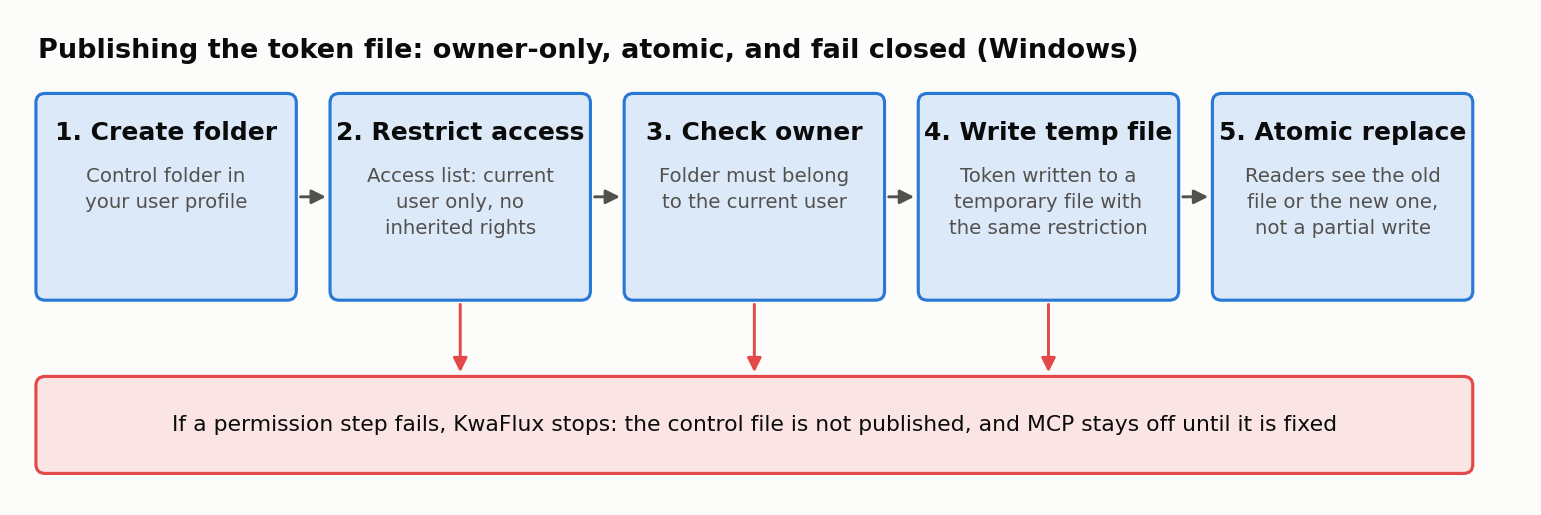
- Create the control folder in your user profile.
- Restrict it to your account. The folder's access list names only the current user, without inheriting broader permissions from the parent.
- Check the owner. KwaFlux confirms the folder belongs to the current user, so a folder planted in advance by someone else isn't trusted.
- Write to a temporary file with the same restriction.
- Replace the control file atomically, so a reader sees either the old file or the new one, not a half-written one.
The important rule is what happens on failure. An earlier version wrote the file first and tightened its permissions afterwards, and only logged a warning if that failed. Now, if KwaFlux can't set the permissions, it doesn't publish the file at all. MCP stops working until the problem is fixed, which is the right trade: a broken connection is visible, a readable token isn't.
Layer 4: limits that keep a client in check
Even a properly authenticated client has limits, because the AI behind it can be steered by what it reads:
| Limit | Value |
|---|---|
| Concurrent connections | 8 |
| Size of one message | 64 KiB |
| Idle connection | Closed after 5 minutes |
| New jobs | 10 per minute in total, 6 per connection |
| Task control | Only the tasks that connection's agent submitted |
| Master switch | One setting in KwaFlux turns all agent access off |
These are about containing a confused or manipulated assistant, which the path and privacy post and the SSRF post look at from other angles.
What the channel doesn't protect against
We want to be exact about the boundary, because overstated security claims do more harm than none.
The channel's defenses stop other user accounts, other computers, and programs that try to impersonate KwaFlux by grabbing the pipe name. They don't stop malware that's already running under your own account. A program running as you can already read your files, your browser data, and anything else you can; no local app can wall itself off from that. Keeping such software off your computer is the job of the operating system and your security software.
Sidenote: The hardening in Layer 3 and the token reset are shipping on Windows first. The Mac build already uses the owner-only socket and the token handshake; we'll update this post when the remaining items ship there.
One change is on our list for later: a handshake in which both sides prove themselves without the secret itself crossing the channel. We've held it for now because it changes the protocol on both ends at once, a handshake bug would take MCP down for everyone, and most of what it would add is already covered by first-instance ownership and the server checking the app is alive.
How we test it
The control plane's request handling is covered by 341 assertions. A separate end-to-end suite starts the real control plane and a real MCP process and runs 12 groups of security cases, including the channel and path checks described here. Both are part of KwaFlux's automated tests, so a change that weakens one of these rules shows up as a failing test.
Final thoughts
"It only listens locally" is where a local channel's security starts, not where it ends. Restrict who can open it, make sure you own the name, authenticate every connection, publish the secret carefully or not at all, and say plainly what's out of scope. That's how KwaFlux handles the link between your AI assistant and the app.
A local MCP server built with care
KwaFlux connects to Codex, Claude, Cursor, and other MCP apps over a channel only your account can open. AI processing runs locally on your GPU — media files are not uploaded for processing. It runs on Windows 10 (64-bit, version 1809 or later), Windows 11, and macOS 12 or newer on Apple Silicon. Importing files and exploring the app need no account. Signing in with an active paid plan is required only to export, convert, repair a file, or download a file from a link.
Try It on Your Own Footage
Download KwaFlux and preview effects on your own footage for free before you pay — no account needed, and your media is processed on your GPU, not uploaded for processing. Video previews run 1, 3, or 5 seconds; stabilization previews run 5, 15, or 30 seconds.
Frequently asked questions
Are named pipes secure on Windows?
It depends on how they're created. A pipe created with the default security descriptor gives read access to Everyone and accepts remote clients. With an explicit access list, PIPE_REJECT_REMOTE_CLIENTS, and FILE_FLAG_FIRST_PIPE_INSTANCE, it's limited to your account on that computer.
Can a named pipe be accessed over the network?
Yes, by default. Windows lets clients open a pipe on another machine by name, and a pipe that accepts remote clients checks them only against its security descriptor. Passing PIPE_REJECT_REMOTE_CLIENTS when creating the pipe refuses them.
What is named pipe squatting?
It's when a program creates a pipe with a name another application expects, before that application starts, so clients connect to the impostor. Creating the pipe with FILE_FLAG_FIRST_PIPE_INSTANCE makes the real server notice that the name is taken.
Why compare tokens in constant time?
Because an ordinary comparison stops at the first wrong byte, so a guess that gets more bytes right takes slightly longer. Measuring that difference can leak the secret byte by byte. A constant-time comparison takes the same time either way.
Does a local MCP server mean my data is safe from other programs?
Partly. A well-built local server keeps out other accounts, other computers, and impostor programs. It can't stop malware already running as you, which can read whatever you can. See what a local app can and can't protect.
Sources
- Microsoft Learn, "CreateNamedPipeA function" (FILE_FLAG_FIRST_PIPE_INSTANCE, PIPE_REJECT_REMOTE_CLIENTS, default security descriptor) (accessed 2026-10-25)
- Microsoft Learn, "Named Pipe Security and Access Rights" (accessed 2026-10-25)
- Model Context Protocol, security guidance for implementers (2026-07-28; Local MCP Server Compromise) (accessed 2026-07-28)
KwMore in Inside KwaFlux
Keep reading
An AI Can't Press OK for You: How KwaFlux Handles Downloads an Assistant Asks For
Why a model saying 'the user has the rights' proves nothing, and how KwaFlux's three download modes and desktop approval keep downloads your decision.
Don't Let the Model See Your Drive: Path and Privacy Rules for an AI-Driven Desktop App
What an AI assistant sends to KwaFlux and what comes back: network paths refused before any file opens, outputs beside the source, no parameters in logs.
Let Your AI Assistant Run Your Video Software: KwaFlux MCP Quick Start
Connect Cursor, Claude, Codex, or another MCP app to KwaFlux in three steps, then ask it to repair, enhance, compress, or convert videos on your PC.