Nearest-Exact, Bilinear, Area, Bicubic, or Lanczos? Upscale Methods Compared
What ComfyUI and FFmpeg resize methods do to edges and detail, measured: sharpness, halos, and the downscaling trap where bilinear and bicubic fail.
Key takeaways
- For upscaling photos and video frames, Lanczos and bicubic keep the most detail. In our 4× test they scored about 5 dB above nearest-exact and 2.5 dB above bilinear.
- Lanczos and bicubic sharpen edges by overshooting them. That's the faint halo you see around high-contrast lines.
- In ComfyUI, "area" gives the same result as nearest-exact when you upscale by a whole number. In FFmpeg, "area" upscales like bilinear.
- For downscaling in ComfyUI, pick lanczos or area. Bilinear and bicubic there skip anti-aliasing and leave strong moiré.
- None of these methods adds detail. For that you need an AI upscaler, which is a different kind of tool.
For upscaling, choose Lanczos or bicubic; they keep the most edge detail, at the cost of slight halos. Use nearest-exact only for pixel art or masks. Bilinear is softer but halo-free. Downscaling is different: in ComfyUI, bilinear and bicubic create moiré, so use lanczos or area.
These names show up in ComfyUI's Upscale Image node, in FFmpeg's scale filter, and in most image editors. In this guide, you'll learn what each method does, what our measurements showed, which one to pick for each job, and where classic resampling stops and AI upscaling starts.
Contents
- What is an upscale method?
- The five methods in plain terms
- Our test: one photo, five methods, two tools
- Halos: the price of a sharper edge
- The downscaling trap in ComfyUI
- Which method should you choose?
- FFmpeg: the flags that match
- When a resampling method isn't enough
- How to compare both in KwaFlux
- Troubleshooting
- FAQ
What is an upscale method?
An upscale method, or resampling filter, is the rule a program uses to calculate new pixels from the existing ones when it changes an image's size. It decides how many neighboring pixels to look at and how much each one counts. It can't invent detail that wasn't captured; it only decides how smooth or crisp the in-between pixels look.
ComfyUI's Upscale Image node offers five: nearest-exact, bilinear, area, bicubic, and lanczos. The latent version of the node swaps lanczos for bislerp, a method for latents rather than finished images.
The five methods in plain terms
| Method | How it fills in new pixels | Looks like |
|---|---|---|
| nearest-exact | Copies the closest original pixel | Blocky squares, no blur, no halos |
| bilinear | Averages the 2 × 2 nearest pixels | Soft and smooth, no halos |
| area | Averages every source pixel that falls inside the new pixel | For downscaling: clean. For upscaling: depends on the tool |
| bicubic | Weighs the 4 × 4 nearest pixels with a curve | Sharper than bilinear, slight halos |
| lanczos | Weighs a wider window (6 × 6 in Pillow and FFmpeg) with a sinc-based curve | Crispest edges, the strongest halos of the group |
Sidenote: In ComfyUI, four methods go through PyTorch's interpolate function with its default settings. The lanczos option takes a different path: it converts each image to 8-bit and resizes it with the Pillow library on the CPU. On long frame batches that path can be slower, and it rounds the picture to 8-bit.
Our test: one photo, five methods, two tools
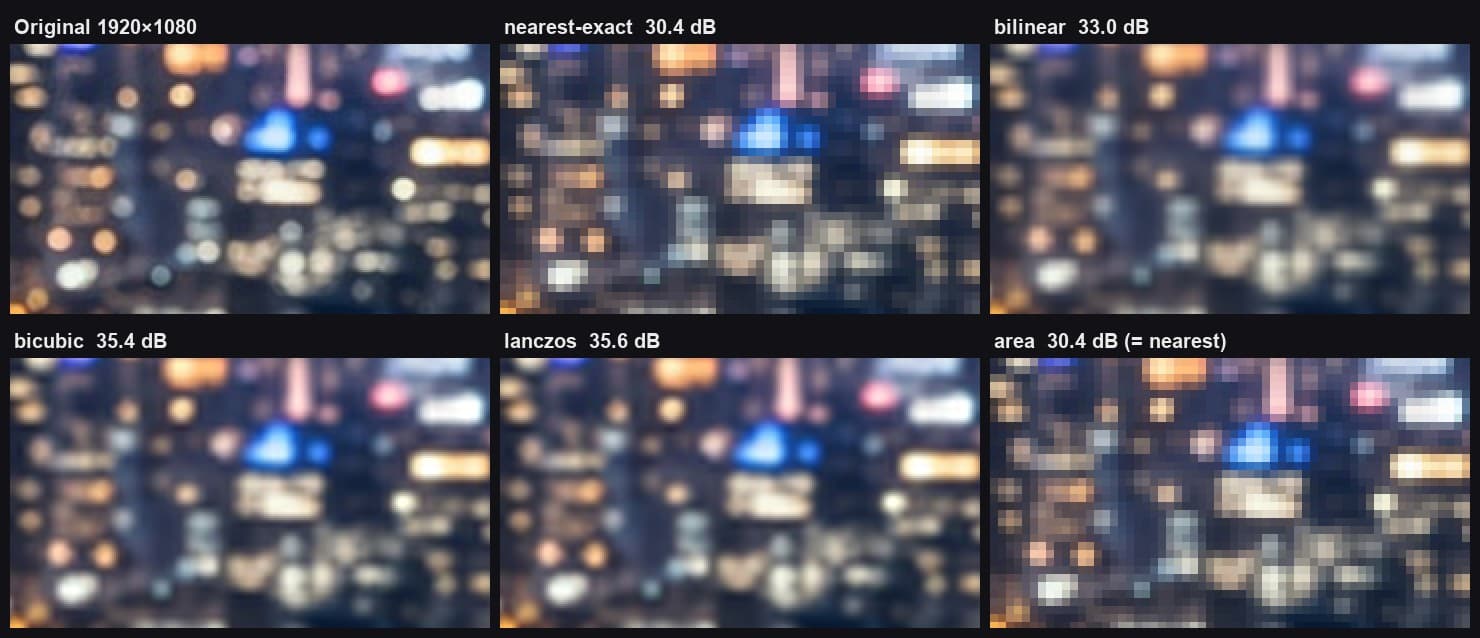
We took a detailed 1920 × 1080 night-city photo, shrank it to a quarter of its width and height (480 × 270), and scaled it back up with each method. Then we compared every result with the original using PSNR, a pixel-accuracy score where higher is closer.
| Method | ComfyUI, 4× | FFmpeg, 4× | ComfyUI, 2× |
|---|---|---|---|
| nearest-exact (FFmpeg: neighbor) | 30.40 dB | 30.40 dB | 36.55 dB |
| bilinear | 33.04 dB | 33.04 dB | 40.35 dB |
| area | 30.40 dB | 33.04 dB | 36.55 dB |
| bicubic | 35.39 dB | 35.14 dB | 43.62 dB |
| lanczos | 35.56 dB | 35.58 dB | 44.46 dB |
Three other sample photos gave the same order, except that on the softest one bicubic edged out Lanczos at 4× by 0.07 dB. Two results stand out:
- "area" isn't the same method in both tools when you upscale. In ComfyUI it produced exactly the nearest-exact picture. In FFmpeg it produced exactly the bilinear picture. Area averaging only matters when several source pixels fall into one output pixel, which happens when you shrink.
- Lanczos and bicubic are close. The 0.2 to 0.4 dB gap at 4× is hard to see. The bigger jump is from bilinear to either of them.
Halos: the price of a sharper edge
Bicubic and Lanczos look sharper because their weighting curves dip below zero. Next to a hard edge, that pushes the dark side darker and the bright side brighter than either original value. Our test used a step from gray level 40 to 215, scaled 4×:
| Method | Darkest value next to the edge | Brightest value next to the edge |
|---|---|---|
| nearest-exact, bilinear | 40 (no overshoot) | 215 (no overshoot) |
| FFmpeg bicubic | 25 | 230 |
| ComfyUI bicubic | 20.8 | 234.2 |
| Lanczos (Pillow and FFmpeg) | 19 | 236 |
On a photo you rarely notice this. On text, line art, UI screenshots, and bright lights against a dark sky, it shows up as a thin light or dark outline.
In ComfyUI, bicubic can also push values past pure white or pure black. On our night photo the 4× result ran from -4.6% to 113% of the normal range before it was clipped. Clipping hides it, but very bright areas lose a little gradation.
The downscaling trap in ComfyUI
People use the same Upscale Image node to shrink images, for example to fit a model's input size. That's where the method matters most.
When you shrink an image, fine patterns that are too small for the new size have to be blurred away first. Otherwise they fold into false patterns, called aliasing or moiré. PyTorch's interpolate only does that pre-blur when you ask for it, and ComfyUI doesn't ask. So in ComfyUI, bilinear and bicubic downscaling look at too few pixels.
We shrank a test pattern of fine rings from 1024 to 256 pixels and measured how much false pattern was left, where 0 is ideal and about 90 means full strength:
| Method | False pattern left |
|---|---|
| ComfyUI bicubic | 93.3 |
| ComfyUI nearest-exact | 90.1 |
| ComfyUI bilinear | 73.4 |
| ComfyUI area | 29.3 |
| ComfyUI lanczos (Pillow) | 11.8 |
| FFmpeg bicubic | 13.0 |
| FFmpeg lanczos | 11.8 |
| FFmpeg bilinear | 10.3 |
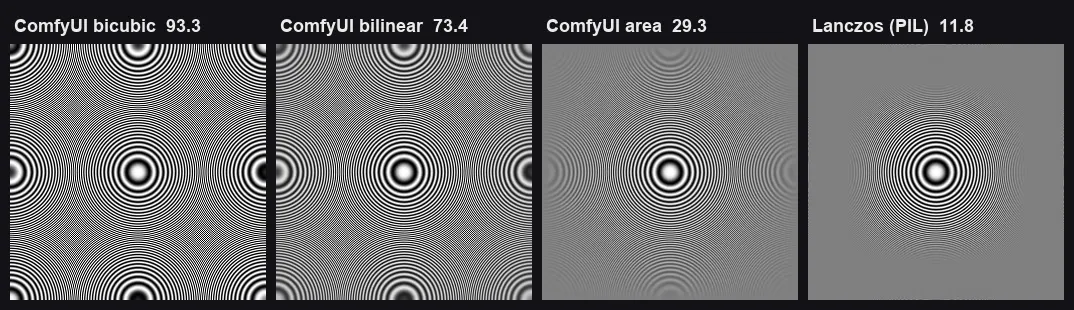
FFmpeg and Pillow pre-blur automatically, so all their smooth methods do well. In ComfyUI, use lanczos or area to shrink.
Which method should you choose?
| Job | Pick | Why |
|---|---|---|
| Upscale a photo or video frame | lanczos or bicubic | Most detail; the halo is usually invisible on natural images |
| Upscale text, UI, or line art | bilinear, or bicubic if it's too soft | Avoids outlines around sharp edges |
| Upscale pixel art or a mask | nearest-exact | Keeps hard pixel edges and exact values |
| Shrink an image in ComfyUI | lanczos or area | The only options there that suppress moiré |
| Shrink in FFmpeg or an editor | bicubic, lanczos, or bilinear | All pre-blur; pick by taste |
| Upscale a latent in ComfyUI | bislerp or bilinear | Lanczos isn't offered for latents |
Pro tip: If you upscale and then run a sharpening step or an AI model, the method matters less, because the next step reshapes the edges anyway. Pick bicubic as a safe default and spend your time on the step after it.
FFmpeg: the flags that match
FFmpeg's scale filter uses bicubic unless you set flags. In our test, leaving it out produced a file identical to flags=bicubic.
# Upscale to 1080p with Lanczos
ffmpeg -i input.mp4 -vf "scale=1920:1080:flags=lanczos" -c:v libx264 -crf 18 -c:a copy output.mp4

# Keep the aspect ratio: set the height, let FFmpeg pick an even width
ffmpeg -i input.mp4 -vf "scale=-2:2160:flags=lanczos" -c:v libx264 -crf 18 -c:a copy output_2160p.mp4

# Pixel art: nearest neighbor, exact 4x
ffmpeg -i sprite.png -vf "scale=iw*4:ih*4:flags=neighbor" sprite_4x.png
FFmpeg also offers spline, which scored between bicubic and Lanczos in our test (35.39 dB) with slightly smaller halos than Lanczos. For more scaling detail, see how to upscale 720p to 1080p.
When a resampling method isn't enough
Every method above calculates new pixels from the old ones with a fixed formula. None of them can tell a face from a wall or recover texture the camera didn't record. If a 4× result looks soft no matter which method you choose, that's the limit of resampling, not a wrong setting.
AI upscalers work differently. A trained model predicts plausible detail from what it learned about real images, and it can also remove compression blocks and noise along the way. The trade-off is that the added detail is a prediction. AI upscaling vs bicubic and Lanczos compares the two approaches side by side, and 480p to 4K: what AI can recover shows where even AI runs out.
How to compare both in KwaFlux
KwaFlux's comparison view shows a resampled version next to the AI result, so you can judge the difference on your own footage:
- Import a clip or image and open Quality Repair.
- Set Output Resolution to the size you need, for example 2× or 4K.
- Render a 1-, 3-, or 5-second preview. No account is needed.
- Open Slider compare. The "before" side is your source scaled to the output size; the "after" side is labeled with the AI upscaled resolution.

For photos, the same steps work from the image enhancer. One license covers 23 video modules, 15 photo modules, 4 audio tools, and subtitle and file tools, with no credits or per-minute fees; the Perpetual License lists at $199.99, paid once.
Troubleshooting
| Symptom | Likely cause | Fix |
|---|---|---|
| Thin light outline around text or lights | Lanczos or bicubic overshoot | Switch to bilinear, or bicubic in FFmpeg (smaller overshoot) |
| Ripples or false rings after shrinking in ComfyUI | Bilinear or bicubic without anti-aliasing | Use lanczos or area to shrink |
| "Area" upscale looks blocky in ComfyUI | Area equals nearest-exact for whole-number upscales | Use bicubic or lanczos to upscale |
| Lanczos is slow on a long frame batch | ComfyUI resizes each frame on the CPU through Pillow | Use bicubic for long batches, or resize outside ComfyUI |
| Everything looks soft at 4× | The detail isn't in the source | Use an AI upscaler, or upscale less |
Final thoughts
Pick Lanczos or bicubic to enlarge, nearest-exact for pixels that must stay hard, and in ComfyUI pick lanczos or area to shrink. The method changes how the edges look, but it can't create detail. When you need detail that the source doesn't hold, that's a job for AI upscaling.
See AI upscaling next to a classic resize
KwaFlux runs the AI video upscaler and image enhancer on your own GPU. AI processing runs locally on your GPU, and media files are not uploaded for processing. It runs on Windows 10 (64-bit, version 1809 or later), Windows 11, and macOS 12 or newer on Apple Silicon. Previews need no account: 1, 3, or 5 seconds for video, and the whole picture for images. Signing in with an active paid plan is required only to export, convert, repair a file, or download a file from a link.
Try It on Your Own Footage
Download KwaFlux and preview effects on your own footage for free before you pay — no account needed, and your media is processed on your GPU, not uploaded for processing. Video previews run 1, 3, or 5 seconds; stabilization previews run 5, 15, or 30 seconds.
Frequently asked questions
Is Lanczos better than bicubic?
Usually, by a small margin. Lanczos scored higher in seven of our eight comparisons, by up to 0.9 dB, which is hard to see. It also overshoots edges slightly more. For most footage either is fine; choose bicubic if you see halos on text.
What does nearest-exact mean in ComfyUI?
It's nearest-neighbor resizing with the pixel-center rounding fixed. Each new pixel copies the closest original one, so edges stay hard and colors stay exact. It suits pixel art and masks, not photos.
Should I use area for upscaling?
No. In ComfyUI, area upscaling by a whole number gives the same result as nearest-exact. Area is meant for shrinking, where it averages the pixels that merge together.
Which upscale method is best for anime?
There's no single best method. Bicubic is a common start for flat-shaded anime; Lanczos adds crisper lines but stronger halos around dark outlines.
Does the upscale method change the file size?
Only slightly. The output resolution and the encoder settings decide the size. Sharper methods leave more fine edges, which can cost a little more bitrate at the same quality setting.
What is bislerp?
It's a ComfyUI method for upscaling latents, the compressed representation a diffusion model works in. It blends latent values along curves instead of straight lines. It's only offered on the latent upscale nodes.
Sources
- ComfyUI source, `nodes.py` (ImageScale, LatentUpscale) and `comfy/utils.py` (common_upscale, lanczos, bislerp) (accessed 2026-10-29)
- PyTorch documentation, `torch.nn.functional.interpolate` (accessed 2026-10-29)
- Pillow documentation, "Filters" (resampling filters) (accessed 2026-10-29)
- FFmpeg documentation, "Scaler Options" (sws_flags) (accessed 2026-10-29)
UpMore in Upscale & Repair
Keep reading
Why Do Downloaded Videos Look Blurry? Six Causes and How to Fix Each
A downloaded video is a compressed copy, often of a copy. We measured how much each re-upload costs. Here's why downloads look blurry and what you can fix.
How to Make a 2026 Year-in-Review Video from Your Phone Clips
A year of phone clips mixes vertical and wide, 30 and 60 fps, HDR and SDR, sharp and shaky. How to prepare them so your recap looks like one video.
Blurry Halloween Photos and Videos? How to Sharpen Them with AI
Costume photos soft and parade clips blocky after the group chat? What makes Halloween photos and videos blurry, and how AI repair sharpens them.