Topaz Video AI Alternatives in 2026: 9 Options Compared on Price, Hardware, and License
Nine Topaz Video AI alternatives compared on license, list price, devices, hardware, and local vs cloud processing, checked on each vendor's own page.
The short answer
There is no single best Topaz Video AI alternative. The right one depends on three things: whether you want to pay once or subscribe, what hardware you have, and whether your footage is live action, anime, or AI-generated. Most alternatives still sell a one-time license, but the terms behind the word "lifetime" vary a lot.
- Topaz Video AI became Topaz Video in September 2025 and is now subscription-only, at $299 a year for the Personal plan. Topaz Labs has been part of Adobe since 23 September 2026.
- Most paid alternatives still sell a one-time license: AVCLabs, HitPaw VikPea, Aiarty, UniFab, VideoProc Converter AI, and KwaFlux.
- The license terms differ more than the price tags do: how many computers you get, whether Windows and Mac share a license, and what "lifetime" covers.
- KwaFlux's Perpetual License lists at $199.99 once and covers 2 devices. That's less than one year of Topaz Video Personal ($299), and it also includes parallel exports across your GPUs, AI Beauty, and conversion tools.
- Hardware is the other big filter. Some tools need 16 GB of RAM or an NVIDIA RTX card; others run on 8 GB and integrated graphics.
- No list can tell you which tool will look right on your footage. Shortlist on license and hardware, then compare the tools on your own clips.
In this guide, you'll learn what each of nine alternatives costs, what it needs to run, where it processes your video, and how to test a shortlist without paying first.
Every price and requirement below comes from the vendor's own page, read on 24 October 2026, and is linked in the Sources. Several vendors were running Halloween sales that day, so we give list prices where the page shows them. We did not run quality or speed tests, and we don't score or rank the tools. KwaFlux is our product. We describe it with the same kind of facts as the others and point out where other tools fit better.
Contents
- What is a Topaz Video AI alternative?
- Why people are looking in 2026
- The 9 alternatives at a glance
- Which alternative should you choose?
- The alternatives one by one
- How to compare them on your own footage
- What no alternative can do
- FAQ
What is a Topaz Video AI alternative?
A Topaz Video AI alternative is any tool that does the same core jobs as Topaz Video: AI upscaling, denoising, deinterlacing, frame interpolation, and restoration. Some are desktop apps, some are free open-source projects, some run in the browser, and some are features inside an editor.
Why people are looking in 2026
Three changes sent Topaz users shopping:
- Subscription only. Topaz Video launched on 16 September 2025, and Topaz stopped selling perpetual licenses. The Personal plan costs $299 a year, $39 a month with an annual commitment, or $59 month to month. Three years on the annual plan comes to $897.
- One computer. Topaz Video runs on one computer at a time. The old Video AI license allowed two.
- Higher hardware floor. Topaz Video needs 16 GB of RAM and does not support Intel Macs. On Personal plans, several Starlight models render only in the cloud, using credits.
Topaz Labs is now part of Adobe. Adobe completed the purchase on 23 September 2026 and said the Topaz brand and its standalone apps would continue. The announcement didn't mention any price changes.
For a closer look at what Topaz Video includes, see our Topaz Video review.
The 9 alternatives at a glance
Prices are in US dollars, before tax, as listed on 24 October 2026.
| Tool | License options | One-time price | Devices per license | Minimum memory | Mac | Where AI runs |
|---|---|---|---|---|---|---|
| Topaz Video (reference) | Subscription only | Not sold | 1 at a time | 16 GB | macOS 13+, M-series | Local, plus cloud for some models |
| KwaFlux | Monthly, yearly, Perpetual License | $199.99 list (current price) | 2, Windows and Mac in any mix | 8 GB | macOS 12+, Apple Silicon | Local only |
| HitPaw VikPea | Monthly, yearly, perpetual | $437.99 list ($350.39 on sale) | 1 PC or Mac; not cross-platform | 8 GB | macOS 13+, M-series | Local, optional cloud |
| AVCLabs Video Enhancer AI | Monthly, yearly, lifetime | $299.99 | Not stated | 16 GB | macOS 12–26 | Local (desktop) |
| Aiarty Video Enhancer | Lifetime | $235 list ($149 on sale) | 3 PCs or 3 Macs, per platform | Not stated | macOS 13+, Intel and Apple Silicon | Local only |
| UniFab Video Upscaler AI | Lifetime (yearly on some pages) | $129.99 (Video Upscaler AI only) | See vendor | 16 GB recommended | 2015+ Mac with dedicated GPU, or M-series | Local, optional FabCloud |
| VideoProc Converter AI | Yearly, lifetime, family | $89.95 list ($54.95 on sale) | 1 (lifetime); 3 (yearly); 3–5 (family) | Not stated | Yes | Local |
| DaVinci Resolve Studio | One-time | $295 list | See Blackmagic | See Blackmagic | Yes | Local (inside an editor) |
| Video2X | Free, open source (AGPL-3.0) | Free | No license limit | Not stated; Vulkan GPU required | No native app | Local |
What a one-time license saves over three years
| Option | What you pay | Devices |
|---|---|---|
| Topaz Video Personal, billed annually | 3 × $299 = $897 | 1 at a time |
| KwaFlux Perpetual License | $199.99 once | 2, Windows and Mac in any mix |
| HitPaw VikPea perpetual (list) | $437.99 once | 1, per platform |
| AVCLabs lifetime (list) | $299.99 once | Not stated |
| Aiarty lifetime (list) | $235 once | 3 PCs or 3 Macs, per platform |
| UniFab Video Upscaler AI lifetime | $129.99 once (upscaling only) | Not stated |
List prices before tax. Most of these vendors, KwaFlux included, run sales, so compare the price on the day you buy. Over the same three years, KwaFlux's list price is $697.01 less than Topaz Video's annual plan.
Aiarty and UniFab list lower one-time prices, so check what each license covers: Aiarty sells Windows and Mac licenses separately, and UniFab sells denoise, HDR, and face tools as separate products. A KwaFlux license covers all of its tools on both platforms.
Cloud and browser tools such as TensorPix, VanceAI, and Topaz's own browser app work differently: they're priced per minute or by credit, and you have to upload your footage. We cover them briefly below.
Which alternative should you choose?
| If you… | Start with | Why |
|---|---|---|
| Want to pay once and use Windows and Mac | KwaFlux | One license covers 2 devices in any Windows/Mac mix |
| Process many clips or long projects | KwaFlux | Runs several exports at once and can spread them across more than one GPU |
| Need portrait retouching as well as restoration | KwaFlux | AI Beauty comes in the same license as the video tools |
| Have 8 GB of RAM or integrated graphics | KwaFlux, HitPaw VikPea | Both list 8 GB as the minimum; see low-end PC options |
| Use an Intel Mac | Aiarty, UniFab | Their pages list Intel Mac support; Topaz and KwaFlux need Apple Silicon. See Mac options |
| Want output above 4K | AVCLabs, HitPaw, UniFab, KwaFlux | Aiarty's page lists 4K as the maximum |
| Already edit in DaVinci Resolve | Resolve Studio | Super Scale and UltraNR work inside your timeline; see Topaz vs Resolve |
| Mostly upscale anime and have a Vulkan GPU | Video2X | Free, with Real-CUGAN and Anime4K; see free options |
| Need conversion and compression too, on a budget | VideoProc Converter AI | It's a converter with AI tools added |
| Already own Topaz Video AI 7 | Keep it for now | It keeps working; see what legacy owners can do |
The alternatives one by one
1. KwaFlux
KwaFlux is a desktop app for Windows and Mac. Its quality tools include AI Video Upscaler, Quality Repair, denoise, stabilization, Smart Frame Interpolation, and SDR to HDR. The same license also covers image enhancement, audio denoise, format conversion, and file repair.
- License: monthly, yearly, or a one-time Perpetual License at $199.99 list. The Perpetual License includes updates within the current major version. See pricing for current prices and promotions.
- More tools in one license: besides Quality Enhancement, the same app has AI Beauty, AI Color Grading, and AI Toolbox (cutout and background replacement, object removal, audio enhancement, subtitles), plus Converter, Repairer, and Downloader.
- Parallel exports: in the Performance settings, Max Concurrent Tasks sets how many jobs run at once. Under AI export resource usage, Full speed fills the selected GPUs, and Custom lets you choose which GPUs to use and how many parallel streams each one runs.
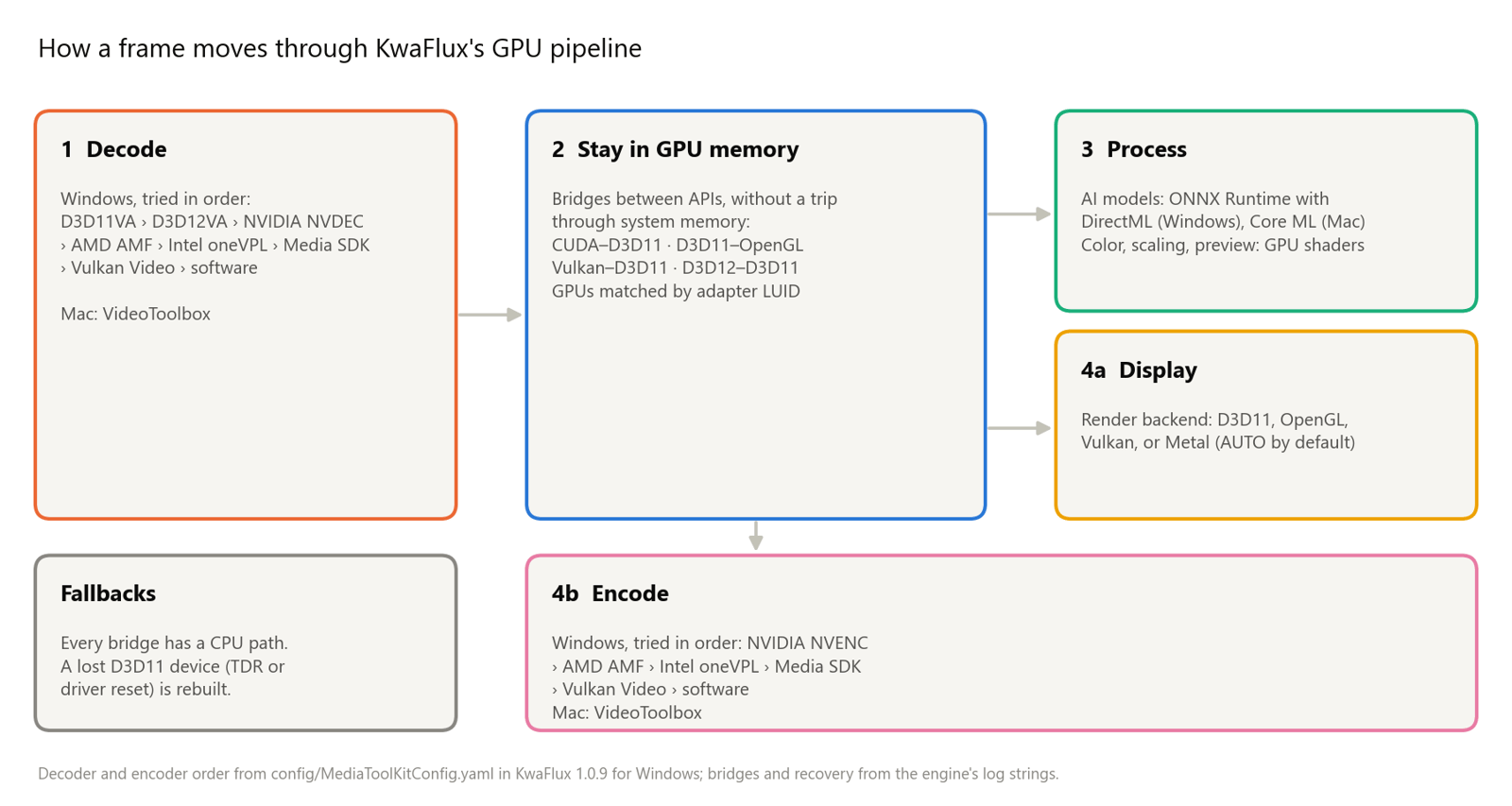
- GPU from decode to encode: decoding, AI processing, and encoding stay on the GPU wherever the driver allows, and step down gracefully on older hardware. See how the GPU pipeline works.
- Quality check built in: with Compare quality after preview on, KwaFlux scores the change in clarity and cleanliness after each preview, so you can check a result with numbers as well as your eyes.
- No credits: no per-minute fees or monthly credit allowance, however long the project.
- Devices: 2 per license, in any mix of Windows and Mac.
- Hardware: Windows 10 (64-bit, 1809 or later) or Windows 11, with an Intel, AMD, or NVIDIA GPU from 2016 or later, integrated or discrete. macOS 12 or later on Apple Silicon. 8 GB of RAM minimum, 16 GB recommended.
- Processing: AI processing runs locally on your GPU. Media files are not uploaded for processing.
- Try first: free 1-, 3-, or 5-second previews on your own clips, with no account. Exporting requires a paid plan. There's a 14-day refund window.
- Look elsewhere if: you're on an Intel Mac or Linux, or you need plugins that run inside an editor.
2. HitPaw VikPea
HitPaw VikPea was formerly called HitPaw Video Enhancer. It offers several AI models, including face, animation, and colorization models, and outputs up to 8K.
- License: Windows plans list at $53.99 a month, $124.99 a year, or $437.99 perpetual. On 24 October the sale prices were $43.19, $99.99, and $350.39. Mac monthly and yearly plans cost more.
- Devices: one PC or Mac per license. HitPaw says Windows and Mac licenses can't be swapped.
- Hardware: 8 GB of RAM minimum on both platforms. On Mac, it needs macOS 13 or later on an M-series chip.
- Processing: local, with optional cloud rendering. Paid plans include bonus credits.
- Try first: the free trial shows previews only.
3. AVCLabs Video Enhancer AI
AVCLabs is a desktop enhancer that upscales up to 8K. It also does denoising, colorization, frame interpolation to 120 fps, and stabilization. We cover it in detail in our AVCLabs review.
- License: $39.95 a month, $119.95 a year, or $299.99 lifetime.
- Hardware: Windows 10/11 64-bit or macOS 12 to 26, with 16 GB of RAM and 20 GB of free disk space.
- Processing: the desktop app processes on your computer. AVCLabs also sells separate online and cloud products.
4. Aiarty Video Enhancer
Aiarty is made by Digiarty, the company behind VideoProc. It sells a lifetime license with a 30-day refund window.
- License: a lifetime license at $235 list ($149 on sale on 24 October) for 3 PCs or 3 Macs, with free updates for life. Windows and Mac are sold separately; a cross-platform bundle is on the same page. The yearly plan is $99 list for 1 PC or 1 Mac.
- Output: up to 4K, with SDR-to-HDR and frame interpolation.
- Hardware: Windows 10 or later, or macOS 13 or later on both Intel and Apple Silicon Macs.
- Processing: local only.
- Try first: the trial handles clips under 120 seconds, and full exports need a license.
5. UniFab Video Upscaler AI
UniFab comes from the DVDFab family. It sells lifetime licenses and optional add-on models.
- License: UniFab's own pricing table lists Video Upscaler AI at $129.99 lifetime. Denoise AI, HDR Upconverter AI, and Face Enhancer AI are separate products at $109.99 to $129.99 lifetime each, or come in bundles such as Video Enhancer Pro ($179.99, upscaler plus Denoise AI) and All-In-One ($319.99).
- Hardware for local processing: UniFab recommends Windows 10/11 64-bit with 16 GB of RAM, 8 GB of VRAM, and an NVIDIA RTX 30-series card or newer. On Mac, it needs a 2015-or-later model with a dedicated GPU, or an M-series chip.
- Output: up to 16K when processed locally. FabCloud processing goes up to 4K, with credits included in the license.
- Try first: a 30-day desktop trial.
6. VideoProc Converter AI
VideoProc is mainly a converter and compressor, with AI upscaling, frame interpolation, and stabilization added.
- License: a lifetime license for 1 computer at $89.95 list ($54.95 on sale), a yearly plan for 3 computers, or a family lifetime license for 3 to 5 computers. Licenses are tied to one platform.
- Fit: a good choice if you mainly need conversion, with occasional upscaling.
7. DaVinci Resolve Studio
If you already edit in Resolve, the Studio version adds Super Scale, UltraNR noise reduction, and Speed Warp retiming. It's a one-time purchase listed at $295. The free version of Resolve doesn't include Super Scale. See our Topaz vs DaVinci Resolve comparison.
8. Video2X
Video2X is free and open source. It runs Real-ESRGAN, Real-CUGAN, RIFE, and Anime4K on any GPU that supports Vulkan. It has a Windows app and Linux packages, but no native Mac app. It's popular for anime. The trade-offs are real: it has no dedicated face-restoration model, no denoise, color, or beauty tools in the same app, no native Mac app, and precompiled builds need an AVX2 CPU.
9. Cloud and browser tools
TensorPix, VanceAI, Imagera, and Topaz for Web run in the browser, so they work on any computer. The trade-offs are uploads, file-size limits, and paying per minute or by credit, which adds up on long projects. See local vs cloud AI video processing.
How to compare them on your own footage
- Pick three clips: a typical source, your worst source, and one with faces.
- Use each tool's free mode: previews in KwaFlux and HitPaw, short trial exports in Aiarty, the 30-day trial in UniFab.
- Match the settings: same output resolution and frame rate in every tool.
- Compare at 100% zoom on the same screen. Check faces, fine textures, and edges during motion.
- Write down render time on your own machine. Published speed numbers come from other people's hardware.
- Read the license before you pay: how many devices, whether it works on both Windows and Mac, what "lifetime" covers, and the refund window.
Pro tip: Make a ten-second test clip with FFmpeg so every tool gets the same input: ffmpeg -ss 00:01:00 -i source.mp4 -t 10 -c copy test.mp4. With -c copy, the cut snaps to the nearest keyframe, so the clip may start a little early. Use the same file in every tool and it doesn't matter.
What no alternative can do
- Invent detail the camera didn't record. Every upscaler guesses fine detail. On very low-resolution sources, faces and text may come out wrong. See what AI can recover from 480p.
- Replace Topaz's exact models. Starlight, Proteus, and Iris are only in Topaz. If your workflow depends on one of them, an alternative will give you a different look, not the same one.
- Promise the same result on every source. Quality depends on codec damage, motion, and lighting. A tool that wins on one clip can lose on another.
Final thoughts
Most Topaz alternatives still let you pay once. The real differences are in the small print: devices, platforms, and the hardware floor. Narrow the list with the table above, then let your own footage decide. If you want one license that you pay for once, that covers a Mac and a PC, and that runs exports in parallel on your own GPUs, start your test with KwaFlux.
KwaFlux runs AI upscaling, repair, and restoration on your own computer. AI processing runs locally on your GPU, and media files are not uploaded for processing. It runs on Windows 10 (64-bit, version 1809 or later), Windows 11, and macOS 12 or newer on Apple Silicon. Previews need no account: render a 1-, 3-, or 5-second preview on any clip. You only need to sign in with an active paid plan to export, convert, repair a file, or download a file from a link.
Related reading: KwaFlux vs Topaz Video · Topaz subscription vs lifetime alternatives
Topaz Labs, Topaz Video, and Topaz Video AI are trademarks of Topaz Labs, LLC. HitPaw, VikPea, AVCLabs, Aiarty, UniFab, VideoProc, DaVinci Resolve, and Video2X belong to their respective owners. KwaFlux is an independent product and isn't affiliated with, sponsored by, or endorsed by any of them. Competitor information comes from the public pages listed above as of the access dates shown and may change. Check current details with each vendor.
Experience on Your Own Footage
Download KwaFlux and preview effects on your own footage for free before you pay — no account needed, and your media is processed on your GPU, not uploaded. Video previews run 1, 3, or 5 seconds; stabilization previews run 5, 15, or 30 seconds.
Frequently asked questions
Is KwaFlux as good as Topaz Video?
It depends on the footage, so test it. Render a free KwaFlux preview of the clip you'd run through Topaz, compare both at 100% zoom, and turn on Compare quality after preview for a before/after score.
What is the best alternative to Topaz Video AI?
There's no universal answer. Shortlist by license (pay once or subscribe), hardware (RAM, GPU, Intel or Apple Silicon Mac), and footage type, then compare two or three tools on your own clips using their free previews or trials.
Is there a Topaz Video AI alternative with a lifetime license?
Yes. AVCLabs, HitPaw VikPea, Aiarty, UniFab, and VideoProc all sell one-time licenses, and DaVinci Resolve Studio is a one-time purchase. Check what each one covers: number of devices, platform, and major-version upgrades.
Is there a free alternative to Topaz Video AI?
Yes, with limits. Video2X is free and open source, and FFmpeg can upscale with standard filters. Both take more setup and produce less refined results than paid tools. Our guide to free Topaz alternatives walks through them.
Is Topaz Video AI being discontinued?
Yes. Topaz Video AI 7.1.5 is the last release. Its successor, Topaz Video, is subscription-only. If you own a Video AI license, you can keep using the version you bought.
Did Adobe buy Topaz Labs?
Yes. Adobe completed the acquisition on 23 September 2026. Adobe said the Topaz brand and its standalone apps would remain, and its announcement didn't mention changes to price or licensing.
Sources
- Topaz Labs, "Pricing" (accessed 2026-10-11)
- Topaz Labs Documentation, "System Requirements | Topaz Video" (accessed 2026-10-11)
- Topaz Labs Documentation, "Video AI vs Topaz Video" (accessed 2026-10-11)
- Adobe Blog, Topaz Labs acquisition announcement (accessed 2026-10-18)
- HitPaw, "Buy HitPaw VikPea" (Windows) (accessed 2026-10-24)
- HitPaw, "Buy HitPaw VikPea" (Mac) (accessed 2026-10-24)
- HitPaw, "VikPea" (accessed 2026-10-24)
- AVCLabs, "Video Enhancer AI" (accessed 2026-10-24)
- Aiarty, "Aiarty Video Enhancer" (accessed 2026-10-24)
- UniFab, "AI Video Upscaler" (accessed 2026-10-24)
- VideoProc, "Buy VideoProc Converter AI" (accessed 2026-10-24)
- Aiarty, "Buy Aiarty Video Enhancer" (accessed 2026-10-24)
- UniFab, "UniFab Review" (pricing table) (accessed 2026-10-24)
- Video2X on GitHub (accessed 2026-10-24)
- Blackmagic Design, "DaVinci Resolve Studio" (accessed 2026-10-23)
Related articles
AI Video Enhancer
480p/720p to 1080p or 4K with purpose-built local models
OpenDownload KwaFlux
Free 1s/3s/5s previews on your own footage - Windows and Mac
Open480p to 4K: what AI can recover
Expectation map - reconstruction vs lost photons, not a how-to
OpenWhich repair type to pick
Smart Repair or a scene such as Anime or Night Scene - pick with a preview
OpenBgMore in Buying & Comparisons
Keep reading

Free Topaz Video AI Alternatives: Video2X, FFmpeg, and Free Trials Compared
Free ways to do what Topaz Video does: Video2X for AI upscaling, FFmpeg for denoise, scaling and frame rate, and free previews. Tested commands included.
Topaz Video AI Alternatives for Low-End PCs: 8 GB RAM and Integrated Graphics
Topaz Video needs 16 GB RAM and a 6 GB GPU. Here are enhancers that list 8 GB RAM or integrated graphics, plus settings that keep renders practical.

Topaz Video AI Alternatives for Mac: Apple Silicon and Intel Options in 2026
Mac options instead of Topaz Video: which run on Apple Silicon or Intel Macs, what macOS each needs, how licenses work across Mac and PC, and how to test.