A Frame That Doesn't Have to Go Home: How KwaFlux Keeps Video on the GPU from Decode to Encode
A 4K 10-bit frame is about 24.9 MB, and every trip between RAM and the GPU costs time. Here's how KwaFlux keeps pixels on the GPU from decode to encode.
Key takeaways
A full GPU video pipeline keeps the pixels in GPU memory from decode through image processing and AI inference to encode, instead of copying them back and forth between system memory and the graphics card. Fewer copies mean faster exports, smoother previews, and an idle CPU.
In this article, you'll see how KwaFlux's media engine does it: a frame adapter that lets nine frame types speak one language, how hardware decoders and encoders from three GPU vendors are scored and chosen, the five-step interop ladder between D3D11 and OpenGL, VideoToolbox and Metal on the Mac, and how the player gets HDR to the screen. It ends with the full path of a pixel through one export and the settings you can change in KwaFlux.
- A 4K, 10-bit, 4:2:0 frame is about 24.9 MB. At 60 fps, every trip between system memory and the GPU moves about 1.5 GB per second. More trips mean slower exports and choppier previews.
- KwaFlux's media engine gives every frame an identity, whether it's a CUDA pointer, a D3D11 texture, a Metal texture, or system memory. Higher layers only ever see "a frame", and the engine picks the lowest-cost bridge when another API needs it.
- On Windows, hardware decode and encode for NVIDIA, Intel, AMD, and system D3D11 and D3D12 ship as plugins. They're scored by GPU, memory, and resolution, the next one steps in when one fails, and software decoding is the fallback.
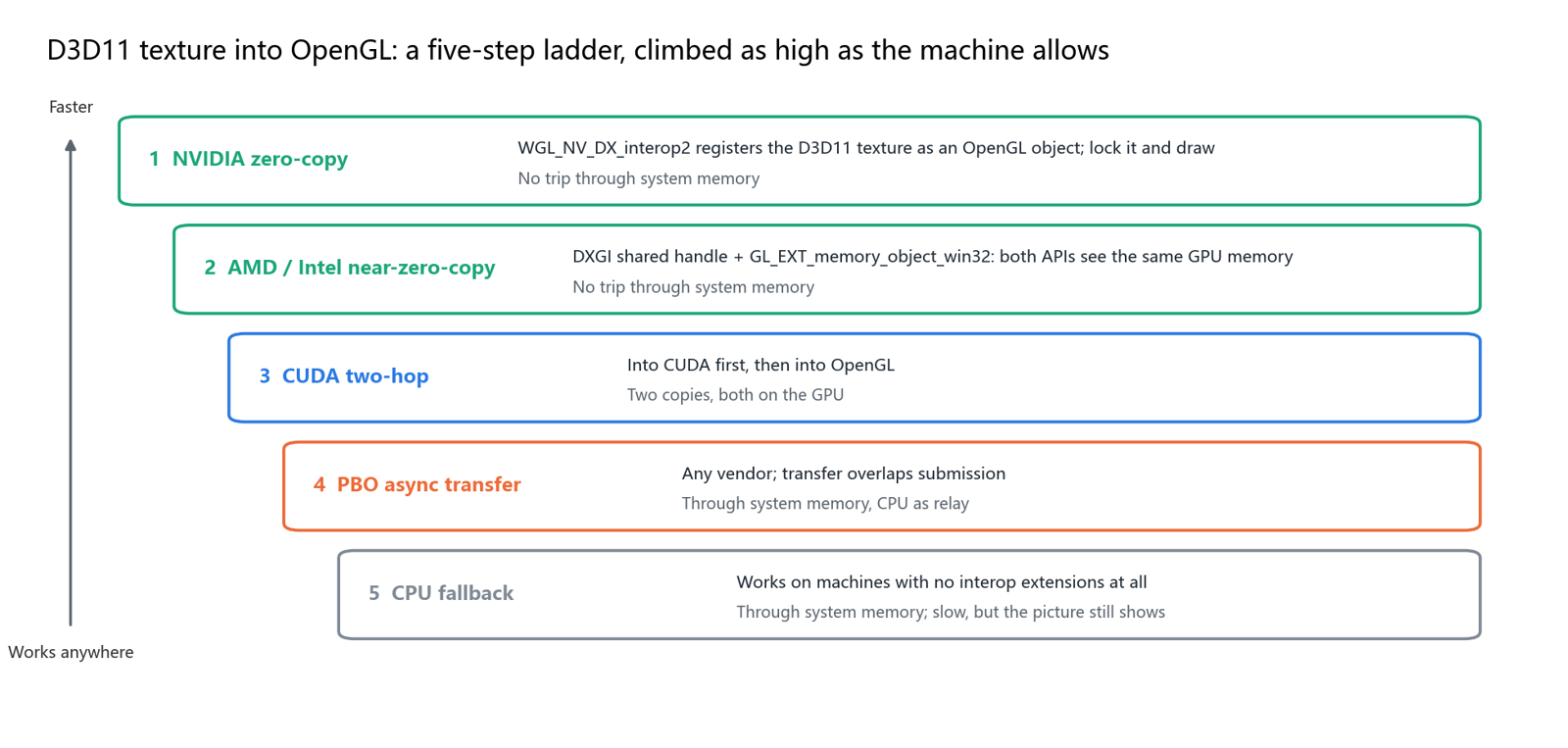
- A D3D11 texture reaches OpenGL over a five-step ladder: NVIDIA zero-copy, AMD and Intel near-zero-copy, a CUDA two-hop, async transfer, and a CPU fallback. Fast machines take the top steps, older ones the bottom, and the picture keeps coming either way.
- It isn't zero-copy on every path: the bottom two steps go through system memory. A full GPU pipeline means staying on the GPU wherever possible and stepping down when it can't, instead of failing.
Why sending a pixel home is expensive
A pixel goes home when a frame is copied from GPU memory back to system memory, processed, and uploaded again. Hardware decoders write the picture into GPU memory, AI models and image filters run on the GPU, and hardware encoders read from GPU memory too. If even one step only accepts pixels in system memory, the frame has to make a round trip across PCIe.
Here's how big one frame is (with 4:2:0 sampling, chroma adds half the size of luma):
| Format | One frame | One trip per second at 30 fps | One trip per second at 60 fps |
|---|---|---|---|
| 1080p, 8-bit NV12 | 3.1 MB | 93 MB/s | 187 MB/s |
| 4K, 8-bit NV12 | 12.4 MB | 373 MB/s | 746 MB/s |
| 4K, 10-bit P010 | 24.9 MB | 746 MB/s | 1.49 GB/s |
| 4K, RGBA half float (common for AI and HDR processing) | 66.4 MB | 1.99 GB/s | 3.98 GB/s |
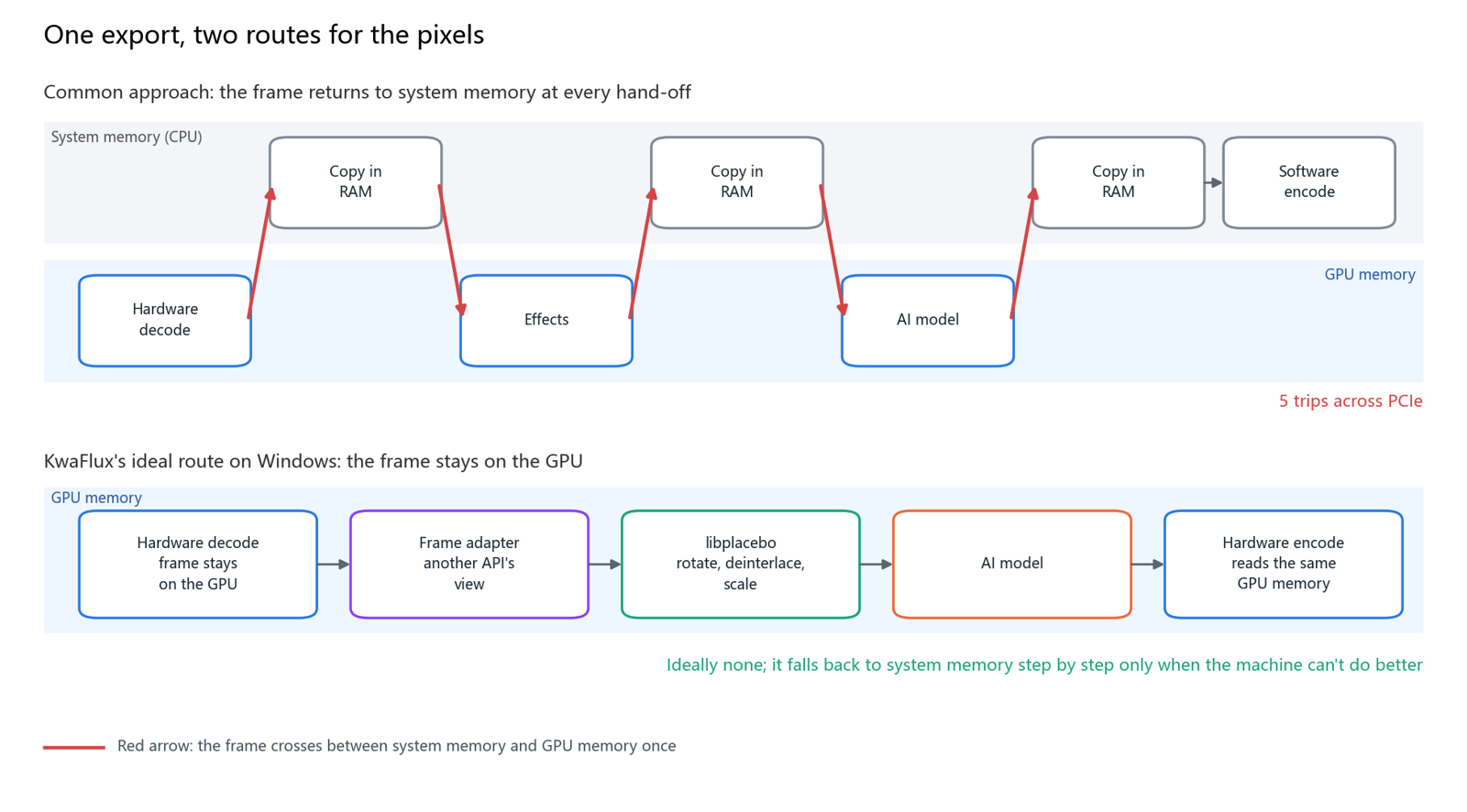
PCIe 4.0 x16 has about 31.5 GB/s of theoretical bandwidth in each direction. That looks like plenty, but it's a peak; each copy also waits for the GPU to finish its current work and for the driver to synchronise, and the CPU has to organise it. The top half of the figure below shows a common approach: decode, effects, AI, and encode each want their own memory, and one frame crosses PCIe five times in a single export. For 4K 10-bit at 60 fps, that's about 7.5 GB per second of copying alone.
The frame adapter: nine frame types, one frame
The frame adapter is a layer in KwaFlux's media engine that makes a frame look the same to the player, effects, and encoders, whatever memory it actually lives in. Media software is full of dialects: FFmpeg speaks AVFrame, NVIDIA speaks CUDA device pointers, Intel and AMD hardware decoders hand over D3D11 textures, Vulkan speaks VkImage, and Apple speaks CVPixelBuffer. Each has its own lifetime, alignment, and colour layout.
| Frame identity | Where it lives | Who produces it |
|---|---|---|
| FFmpeg frame | An AVFrame in system memory | Software decoding and every fallback path |
| D3D11 frame | An ID3D11Texture2D | D3D11VA, Intel, and AMD hardware decoding on Windows |
| D3D12 frame | A D3D12 resource | D3D12 video decoding |
| CUDA frame | A CUDA device pointer | NVIDIA NVDEC decoding; NVENC's native input |
| OpenGL frame | A texture or framebuffer object | Filters, previews, and cross-platform rendering |
| Vulkan frame | A VkImage | Vulkan video decoding and rendering |
| Metal frame | An MTLTexture | Display and HDR on macOS |
| CVPixel frame | A CVPixelBuffer | VideoToolbox decoding on macOS |
| OpenCV frame | A cv::Mat | Algorithms that read pixels directly |
The layers above get one frame interface and, when they need another identity, ask for it; the engine picks the lowest-cost bridge on that machine. A few design details keep it from falling apart on a third GPU vendor:
- Types are fixed at compile time. A cross-interface query is a static conversion, not runtime type information, so nothing fights across DLL boundaries.
- Only frames that own GPU resources carry GPU operations. Clone, convert, and export-to-matrix live on the specific frame types, not on the shared interface.
- Ownership is explicit. Whoever allocates frees, and shared handles aren't released twice. When a GPU device is rebuilt, the interop resources that depend on it are invalidated and rebuilt with it, so a texture from the previous device doesn't linger on the next.
Windows: hardware decode and encode on three GPU vendors
On Windows, KwaFlux installs eight video decoder plugins and six video encoder plugins, each a separate DLL. After demuxing, the selector follows the configuration; on Auto, it scores every candidate, tries the highest first, moves to the next if initialisation fails, and software decoding is there to catch anything left.
| Decoder plugin | Frame it produces | Codecs |
|---|---|---|
| NVIDIA NVDEC | CUDA frame, 8-bit NV12 or 10-bit P016 | H.264, HEVC, VP9, AV1, MPEG-2 |
| D3D11VA (system hardware decoding) | D3D11 NV12 texture | H.264, HEVC, VP9, AV1, MPEG-2 |
| D3D12VA | D3D12 resource | H.264, HEVC, VP9, AV1 |
| Intel oneVPL (current Intel GPUs) | D3D11 texture | H.264, HEVC, VP9, AV1, MJPEG |
| Intel Media SDK (5th to 10th-gen Core integrated graphics) | D3D11 texture | H.264, HEVC, MPEG-2, MJPEG |
| AMD AMF | D3D11 texture, wrapped straight into an AMF surface | H.264, HEVC, VP9, AV1, MPEG-2 |
| Vulkan Video | Vulkan image | H.264, HEVC |
| FFmpeg software decoding | System-memory frame | Everything FFmpeg reads, including VP8 and VP9 with alpha |
The table lists what each plugin handles; whether your GPU can decode a given codec in hardware depends on its generation. NVIDIA's support matrix, for example, shows consumer cards decoding AV1 in hardware from the RTX 30 series on.
What the score looks at. The wrong vendor is out at once: on a non-NVIDIA GPU, NVDEC scores zero. Hardware decoders lose points when GPU memory is tight, and with a strong CPU, software decoding can win, so the machine isn't dragged down just to say it used hardware. 4K adds points for hardware, since that's exactly when fixed-function units should work. If you're displaying through D3D11, D3D11VA gains points, and decoding on a different GPU from the one driving the display costs points, because cross-GPU copies are a penalty.
Encoding: the encoder takes what the decoder produced.
| Encoder plugin | Preferred input | Output codecs |
|---|---|---|
| NVIDIA NVENC | CUDA frames; also accepts D3D11, D3D12, Vulkan, OpenGL, and system-memory frames | H.264, HEVC, AV1 |
| Intel oneVPL | D3D11 textures on the same GPU, copied on the GPU | H.264, HEVC, AV1, VP9, MJPEG |
| AMD AMF | D3D11 textures wrapped straight into AMF surfaces, packets fetched asynchronously | H.264, HEVC, AV1 |
| Intel Media SDK | D3D11 textures or system-memory frames | H.264, HEVC, MPEG-2, MJPEG |
| Vulkan Video | Vulkan frames | H.264, HEVC |
| FFmpeg software encoding | System-memory frames | Whatever the software encoders support |
NVENC shows most clearly why the frame adapter matters: it doesn't require every frame to become CUDA first. A CUDA frame gets a 2D copy on the device; a D3D11 frame goes through interop; D3D12 passes through D3D11 into CUDA; Vulkan uses external memory; OpenGL uses a pixel-buffer bridge; only a frame that was already in system memory gets uploaded once. For HEVC and AV1, HDR mastering and content light data go into the encoder configuration; H.264 has no native field for them, so the encoder plug-in writes them into SEI itself.
Sidenote: NVIDIA's support matrix lists a maximum of 12 concurrent encode sessions on GeForce cards with an encoder. When the sessions run out, KwaFlux's NVENC plugin steps aside and hands the job to the next encoder instead of failing halfway through.
Plugins carry a version check and aren't loaded on a mismatch, and capability probes can score a plugin without loading it. A new GPU generation means adding a plugin; the player and converter above it don't change.
The five-step ladder: getting a D3D11 texture into OpenGL
The decoder and the display API often don't match: NVIDIA decodes into CUDA or D3D11 while the picture needs to reach OpenGL, and Intel decodes into D3D11 while a filter runs on an OpenGL texture. KwaFlux's graphics core builds the bridge, and between D3D11 and OpenGL it's a five-step ladder, climbed as high as the machine allows:
- NVIDIA zero-copy. The
WGL_NV_DX_interop2extension registers a D3D11 texture as an OpenGL object; after a lock, OpenGL reads and writes it directly, with no trip through system memory. - AMD and Intel near-zero-copy. A DXGI shared handle plus the
GL_EXT_memory_object_win32extension lets both APIs see the same GPU memory. - CUDA two-hop. Into CUDA first, then into OpenGL; both copies happen on the GPU.
- Pixel buffer object (PBO) async transfer. Works on any vendor; transfer overlaps submission, and the CPU only relays.
- CPU fallback. On a machine with no interop extensions at all, the picture still arrives, just slowly.
Next to the ladder are a few dedicated bridges. CUDA and D3D11 register with each other. D3D12 and D3D11 share resources through a DXGI shared handle with fence synchronisation, so D3D12 doesn't need a direct bridge to every other API. Vulkan and D3D11 use external memory. The CUDA colour-conversion kernels are compiled into the library, so NV12 and P016 become BGRA on the GPU, and 10-bit pictures can stay in 16-bit RGBA instead of being cut to 8 bits at the door.
Mac: VideoToolbox decodes, Metal displays
On macOS the contest isn't the length of the plugin list. Apple built encoding and decoding into the media engine on its chips, and KwaFlux plugs that engine into the same frame language:
- Decoding goes through VideoToolbox, which hands over a
CVPixelBufferwrapped as a CVPixel frame. It covers H.264, HEVC, VP9, and ProRes. - Encoding uses
h264_videotoolbox,hevc_videotoolbox, andprores_videotoolbox, so ProRes exports go through VideoToolbox as well. - Display goes through Metal.
CAMetalLayerchecks whether the display supports extended dynamic range (EDR): if it does, HDR is shown through EDR; if not, the same tone-mapping maths as on Windows maps PQ or HLG to SDR.
To the player, effects, and conversion pipeline, a D3D11 texture on Windows and a CVPixelBuffer on the Mac are both just "a frame", so features don't fork into two codebases by operating system.
The player: audio keeps time, HDR switches per frame
Audio is the master clock. Ears tolerate jitter far less than eyes do, so the picture follows the sound, not the other way round. Between audio callbacks the clock is interpolated linearly against wall time and smoothed with an exponential moving average, and the thresholds scale with the frame interval instead of being a fixed number of milliseconds. Each frame gets one of three decisions: wait, draw, or drop. What gets dropped is a frame that's too late to show, not your place in the video.
A seek is a transaction. Decoding is interrupted, stale frames are flushed, a generation number keeps old frames out, and the clock resets; the audio clock starts again only once the first frame at the new position has actually been drawn. What you see is where you jumped to, not the last second still sitting in the queue.
HDR isn't switched on for a whole file at once. Each frame is judged by its own transfer characteristics: only PQ and HLG request an HDR swap chain, and if the next section is SDR the swap chain drops back, so ordinary footage isn't shown as a PQ signal and doesn't turn grey. HLG is converted to PQ in a shader before it goes to the display.
| Display backend | Used for | HDR handling |
|---|---|---|
| D3D11 | The main path on Windows | 10-bit swap chain with PQ and BT.2020 passthrough; mapped to SDR in a shader on non-HDR displays |
| Vulkan | Modern graphics path | HDR10 surface, 10-bit or half float |
| Metal | macOS | CAMetalLayer extended dynamic range, same tone mapping |
| OpenGL | Common path on every platform | No HDR passthrough; maps HDR to SDR |
HDR on an ordinary display. All four backends share one tone mapper: PQ or HLG is converted to real luminance in nits, moved into IPT, run through tone and gamut tables, and output as BT.709 and sRGB. The tone table follows the picture's peak, measured on a tiny off-screen target and read back without stalling the GPU, with smoothing across scene changes. When a file has no mastering luminance, it starts from 1,000 nits rather than a flattering constant. Subtitles going from sRGB into an HDR swap chain are lifted to PQ reference white, so white text doesn't look grey against bright scenes.
Comparison playback splits the original and the processed picture into two pipelines, and each side of the divider keeps its own brightness history, so a night scene on the left doesn't darken the daylight on the right. While you play, background tasks give up their share of the GPU and take it back slowly when you stop: real-time playback first, exports queue.
libplacebo: scaling, tone mapping, and debanding
libplacebo is the GPU image-quality library split out of the mpv player. KwaFlux wires it in as an effect node and picks its backend by the incoming frame: OpenGL frames, software-decoded frames, CUDA frames, and CVPixel frames go through OpenGL; D3D11 NV12 goes straight to the D3D11 backend, saving a colour round trip; Vulkan frames stay in Vulkan.
- Upscaling uses EWA Lanczos and downscaling Lanczos, with bilinear when speed matters.
- HDR to SDR can use BT.2390, Reinhard, Spline, or Hable curves, with the peak measured from the picture.
- Debanding, dithering, and anti-ringing keep gradient skies from turning into stripes.
- Deinterlacing uses a temporal window of the previous, current, and next frame instead of guessing each frame alone.
- Presets come in fast and high quality: fast for previews and pre-encode scaling, high quality for the final render.
Auto-correction (rotation, pixel aspect ratio, interlacing, chroma location) and pre-encode scaling go to libplacebo first. When upscaling changes the resolution, the scaling node still sits before the encoder, so the encoder receives the target size. If libplacebo can't start, FFmpeg's scale, zscale, and yadif filters take over, so a missing module doesn't stop the job.
The ideal path of a pixel through one export
Put together, one export on Windows goes like this:
- The file is demuxed into packets, and the selector picks the right hardware decoder for this machine.
- Frames are born as CUDA pointers or D3D11 textures, not as a block allocated in system memory.
- Rotation, aspect-ratio correction, deinterlacing, or tone mapping for an SDR deliverable happen in libplacebo on the GPU.
- AI models (upscaling, quality repair, SDR to HDR, and others) process each frame on the GPU; the frame's type can change along the way without the job knowing which bridge it crossed.
- If the resolution has to match a target, one more fast scale happens.
- Each encoder receives frames its own way: NVENC takes CUDA, oneVPL and AMF take D3D11.
- Packets go into the muxer, timestamps are ordered, and the file is written.
In one sentence: hardware decoding leaves a texture, interop gives another API a view of it, image processing stays on the GPU, and the hardware encoder reads its frames from the same GPU memory. System memory shows up only when the machine has no higher bridge, or when a step genuinely needs to read pixels on the CPU. It's a fallback, not the centre of the design.
On the Mac, it's the same sentence in another dialect: VideoToolbox decodes in the media engine, frames enter as CVPixelBuffer, Metal sends HDR to the screen through EDR, and ProRes and HEVC exports go back to VideoToolbox.
Segment-parallel exports cut the timeline into pieces, and each piece runs this same pipeline rather than a shortcut that skips colour processing for speed.
What you can change in KwaFlux
Most of this is automatic. These settings change how it runs:
- Hardware Accelerated Decoding (Settings › Performance): Auto (default), Enabled, or Disabled. If one file decodes with corruption or errors, set it to Disabled to troubleshoot with software decoding. The change applies after the app restarts.
- AI Processor (Settings › Performance): whether AI processing uses the GPU or lets the app decide. GPU is usually faster; the choice applies to the next export, preview, or mask generation.
- AI export resource usage: Light use (one stream, and only one GPU on multi-GPU machines), Balanced (default), Full speed, or Custom (which GPUs to use and how many streams each runs). Lowering it applies to a running export at once, and finished segments aren't lost.
Troubleshooting
| Problem | Likely cause | Fix |
|---|---|---|
| One file previews with corruption or a green picture | This GPU's hardware decoder doesn't fully support that codec variant | Set Hardware Accelerated Decoding to Disabled and restart to use software decoding |
| SDR sections look grey during HDR playback | The player isn't switching display mode per frame, or the file's tags are wrong | Check each section's transfer characteristics with ffprobe |
| High CPU and an idle GPU during export | The path has dropped to a step that goes through system memory, or a filter only runs on the CPU | Update the GPU driver; check for settings that only process on the CPU |
| NVIDIA encoding reports too many sessions during parallel exports | More encode sessions than the driver allows | Run fewer parallel jobs, or set resource usage to Light use or Balanced |
| Slow exports on a dual-GPU laptop | Decoding and display are on different GPUs, causing cross-GPU copies | Set KwaFlux to use the discrete GPU in the system graphics settings |
What this architecture can't do
- Zero-copy on every path. Steps 4 and 5 of the ladder go through system memory, and older GPUs or drivers without interop extensions end up there.
- Reproduce Dolby Vision. The HDR story that holds is static HDR10 and HLG.
- Full Windows-style interop on the Mac. The Mac's strengths are VideoToolbox, ProRes, CVPixel frames, and Metal EDR, not as many interop bridges as on Windows.
- Promise a speed-up factor. How much faster fewer copies make your export depends on the GPU, driver, resolution, and processing steps; preview and measure with your own footage.
Final thoughts
A full GPU pipeline isn't a slogan; it's a routing table that can step down. Fast machines keep the pixels on the GPU the whole way, and slower ones fall back one step at a time and still finish the job. Next time you export, glance at the GPU and CPU load and you'll know which route your pixels took.
Try it on your own footage
KwaFlux runs the Video Converter and every AI tool on your own GPU, keeping decoding, processing, and encoding on the graphics card wherever it can. AI processing runs locally on your GPU — media files are not uploaded for processing. It runs on Windows 10 (64-bit, version 1809 or later), Windows 11, and macOS 12 or newer on Apple Silicon. Previews need no account: render a 1-, 3-, or 5-second preview on any clip. Signing in with an active paid plan is required only to export, convert, repair a file, or download a file from a link.
Experience on Your Own Footage
Download KwaFlux and preview effects on your own footage for free before you pay — no account needed, and your media is processed on your GPU, not uploaded. Video previews run 1, 3, or 5 seconds; stabilization previews run 5, 15, or 30 seconds.
Frequently asked questions
What does zero-copy mean?
Zero-copy means two components share the same memory and hand over access instead of copying the pixels. NVIDIA's WGL_NV_DX_interop2 extension, for example, registers a D3D11 texture as an OpenGL object, and once it's locked OpenGL reads and writes it without a trip through system memory.
Does a second GPU make exports faster?
Sometimes. A second card helps when the software splits the timeline into segments and runs them on both GPUs in parallel. It doesn't speed up a single stream, and decoding on one card while displaying on another adds cross-GPU copies, which cost time instead of saving it.
How many hardware encode sessions can a consumer NVIDIA card run at once?
Up to 12, according to NVIDIA's current support matrix for GeForce cards with an encoder; most professional and data-centre cards are unrestricted. A new encode beyond the limit fails, so keep it in mind when exporting several files in parallel.
Is hardware decoding better than software decoding?
Not always. With tight GPU memory, a very new codec, or unusual file parameters, hardware decoding can fail or corrupt the picture, and with a strong CPU, software decoding is not slow. The sensible design keeps both, chooses per case, and falls back to software when hardware can't decode.
Why is my export still slow with hardware acceleration on?
Usually because decoding isn't the bottleneck. AI inference, filters, and encoding take time too, and any step that drops back to system memory makes the pipeline wait for copies. Check which part is waiting: a low GPU load with a high CPU load usually means something fell back to the CPU. See local vs cloud AI video processing.
Sources
- NVIDIA, Video Encode and Decode GPU Support Matrix (up to 12 concurrent encode sessions on GeForce; AV1 hardware decoding from 5th-gen NVDEC) (accessed 2026-10-22)
- Khronos, WGL_NV_DX_interop2 (registering D3D10 and D3D11 resources as OpenGL objects) (accessed 2026-10-22)
- Khronos, EXT_external_objects_win32 (`GL_EXT_memory_object_win32`, importing external GPU memory through Win32 handles) (accessed 2026-10-22)
- libplacebo, Options (EWA Lanczos, tone-mapping curves, debanding, fast and high-quality presets) (accessed 2026-10-22)
- PCI-SIG, Specifications (PCIe 4.0 at 16 GT/s per lane; bandwidth here computed for x16 with 128b/130b encoding) (accessed 2026-10-22)
- Apple Developer, Video Toolbox (hardware-accelerated encoding and decoding framework) (accessed 2026-10-22)
- Apple Developer, CAMetalLayer wantsExtendedDynamicRangeContent (extended dynamic range on Metal layers) (accessed 2026-10-22)
- FFmpeg Filters Documentation (`scale`, `zscale`, `yadif`) (accessed 2026-10-22)
KwMore in Inside KwaFlux
Keep reading

KwaFlux: Everything You Need to Know (Features, Platforms, Pricing, Updates)
What KwaFlux is, what it includes, which systems it runs on, what is free and what is paid, how licenses work, and what changed in each version.
KwaFlux on Mac: Supported Macs, Setup, and Performance Tips
Which Macs run KwaFlux, how to install it, what the GPU Acceleration Component and Standard Mode mean, and how to keep AI video fast on Apple Silicon.
How to Make AI Video Enhancement Faster: Workflow, Settings, and Hardware
Why AI video enhancement is slow and how to speed it up: process less, pick the output size, order the steps, and use the GPU and app settings well.