Why AI Restoration Looks Plastic: Losses, GANs, Diffusion, and How to Avoid It
Why AI-restored video looks waxy: averaged detail, invented GAN texture, diffusion drift, and mismatched training data, plus how to spot and avoid it.
Key takeaways
AI restoration looks plastic when a model removes real texture faster than it can rebuild it. Skin turns waxy, hair clumps into strands, grain and foliage smear into smooth patches, and the picture reads as clean but artificial. The causes are well understood: the training loss, the model family, and training data that doesn't match the footage.
- "Plastic" is restoration that has averaged away fine texture (pores, hair, grain, foliage) or replaced it with invented texture that doesn't match the scene.
- Models trained only on pixel error (L1 or L2) predict the average of all plausible answers, and averages are smooth. GANs and diffusion models add texture back, but part of it is invented.
- Blau and Michaeli proved that low distortion and high realism pull against each other for any distortion measure, so no single score can tell you which result looks right.
- Training data that doesn't match your footage, and face priors that pull toward a generic face, are the other two big causes.
- Judge at 100% zoom and in motion, lower the strength or blend with the source, keep or add back grain, and repair before you upscale.
What does "plastic" mean in AI restoration?
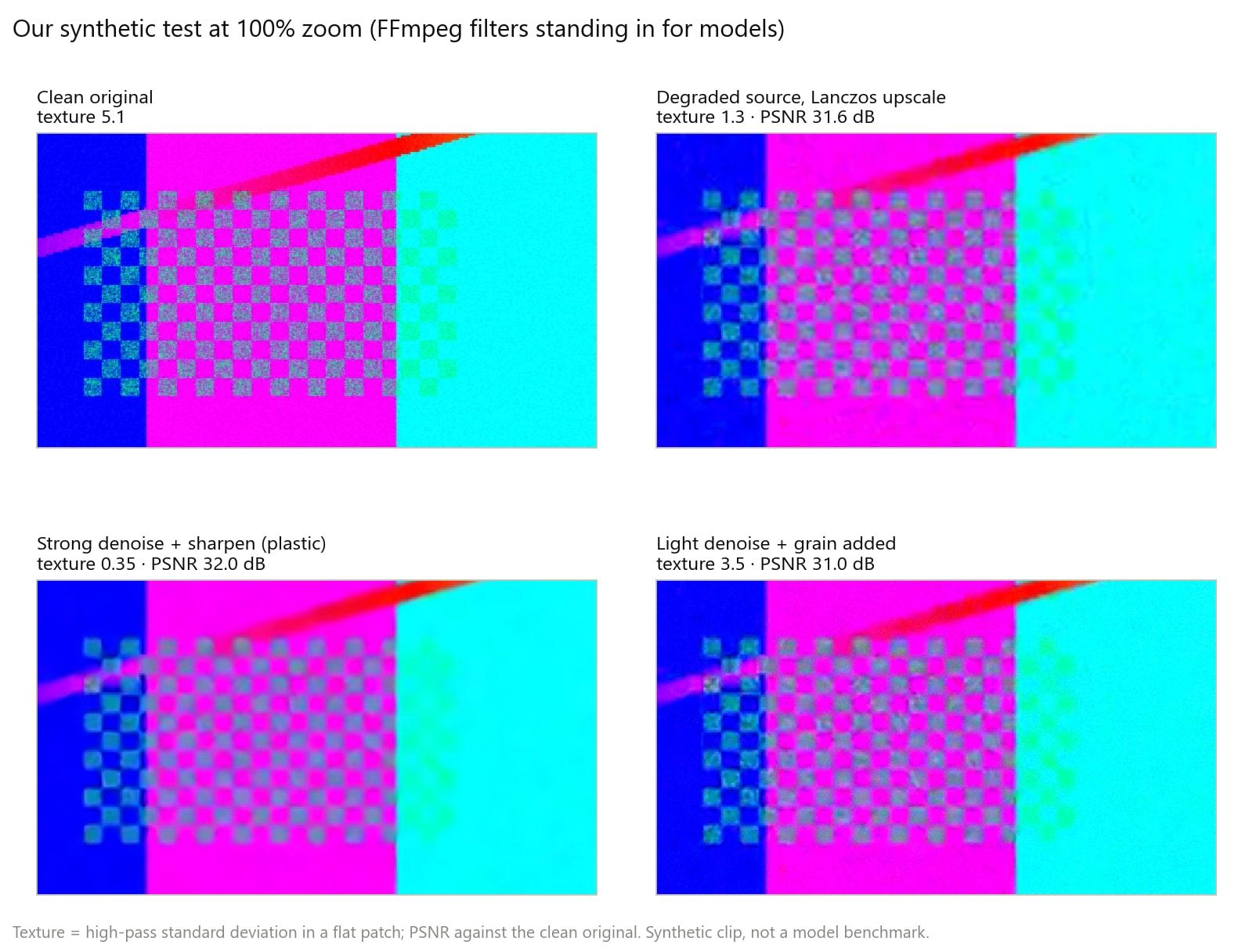
A plastic result is a restored image whose surfaces are smoother or more uniform than the real scene, so skin, fabric, hair, and foliage lose the small irregular texture that makes them look physical. It often comes with crisp outlines: in our FFmpeg test below, strong denoising plus sharpening left hard checkerboard edges with the fine texture between them gone. Sharp boundaries around smooth fills are what the eye reads as wax or CGI.
How each model family fails
| Model family | What it learns from | Typical failure when pushed | Examples |
|---|---|---|---|
| CNN regression | Pixel losses (L1, L2 or MSE) | Smooth, averaged texture | MSE-trained networks before SRGAN |
| GAN | Pixel, perceptual, and adversarial losses | Invented texture and artifacts | SRGAN, Real-ESRGAN |
| Transformer | The same losses, with long-range attention | Whichever failure its loss produces | SwinIR, Restormer |
| Recurrent video model | Aligned features from many frames | Smears or ghosts where alignment fails | BasicVSR++ |
| Diffusion | Iterative denoising from a learned image or video prior | Detail that drifts from the source, flicker, heavy compute | Upscale-A-Video, STAR, SeedVR2 |
CNN regression with L1 or L2 loss
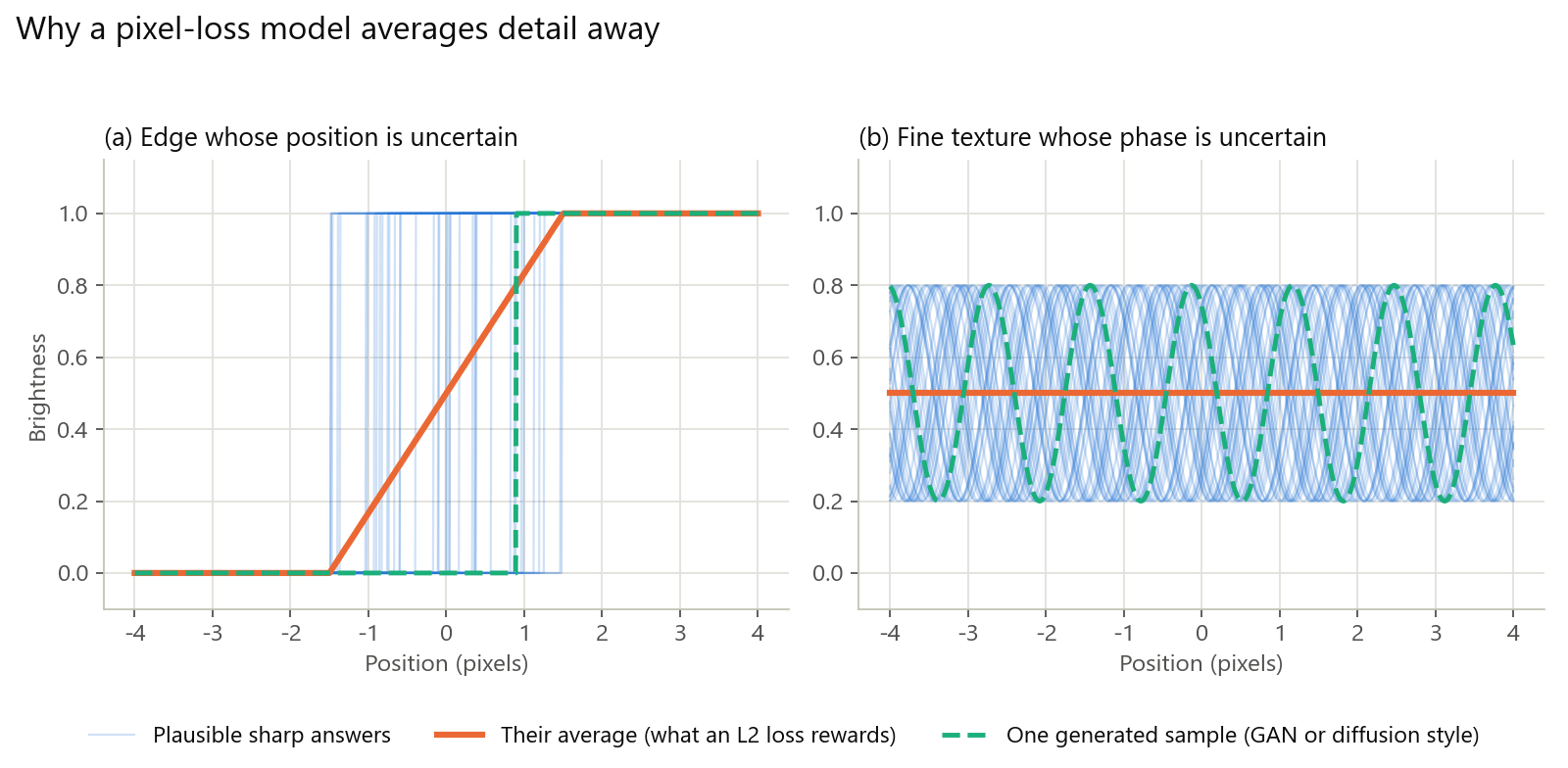
A degraded pixel is consistent with many sharp originals: an edge could sit a pixel to the left or right, and a patch of skin could have its pores in countless arrangements. A network trained with L2 (MSE) loss is rewarded for predicting the mean of those possibilities, and the mean of many sharp, differently placed textures is smooth. L1 predicts the median, which helps edges, but texture whose position is uncertain still cancels out. The SRGAN authors put it directly: MSE-optimized results often lack high-frequency detail and are perceptually unsatisfying.
GANs: texture from an adversarial loss
SRGAN added a discriminator that learns to tell restored images from real photos, plus a content loss based on perceptual similarity rather than pixels; its authors describe the effect as pushing the solution toward the natural image manifold. The output looks sharper, but the texture is generated to be plausible, not recovered. When the generator is unsure, it still has to produce something texture-like, which is where invented patterns and crunchy edges come from. Real-ESRGAN, trained on purely synthetic data, also simulates the ringing and overshoot that real footage carries, so it learns to remove them.
Transformers and recurrent video models
Transformers such as SwinIR and Restormer replace convolution with attention, which captures long-range pixel interactions; Restormer notes that standard attention's cost grows quadratically with resolution, so restoration transformers use more efficient attention designs. The architecture doesn't decide plasticity by itself; the loss does. For video, recurrent models such as BasicVSR++ propagate features forward and backward through the clip with flow-guided deformable alignment, so a frame can borrow real detail from its neighbors instead of inventing it. Where alignment fails, in fast motion or occlusions, the borrowed detail smears or ghosts.
Diffusion restoration
Diffusion models restore by iteratively denoising from a learned prior, and they generate the most convincing fine detail. That strength is also the risk. The Upscale-A-Video authors note that the randomness of diffusion sampling makes temporal consistency hard, and they expose noise levels to balance restoration against generation. STAR notes that image diffusion models trained on stills struggle with temporal consistency, and that large generative backbones can weaken fidelity. Cost is the other limit: SeedVR2's authors call the inference cost of diffusion video restoration prohibitive, which is why they distill it into a single step.
The perception–distortion tradeoff
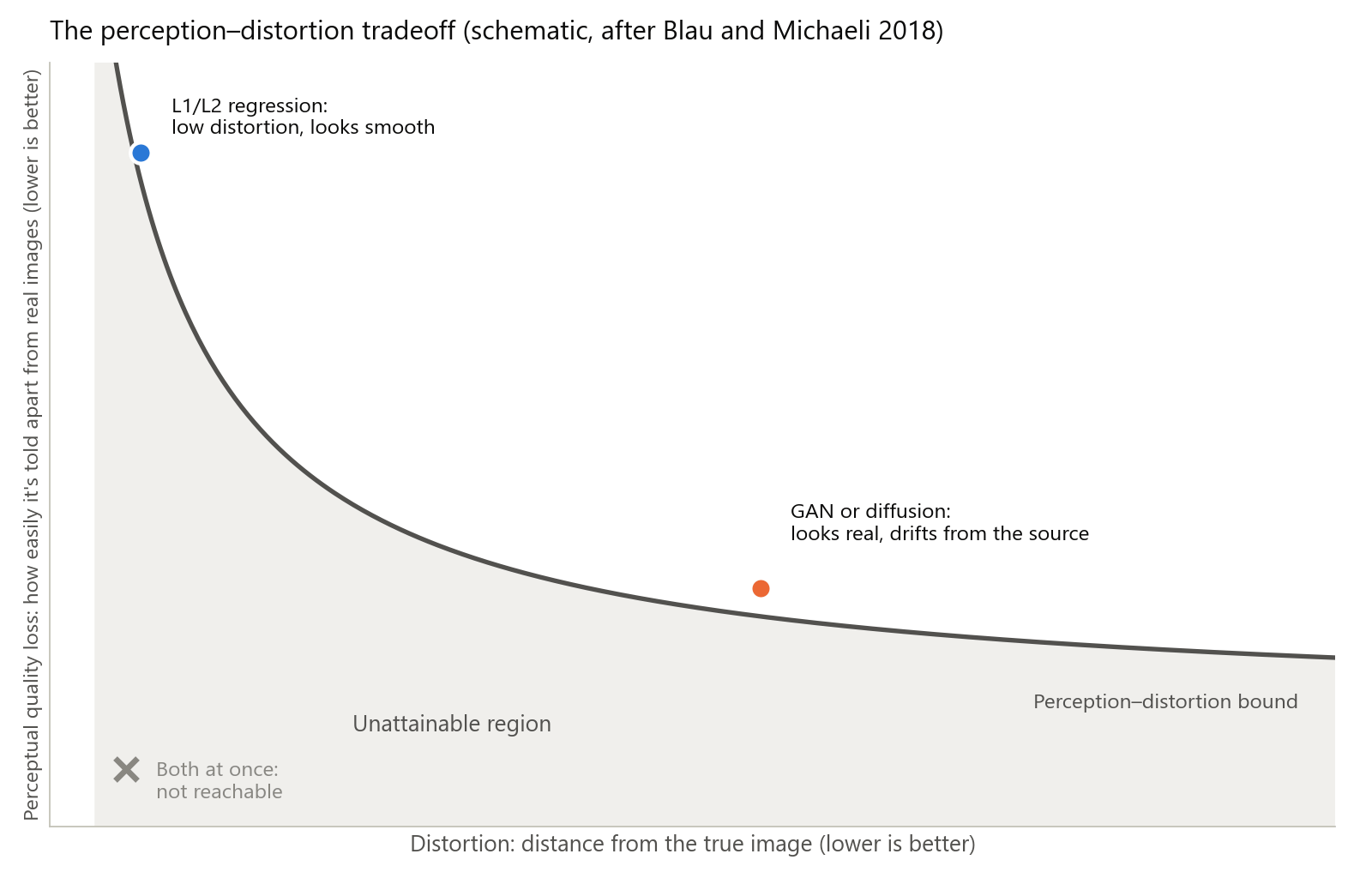
Blau and Michaeli proved that distortion (how far the output is from the true image) and perceptual quality (how hard the output is to tell apart from real images) are at odds: as mean distortion falls, outputs become easier to distinguish from real images. The result holds for any distortion measure, not just PSNR or SSIM, and the authors show that GANs offer a principled way to approach the bound.
We reproduced the effect on synthetic footage. A finely textured test clip was degraded to half resolution with noise and heavy compression, then "restored" two ways with FFmpeg filters standing in for models: a strong denoise with sharpening, and a light denoise with grain added back. Scored against the clean original:
| Version | Fine texture (our high-pass measure) | PSNR vs clean | SSIM vs clean |
|---|---|---|---|
| Clean original | 5.1 | Reference | Reference |
| Degraded, Lanczos upscale only | 1.3 | 31.6 dB | 0.700 |
| Strong denoise and sharpen | 0.35 | 32.0 dB | 0.721 |
| Light denoise, grain added | 3.5 | 31.0 dB | 0.651 |
The over-smoothed version won both pixel metrics while keeping about a fifteenth of the original texture; the grain version kept most of the texture energy and scored lowest, because random grain doesn't match the original pattern pixel for pixel. When you have a clean reference, for example after degrading a clip on purpose to test settings, the measurement takes one command:
ffmpeg -i restored.mp4 -i reference.mp4 -lavfi "[0:v][1:v]psnr" -f null -Use metrics to catch large rewrites, not to rank looks; how we score video quality explains why a similarity score measures change, not improvement.
Degradation mismatch and identity drift
Degradation mismatch. A model can only undo damage it has learned. Real-ESRGAN's answer was a high-order degradation model, chaining blur, resizing, noise, and compression repeatedly, because real damage is more complex than simple downsampling. When footage carries damage outside the training mix, such as interlacing remnants, heavy chroma noise, unusual compression, or film grain, the model may sharpen it as if it were detail, or wipe texture along with it as if everything were noise.
Face identity drift. Face restorers bring strong priors: GFPGAN draws on a pretrained face GAN, and CodeFormer predicts entries from a learned codebook of facial parts. Both papers frame the result as a balance between quality and fidelity, and CodeFormer exposes that trade-off as a control. The stronger the prior, the more a small or blurry face is pulled toward a plausible average face, with smooth skin, regular teeth, and generic eyes. See how to restore faces in video for what to check.
What's changing in 2026
- One-step diffusion. Distillation and adversarial post-training reduce diffusion restoration to a single step; SeedVR2 reports results comparable to or better than multi-step methods. Cheaper inference makes diffusion-style detail practical on long clips, but the fidelity question stays.
- Temporal priors. Instead of image models run frame by frame, newer video super-resolution uses video priors: temporal layers and recurrent latent propagation in Upscale-A-Video, or text-to-video backbones in STAR.
- On-device NPUs. Microsoft's Copilot+ PC guide describes NPUs that exceed 40 trillion operations per second and notes that many run integer math such as INT8, so models are converted to lower-precision formats to run there.
How to spot a plastic result
| Where to look at 100% zoom | Plastic sign | Natural sign |
|---|---|---|
| Skin | Uniform, poreless, waxy highlights | Pores and fine variation on cheeks and nose |
| Hair | Clumped strands or painted texture | Separate strands that thin out at the edges |
| Text and logos | Letters redrawn into wrong shapes | Shapes that match the source, even if soft |
| Foliage and gravel | Smeared blobs or a repeating pattern | Irregular detail that varies across the frame |
| Flat areas such as sky or walls | Smooth bands, or texture that wasn't there | Grain or noise similar to the source |
| Motion | Texture that swims or shimmers | Detail that moves with the object |
Compare the same crop of the source and the result. Scale the source with nearest neighbor so you see its real pixels:
ffmpeg -ss 2 -i source.mp4 -ss 2 -i restored.mp4 -filter_complex "[0:v]scale=1280:720:flags=neighbor,crop=480:270:760:400[a];[1:v]crop=480:270:760:400[b];[a][b]hstack" -frames:v 1 compare.pngA difference map shows what the restoration removed or added. Mid-gray means unchanged; structure in flat areas means noise or texture was removed, and new patterns mean invented detail:
ffmpeg -ss 2 -i source.mp4 -ss 2 -i restored.mp4 -filter_complex "[0:v]scale=1280:720:flags=bicubic,format=gray[a];[1:v]format=gray[b];[b][a]blend=all_mode=grainextract,eq=contrast=4" -frames:v 1 diff.pngIn our test, the map of the over-smoothed version showed the source's noise and blocking in flat areas, and the texture of the checkerboard region, all removed.
How to avoid it
Method 1. Lower the strength, or blend with the source. Many restorers expose a strength or fidelity control, such as CodeFormer's fidelity trade-off or Upscale-A-Video's noise level; use the lowest setting that fixes the problem. If a tool has none, mix its output with the source:
ffmpeg -i source.mp4 -i restored.mp4 -filter_complex "[0:v]scale=1280:720:flags=lanczos,format=yuv420p[a];[1:v]format=yuv420p[b];[b][a]blend=all_expr='A*0.7+B*0.3'" -c:v libx264 -crf 16 -c:a copy blended.mp4That keeps 70% of the restoration and 30% of the upscaled source. In our test, the blend brought back a little texture (0.63 against 0.35 by our measure) and some of the source noise with it, so it suits mild cases.
Method 2. Keep grain, or add it back last. Grain hides the waxy look and gives the encoder texture to keep. Add fine temporal grain to luma only, and tune x264 for it:
ffmpeg -i restored.mp4 -vf "noise=c0s=6:c0f=t" -c:v libx264 -crf 16 -tune grain -c:a copy regrained.mp4c0s=6 sets the luma noise strength and c0f=t makes it change every frame; x264's grain tuning lowers deblocking and quantizer deadzones so fine grain survives encoding. In our test, the texture measure rose from 0.35 to 3.5, against 5.1 for the clean original. It's new grain, not recovered detail. To tell grain from noise first, see grain vs noise vs compression artifacts.
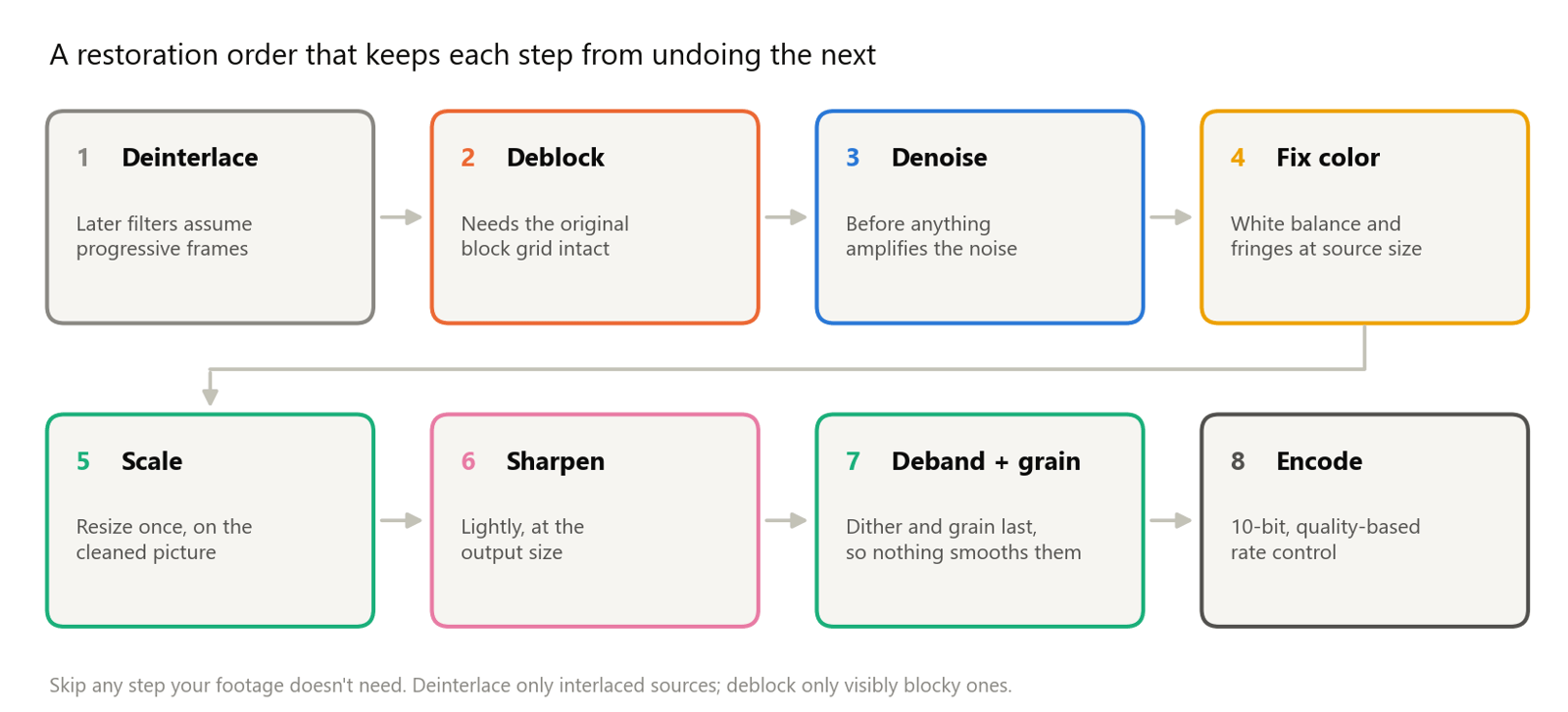
Method 3. Repair before you upscale. Remove compression blocks and noise at the source resolution, then upscale. An upscaler that sees blocks and noise as detail will enlarge and sharpen them.
Method 4. Judge in motion. Shimmering texture is invisible on a still. Put the source and the result side by side at the source frame rate and watch at 100%:
ffmpeg -i source.mp4 -i restored.mp4 -filter_complex "[0:v]scale=1280:720:flags=neighbor[a];[a][1:v]hstack" -c:v libx264 -crf 16 side_by_side.mp4Pro tip: Check faces, text, and foliage first. They're where invented detail is easiest to see and hardest to excuse.
How KwaFlux handles this
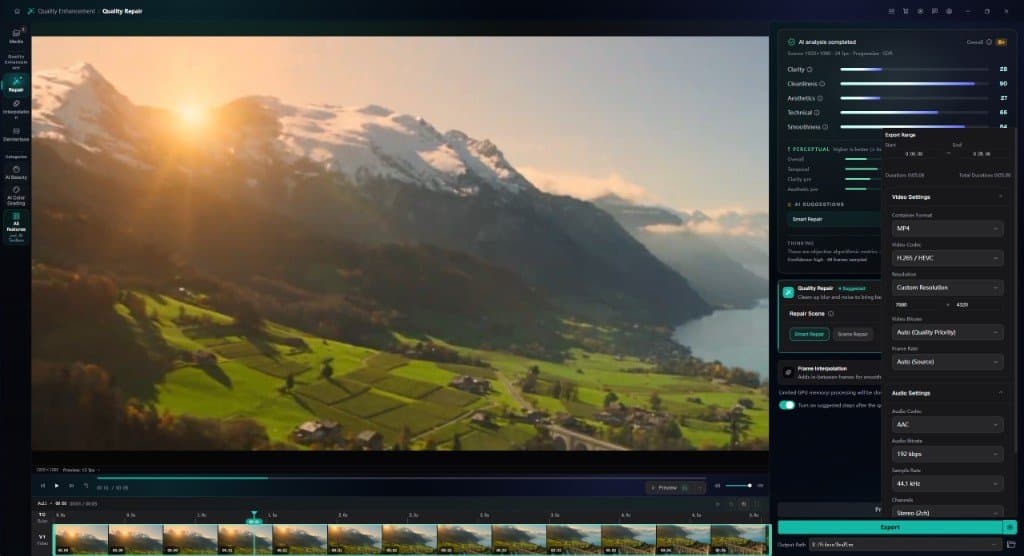
- Smart Repair works from neighboring frames. In Quality Repair, Smart Repair checks the clip and combines denoising, sharpening, color and brightness correction, upscaling, and face and fine-detail restoration. Working from neighboring frames makes it the multi-frame kind of restorer described above.
- Scene Repair types work frame by frame. Anime, Night Scene, Dehaze, Remove Rain, Colorize, and Film Grain Removal each target one kind of damage. A scene type used on footage it wasn't made for is a common cause of waxy faces; which repair type to pick covers the choice.
- Preview before you export. Render a 1-, 3-, or 5-second preview. AI previews are capped at 15 fps by default, so choose Match source before you judge motion or shimmer.
- Treat the similarity score as a flag. With Compare quality after preview turned on, each preview reports scores including Similarity to source (VMAF), which the app describes as "Higher means fewer changes, not better quality." A sharp drop marks a heavy rewrite worth checking at 100% zoom.
- Keep the grain you want. Film Grain Removal removes grain by design. If grain is part of the look, skip it, and add grain back after export with the FFmpeg command above if the result looks too clean.
Common problems
| Problem | Likely cause | Fix |
|---|---|---|
| Waxy, poreless skin | Denoising too strong, or a regression-style result | Lower the strength, blend with the source, add fine grain |
| Hair turns into painted strands | Texture invented by a generative prior | Lower the strength and compare against the source crop |
| Letters change shape | The model redrew text it couldn't read | Keep the source for that area; unreadable text can't be recovered |
| Texture swims or shimmers | Per-frame invention without temporal consistency | Use a multi-frame restorer and judge at the source frame rate |
| Noise sharpened into crunchy detail | Damage the model didn't learn | Denoise or deblock first, then upscale |
| A face looks like someone else | A strong face prior on a tiny or blurry face | Lower the face restoration strength and check identity at 100% zoom |
What this can't do
- No restorer recovers detail the camera didn't capture. It predicts plausible detail.
- No single setting suits every shot. Texture-rich footage and flat graphics fail in different directions.
- Metrics can't pick the natural-looking result. Pixel scores reward smoothing, so your eyes have to decide.
- Added grain doesn't restore texture. It masks the waxy look.
Final thoughts
AI restoration looks plastic when averaging wins over texture, or when invented texture doesn't match the scene. Choose settings that keep fidelity, compare at 100% zoom and in motion, and treat a clean but textureless frame as a warning, not a win.
KwaFlux runs Quality Repair on your own GPU. AI processing runs locally on your GPU — media files are not uploaded for processing. It runs on Windows 10 (64-bit, version 1809 or later), Windows 11, and macOS 12 or newer on Apple Silicon. Previews need no account: render a 1-, 3-, or 5-second preview on any clip. Signing in with an active paid plan is required only to export, convert, repair a file, or download a file from a link.
Experience on Your Own Footage
Download KwaFlux and preview effects on your own footage for free before you pay — no account needed, and your media is processed on your GPU, not uploaded. Video previews run 1, 3, or 5 seconds; stabilization previews run 5, 15, or 30 seconds.
Frequently asked questions
Is a higher PSNR or SSIM score a sign of a better restoration?
Not necessarily. Pixel metrics reward outputs that are close to the reference on average, and averages are smooth. In our synthetic test, an over-smoothed result beat a grainier, more natural one on both PSNR and SSIM. Treat scores as a check for large changes; how we score video quality explains why.
Are diffusion models better than GANs for restoring video?
It depends. Diffusion models usually generate more convincing detail, but they cost more to run and can drift from the source or flicker between frames. GANs are faster but invent texture when pushed. For video, temporal consistency matters as much as detail.
Can adding film grain fix a plastic look?
Partly. Fine grain hides waxy surfaces and gives the encoder texture to keep, but it's new random texture, not recovered detail, so it can't fix wrong shapes or a changed face. Add it last, after any scaling.
Why does restored detail shimmer when the video plays?
Because a model that rebuilds each frame on its own invents slightly different texture every time, and the eye reads those changes as shimmer or swimming. Multi-frame models that borrow detail from aligned neighboring frames reduce it, so judge at the source frame rate.
Why does upscaling a noisy video make it look worse?
Because an upscaler that mistakes noise or compression blocks for detail enlarges and sharpens them along with the picture. Clean the picture at its original resolution first, then upscale, and add grain last if you want it.
Sources
- Blau and Michaeli, "The Perception-Distortion Tradeoff," CVPR 2018 (distortion and perceptual quality are at odds for any distortion measure) (accessed 2026-10-21)
- Ledig et al., "Photo-Realistic Single Image Super-Resolution Using a Generative Adversarial Network" (MSE results lack high-frequency detail; adversarial and content losses) (accessed 2026-10-21)
- Wang et al., "Real-ESRGAN: Training Real-World Blind Super-Resolution with Pure Synthetic Data" (high-order degradation model, ringing and overshoot) (accessed 2026-10-21)
- Liang et al., "SwinIR: Image Restoration Using Swin Transformer" (accessed 2026-10-21)
- Zamir et al., "Restormer: Efficient Transformer for High-Resolution Image Restoration" (long-range interactions, quadratic cost) (accessed 2026-10-21)
- Chan et al., "BasicVSR++: Improving Video Super-Resolution with Enhanced Propagation and Alignment" (accessed 2026-10-21)
- Wang et al., "Towards Real-World Blind Face Restoration with Generative Facial Prior" (GFP-GAN; realness and fidelity) (accessed 2026-10-21)
- Zhou et al., "Towards Robust Blind Face Restoration with Codebook Lookup Transformer" (CodeFormer; controllable fidelity and quality) (accessed 2026-10-21)
- Zhou et al., "Upscale-A-Video: Temporal-Consistent Diffusion Model for Real-World Video Super-Resolution" (temporal consistency, noise levels) (accessed 2026-10-21)
- Xie et al., "STAR: Spatial-Temporal Augmentation with Text-to-Video Models for Real-World Video Super-Resolution" (image diffusion and temporal consistency) (accessed 2026-10-21)
- Wang et al., "SeedVR2: One-Step Video Restoration via Diffusion Adversarial Post-Training" (one-step restoration, inference cost) (accessed 2026-10-21)
- Microsoft Learn, "Copilot+ PCs developer guide" (NPUs above 40 TOPS, INT8 models) (accessed 2026-10-21)
- FFmpeg Filters Documentation (`psnr`, `blend`, `noise`, `nlmeans`, `unsharp`) (accessed 2026-10-21)
- x264 source, x264.c help text (`--tune grain` settings) (accessed 2026-10-21)
UpMore in Upscale & Repair
Keep reading
Denoise, Deblock, Sharpen, Correct Color: Video Restoration Filters in Depth
How denoising, deblocking, debanding, sharpening, white balance, and chromatic aberration fixes work, which order to run them in, with FFmpeg tests.
4K vs 8K: What Actually Changes on Screen, and When Upscaling to 8K Pays Off
4K vs 8K explained with pixel math, bitrates, and file sizes. See when 8K pays off, when 4K is enough, and how to export an 8K upscale.
How to Upscale 720p Video to 1080p (and When to Stop There)
Upscale 720p video to 1080p with KwaFlux, HandBrake, or FFmpeg. Exact settings, the bitrate to export at, and when going further to 4K isn't worth it.