KwaFlux feature
AI smart crop, cartoon, sketch, and face relight
Smart Effects is one desktop group: reframe a clip around a person, turn a picture into cartoon or pencil sketch, apply one of three preset anime styles, or move a light on a face. Style names stay in the app. Preview 1, 3, or 5 seconds with no account.
- Smart crop to 9:16, 16:9, 1:1, 3:4, or 4:3, tracking a person or face first
- Cartoon, pencil sketch, and three preset anime styles
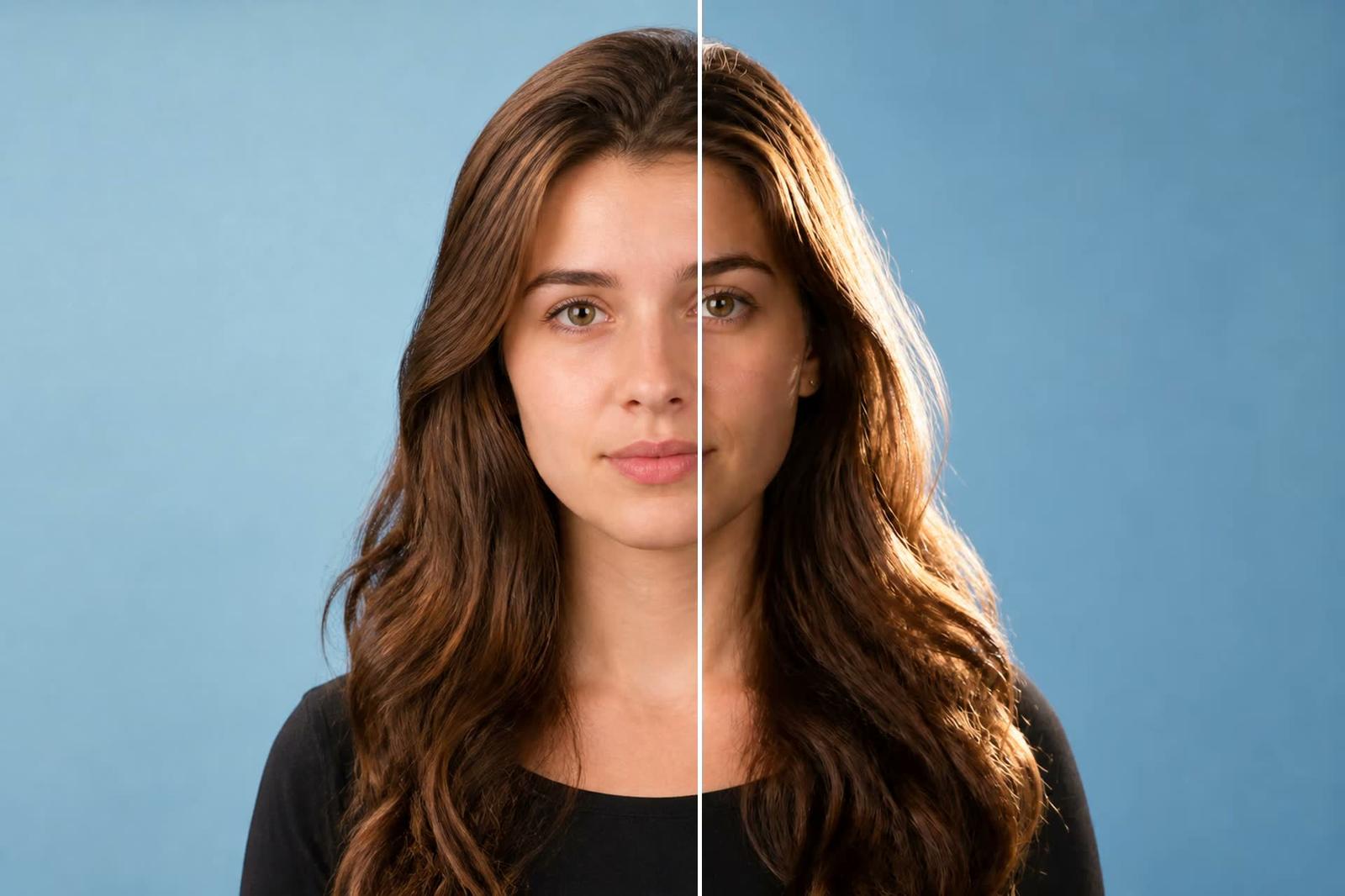
- Face relight: 0 front, 90 right, −90 left, 180 back; elevation 30–50 for a portrait key
Smart effects
One group, separate tools
Pick the tool that matches the job. Do not expect one slider to crop and cartoonize.
Tools in this group
Smart crop
- Tracks a person or face first and crops to 9:16, 16:9, 1:1, 3:4, or 4:3. You can also click the subject yourself.
Cartoon and sketch
- Cartoonization, pencil-sketch generation, and three preset anime styles. The preset names are not repeated on the website.
Face relight
- Azimuth 0 is front, 90 right, −90 left, 180 back. Elevation 30–50 is the suggested portrait key.
Name the job, then open that tool
A vertical reframe is smart crop. A pencil look is sketch. A new light on a face is relight. They do not share one slider.
Preview before you export
Render 1, 3, or 5 seconds with no account. Signing in and a paid plan are required only to export or convert.
How to use Smart Effects
01
Import
Open the tool that matches the job: crop, cartoon, sketch, style, or relight.
02
Set the one control that matters
For crop, pick the aspect. For relight, set azimuth and elevation. Cartoon and sketch have their own panels.
03
Preview, then export
Check a short preview. The full export needs sign-in and a paid plan.
System requirements
- Operating system
- Windows 10 (64-bit, 1809+) or Windows 11; macOS 12 or newer (Apple Silicon)
- Apple Silicon only. Offline installer package. macOS 12 runs in standard mode.
- GPU
- 2016 or later Intel, AMD, or NVIDIA GPU — integrated or discrete
- DirectX 12 Feature Level 12_0. Windows only. macOS uses Apple Silicon.
- Memory
- 8 GB RAM
- Enough to launch, preview, and export. Long clips and stacked modules will be slower.
- Storage
- SSD workspace
- Use an SSD for the app, cache, and temp files.
Windows 10 (64-bit, 1809+) or Windows 11; macOS 12 or newer on Apple Silicon.
Frequently Asked Questions
Is my footage uploaded to the cloud?
- No. The AI processing runs on your own GPU and your media files are not uploaded — there is no queue and no per-minute cloud fee. The network is used only for sign-in and license checks (needed to export on a paid plan) and for updates.
Can I try it before buying?
- Yes. Download KwaFlux and render 1-, 3-, and 5-second effect previews across all AI modules without creating an account. You only sign in and pick a paid plan when you want to export or convert, and there is a $199.99 Perpetual License if you prefer to skip subscriptions.
How many devices can I use?
- Each license can be used on up to 2 devices. Sign in on a new device to activate it; if you are already at the limit, the least recently used device may be signed out automatically. You can also revoke devices from your dashboard at any time.
What are the pricing options?
- The Perpetual License is $199.99 one-time. Subscriptions are also available at $29.99/month, $49.99/quarter, and $79.99/year. All plans include the full local desktop feature set.
Related workflows
AI Video Beauty built for video, not just photos
Overall retouch with 10 preset styles, gender-adaptive by default
OpenAI Image Enhancer for photos that deserve a second chance
Five image repair types with output from 1x up to 4K
OpenVideo Converter that lives inside your enhancement pipeline
MP4, MKV, and MOV containers with H.264, H.265, or AV1 encoding
Open